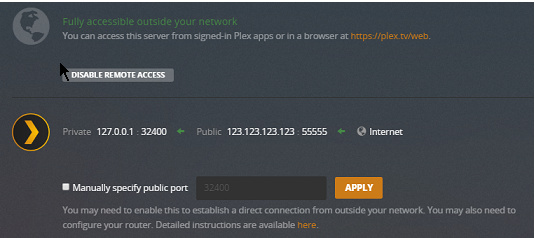
On my home network, it says that the connection to the server is indirect (from all of my research it seems to be DNS rebinding but my router has no settings for it?). I am only able to connect to it since the remote access is configured, but it says that it is not connected (even though I lose connection if I turn it off). Is there anything that I have to do to get this to work?
Is remote access really safe? I want to listen to my music when I am away from my home network, but I am wondering if opening a port is safe and all and are there any precautions I should take when doing it.
Thanks for this,
I have previously looked at these and tried to figure out what is relevant to me. I just realized that Double-NAT might apply to me, but am not at home so can’t check if this is the issue. In my modem settings there is no page for DNS rebinding, so how would I go about doing this if that may be the issue (call ISP?). Thanks so much for your help
Either that, or replace the router or the router’s firmware with an open firmware like Tomato or open-wrt or dd-wrt.
You can also try and make sure that ‘Secure connections’ is not set to ‘Required’.
And then allow the client to fall back to unsecure connection if it is in the same local network as the server. (This is a client setting).
If the router at least allows you to define the DNS server, set it to Google’s (8.8.8.8 and/or 8.8.4.4)
I am struggling tremendously with this. My dad won’t allow me to flash the router’s firmware and neither will he allow for the network to be “potentially compromised” by playing around with DNS rebinding as this is a “common form of attack” as far as he understands. He has asked me whether or not you can manually configure both the server and client with intranet IP and DNS settings (possibly with the intranet disconnected from the home router/gateway).
I have tried disconnecting our second router, but to no avail - to test double-NAT. The secure connections tab on the server is set to preferred so that should not be an issue. I’m really at a loss of what to do right now so any help would be appreciated. I can still connect to the server via an indirect and non-secure connection so I don’t know where this places the state of the issue. I can still even connect to it (at home and away from home) when the port is not even forwarded, so I’m a bit confused on that.
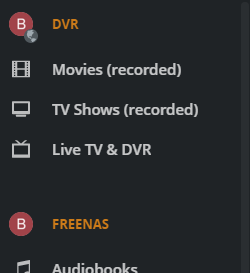
When on the inside of your network and you click Home > More on the left sidebar of the Plex web UI, what does the account icon look like for the PMS server? For example, does it look like the first one below (the B next to DVR) or the second (the B next to FreeNAS)?
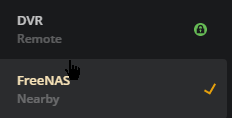
When on the inside of your network and you click on the server in the Settings sidebar, does it say the local PMS server is nearby or remote? For example:
The “manual server IP” thing is only supported by a few client types.
The web app doesn’t belong into this group.
Two routers in a network are never a good idea. If the second one is only used as an Ethernet switch and access point, it should be configured accordingly. Switch off NAT’ing and the DHCP and DNS services – i.e. “Access point mode”.
(Not all routers allow this. That’s where again alternative firmware comes in to the rescue.)
Gotcha. I will try to make the exception on just the one things (not sure if my router supports it though). Does manual server IP work for the MAC bundled client? I think I will just set the second router to be in passthrough mode which should hopefully eliminate the issue with it.
Thanks.
Indirect is a fallback to a Plex Relay when a direct connection is not possible. More information in the article below. It’s still secure, but the streaming quality may be reduced.
I managed to fix the local connection issue. Turns out all I had to do was allow the port on the firewall of the server (I’m dumb). I am still getting remote access issues. It says that it is signed in but not reachable. I have a feeling the port is just not working (that I forwarded) as this seems to be what the issue is pointing at. Do you think this would be it, and what do you think I can do to fix it?
Sorry about the late reply. I have checked for Double-NAT and it is not an issue. The ports are also all the same (throughout Plex specified, firewall allowed and forwarded). Any clues?