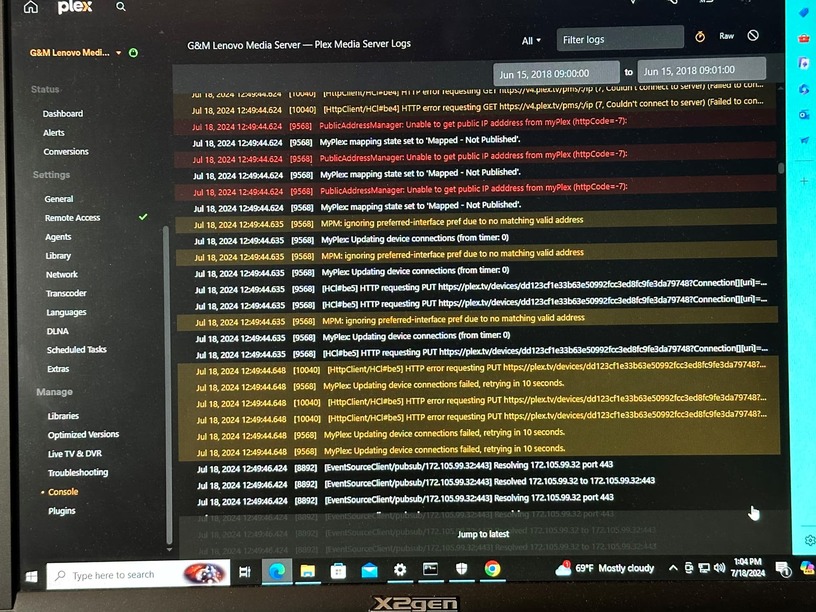
i’m not sure if this is approripate, to message directly, but i’m at my wits end.
a week or more ago, after about 4-years of everything running fine, Plex stopped working on my local network for no reason whatsoever. (no changes made to setup)
remote streaming is fine.
i’ve spent about 20 hours trying to trouble shoot this, including a fatory reset of my ATT BGW320-505 router and one of my local streaming devices (Roku Ultra), but nothing has made it possible for my local devices to connect to the server (on the same network).
setup: Plex server V 1.40.4.8679 (should be current) on windows 10.
my ATT router does not allow for any DNS settings, but NAT/Gaming (Port forward 32400) and IP Passthrough configured to allow connections to the server. (hence no problem with remote streaming)
server and local devices (at least one for sure) are set to the same subnet 255.255.255.0
i’m signed in to both the server and web app with the same credntials used for all devices.
windows firewall settings allow for Plex DLNA Server, Plex Media Server, Plex Spript Host & Plex Tuner Service. I have even confirmed windows firewall Inbound rules allow for all Plex related services.
no proxy, ad-blocking software, or anti-virus software is installed, and no VPN.
weirdly, when i log into these devices, sometimes they seem to at least see the server because my libarary names are there to choose from, but can’t seem to load up the library content, or sometimes they seem to load the content, but won’t display posters, and for sure nothing will play. (when i try to play something, then it comes back with can’t connect to server)
ALL of the content we want to watch is on Plex (the standard streaming services suck in comparison) so this is driving us all crazy.
Please… HELP!
sincerly and with great respect (because i really do love Plex)
Grant Carlson (user GMCarlson312)
thank you in advance for any help you can provide.