In previous version of Plex /EPG it used to show the channel on the screen with the details about the show/movie along with the air date video quality and summary of the show/movie. now it does not show the channel you are working with. can we get this additional display field back.
What client are you using?
I simply use my browser (firefox) on pc to go thru the guide to mark shows/movies to record its faster then using a pda or tablet device.
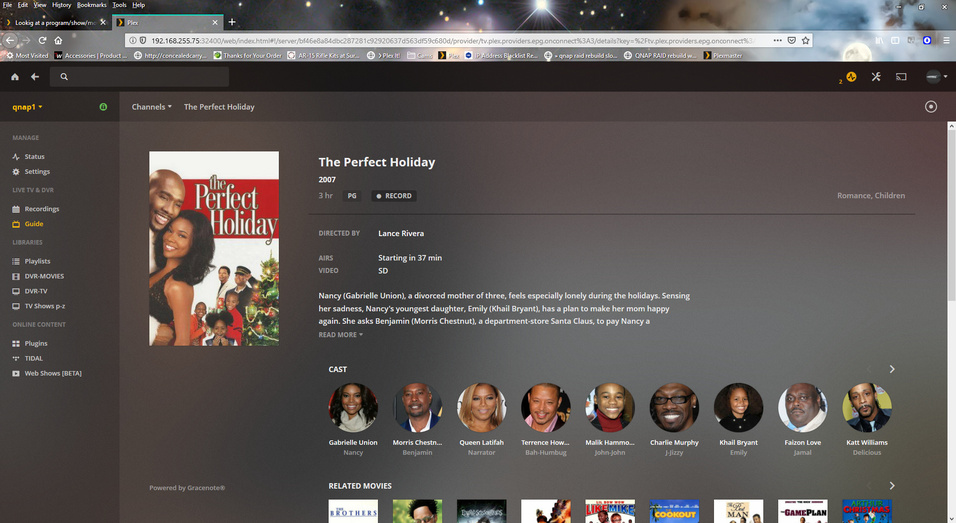
see on the right it shows airs and video it used to show channel but doesn’t anymore.
this is just an example screen shot.
That’s good info to have posted. On iOS for example, the channel info is displayed.
Please compare with the hosted web app. https://app.plex.tv/desktop
I can see the channel names.
Are you using a custom EPG XML file?
1 Like
@OttoKerner
your correct the hosted app does show the channels but the local connection which I would assume is the same thing but isn’t.
I am not using a custom EPG xml file, just the standard install with upgrades from plex as they come out. How would I get them to be the same/match up. I would have expected the local page would show the same as the hosted page.
how would the be different? I didn’t do anything custom.
The local web app is bundled with the server software. As such, it will almost always be a little bit behind (on features and bug fixes) of the hosted web app, which gets updated independently (and sometimes more often than the server).
https://support.plex.tv/articles/200288666-opening-plex-web-app/
@OttoKerner Thanks for the reply. I didn’t think the local vs web side was that off but i guess it is what it is and eventually an update would fix the discrepancies at some point.
This topic was automatically closed 90 days after the last reply. New replies are no longer allowed.
