Running PMS on linux server, I had to rebuild after a HD failure. Got everything up and running, Library scanned and added.
But Im missing my “recently aired” catagory? I used that almost exclusively for my TV shows. How can I add it back?
Running PMS on linux server, I had to rebuild after a HD failure. Got everything up and running, Library scanned and added.
But Im missing my “recently aired” catagory? I used that almost exclusively for my TV shows. How can I add it back?
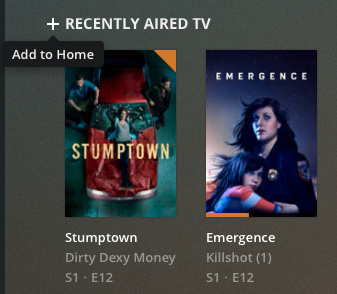
In the web client, navigate to your TV Shows library and click the Recommended tab at the top. You should see a hub in there named “Recently Aired TV.” To add it back to your home screen, hover over the link and then click the + to the left of it:
You should be able to do something similar in the “big screen” apps (Roku, Android TV, Apple TV):
Thank you!
Sorry to be a pain. That seems to have resolved the issue on my plec web client. But im still misding it on my TCL roku tv. How do i add it there?
No problem. The information is in the “Add New Rows” section of the support article I linked above. For it to work, you must be managing your home screen manually. To do that, select Home from the side panel and click the * button on the remote (or click the 3 vertical dots to the left of Home). From the menu which comes up, select “Disable (Manually Manage)” Once you’ve done that, you can navigate to your TV shows library in the side panel and click * on the remote. You should get an option to “Manage Hubs.” In that menu you can select which hubs you want to show on the home screen.
This topic was automatically closed 90 days after the last reply. New replies are no longer allowed.