The resolution of the cover pictures used in Plexamp seems rather low - to the point where it seems as if Plexamp has requested a downscaled version from my Plex server and then scaled up the image to fit the viewport. This makes album art look distinctly ‘fuzzy’ compared to other clients;
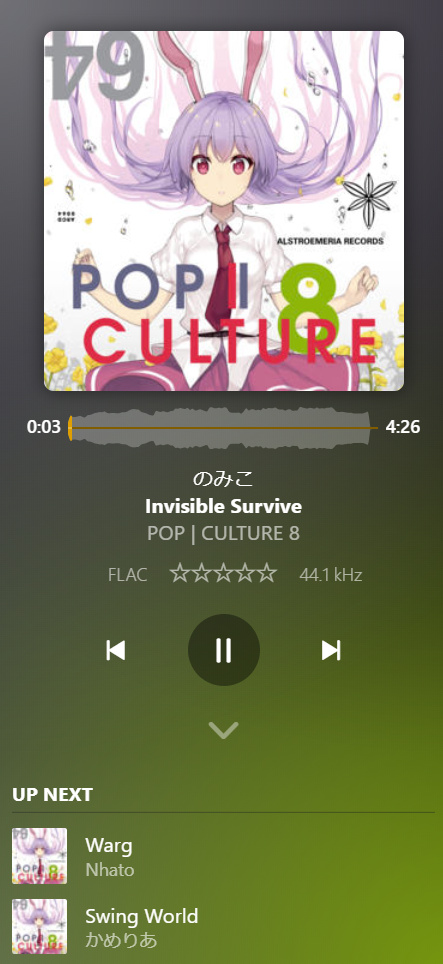
(compare against the full resolution original artwork here)
I have confirmed that the album cover selected in Plex itself is the correct high-resolution one - if I view the XML info for a track and then request the “thumb” in my browser, the full sized artwork is returned.
I can understand that on mobile it might be preferable to use a lower quality, downscaled version of the cover artwork but on Desktop it would definitely be preferable to pull in higher quality artwork. I would imagine the difference would be even more pronounced on HiDPI displays.
Are you using a “zoom factor” for your screen in general?
The pixel dimensions of your screenshot seem to indicate that.
My display scaling is set to 100%, however I have enlarged the Plexamp window using the drag/sizing handles. For comparison, i’ve just installed Plexamp on another computer and not enlarged it;
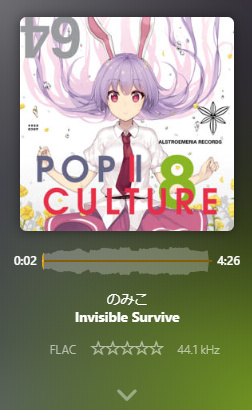
This looks far sharper - is Plexamp requesting artwork that fits the default window size at a 1:1 pixel ratio, and then upscaling that locally when the window is enlarged rather than requesting a new higher resolution version?
Which OS is this?
I couldn’t get a cover art size as in your first screenshot simply by enlarging the window. The art only scales up to a certain size and then remains fixed.
This changes only if I change the aspect ratio to landscape.
I’m running Windows 10 (1909). I’ve also just tried resizing the window on the new install and couldn’t replicate it again at first - the artwork goes no larger than the default size. However, if I go in to Plexamp’s Settings > Appearance > Size and set to Huge, then resizing the window does also resize the album art up to a point. However, the quality issue becomes apparent again as it looks like the image used on the ‘Huge’ size is upscaled locally from the pixel-perfect one on the ‘Normal’ size.
(Apologies if you were referring to Plexamp’s Appearance Size setting when you asked about a Zoom Factor earlier - I forgot I had actually changed this!)
I can replicate the issue with larger zoom settings in Plexamp.
I assume the zoom in Plexamp simply zooms both graphic dimensions and font sizes. Instead of taking into account the true pixel count. But that’s just my private theory.

