Server Version#:1.14.0.5470
Player Version#: web player
So this seem to apply only to WEB player in a situation where Plex transcodes HEVC to x264, because browsers don’t support HEVC. So, if I set home streaming quality to 10Mbps 1080p, and my original video file bitrate is lower than 10Mbps, Plex will disregard my settings and transcode the video to Maximum quality (something like 30Mbps). If the video file has a higher bitrate than home streaming setting, then it will properly adjust the bitrate.
So to reproduce:
Open web player
Set home streaming/internet streaming to 1080p 12Mbps
Open an HEVC file that has a lower bitrate than 10Mbps (6-8Mbps)
Observe the transcoded bitrate that is higher than 10Mbps
Now open HEVC file that is a higher bitrate than 10Mbps, and observer that it is properly transocded to less than 10Mbps.
Turns out this is not just a problem with home streaming, but with INTERNET STREAMING as well. This is completely unacceptable. So now if I want to remotely play HEVC video on the web player, instead of following the set limit it transcodes to maximum quality which for a 8Mbps HEVC file is 30+Mbps! Please fix this ASAP.
@OttoKerner, Tautulli. @anon18523487, I will try to provide logs tommorow. Do I only have to simply post server logs or enable ‘player debugging’ or anything like that?
Do you really think I even need to do a log at this point? Seems like it can be reproduced by anyone, including you. I can and will do it if it’s necessary, but you should be able to easily see what’s going on yourselves.
I’m directing you to a reddit comment on my post. It seems like they explained it better than I ever will:
You cannot reproduce this with a web browser (with default settings) that is in the same local network as the server.
You must use one that is actually ‘remote’.
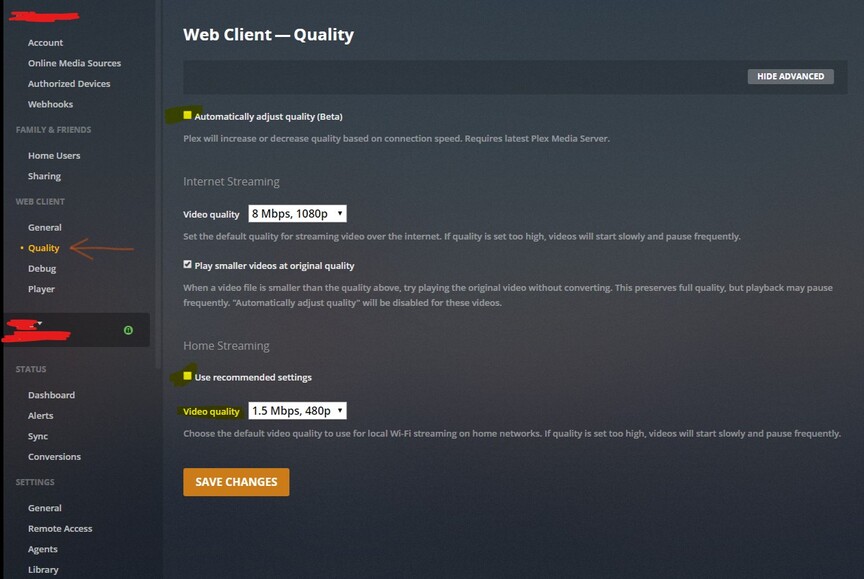
Here is what happens if you are trying to reproduce this on a local connection: the web client will use ‘Automatic Quality’ which can raise the bitrate higher than what the original HEVC file has.
Why? Because HEVC is more efficient than AVC(H.264).
Which means that it can transport more visual quality within less bitrate.
But web browsers don’t support HEVC, so Plex must transcode to AVC. If now Plex would simply use the original bitrate of the HEVC file as its target bitrate for the AVC transcode, you’d get inferior picture quality.
Therefore, Plex increases the target bitrate, to maintain visual quality.
And with a local connection, there is no issue with that. ‘Automatic quality’ will detect if your local network/WiFi has trouble maintaining this higher bitrate and will adjust downwards accordingly.
You can only simulate a hard bandwidth limit on a local connection if you:
disable ‘Automatic quality’
disable ‘Use recommended settings’ under ‘Home streaming’
The same applies to a remote connection.
If you transcode a HEVC stream to AVC over a remote connection, the source bitrate of the HEVC file is not used as the target bitrate, because that will always reduce visual quality.
Instead, the bitrate limit set under ‘Internet Streaming’ in the above screenshot will be used as maximum.
Additionally, if the server owner has defined a lower bitrate maximum for remote connections, this will be the maximum allowed bitrate. (This is a Plex Pass feature)
(This is also the place for the server owner to define an overall bandwidth limit which all concurrently streaming remote users may use up together.
You should set this lower than what the actual upload limit of your internet connection is, so remote users cannot saturate your upload.)
@OttoKerner, sorry, but I’m not sure what was the point of your post.
Not so long ago, HEVC was converting to x264 at the same bitrate, which I have reported myself as a problem so I understand very well the reasons behind the coversion to higher bitrate and I’m glad that Plex fixed it.
Also, “automatic quality” is disabled in web player by default. The only thing you need to do to reproduce this locally is is set ‘home streaming’ limit. That’s it.
That is the thing: If I set a home streaming limit (which is only possible if you disable ‘Use recommended settings’), the integrated bitrate stays exactly at my defined limit.
That’s why I have asked how you determine which bitrate is actually used by Plex.
So I just tested it more intensely. My source HEVC file has a nominal b/w of 4.2 mbps
I have disabled ‘Automatic Quality’ and have set an upper limit of 18 mbps for home streaming. I couldn’t see the bandwidth exceed that.
Then I reduced the bandwidth maximum preference to 10 mbps and indeed, the transcoder used a target bitrate of 17.3mbps.
So there is indeed an issue here.
However, if you are using the new realtime bandwidth monitor in the dashboard, you must play the video for at least 2 minutes before you can realistically gauge the actually used bandwith with it. For some reason, the average bandwidth of my video went to ~10mbps.
Whether that was because it somehow still obeyed my set maximum of 10mbps
or just because the ‘movement’ in my video was small (so it compresses more efficiently), I don’t dare to say.
The bitrate selector in the video player showed ‘Convert Maximum (HD) 4.2 mbps’ which is at least misleading. There is definitely something not right here.