Better leave everything as-is, for the time being. It could help with investigsting what went wrong here.
This being new year’s eve, it can take a while until someone is able to take a look though.
I’m fine keeping it as is. If Morris is fine too, we’ll do what we can to help.
Yep I’m fine with leaving it.
Are you two sharing any hardware or software tools?
No
Did someone of you use old hardware of the other, or restored a backup of the other?
No
Did you two establish a VPN between your respective home networks, so as to access each other’s home network?
No
Is one of you currently visting the other, so that a computer/device of one user is now located within the home network of the other user?
No


Worth mentioning that it looks like I added Morris as a Plex Home user and didn’t just share the library. I would expect that to mean that he has access to my stuff but it looks like I’m admin on both.
I don’t fully remember if I actively added him as a Plex Home user, or if he somehow just got in there in some related issue.
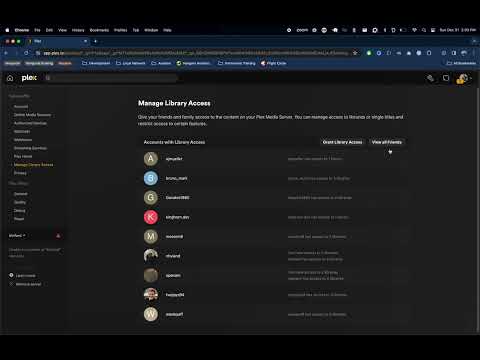
(at this time, video is processing)
- Logged in as me
- Went to add a user and cancelled, which logs me in to Morris’s account
- Went to add a plex user, doesn’t work since Morris disabled remote access and I can’t see the servers
- Added a managed user successfully
You experience fast user switching in Plex Home (it works both ways in a Plex Home). The article sums up all the risks both adding an account to your Plex Home or joining another Plex Home (while leaving your own Home).
But the two of you being admins is indeed a strange issue.
I never left my home.
According to what we’ve seen, right now, I could promote any of my friends to a Home User, then have full control of not only their server, but their actual Plex.tv account, and their forum user.
Is that the expected behavoir?
Just an FYI, it’s a good idea for you gents to remove and then re-upload those screenshots with your email addresses and any faces blurred out… otherwise you and the others could find yourself looking at a whole other kind of security issue far beyond Plex 
Yes, that is correct and expected.
That’s not the issue. The issue is having two Plex Home admins. Just stop touching it for now until a Plex employee looks at your accounts.
Yes it is.
https://support.plex.tv/articles/203815766-what-is-plex-home/
https://support.plex.tv/articles/203960236-consequences-of-being-in-a-plex-home/
You are warned when joining a Plex Home.
And because of the consequences joining a Plex Home must be explicitly acknowledged by the invited user.
Inviting and joining a Plex Home is only for very limited use. NEVER invite to or join a Plex Home, when you are not living under one roof or at least very close and always protect the account with a PIN.
What should my view be if I’m in his Plex Home? How do I know if I am a Home User in his Plex home?
Though not common, if a server admin joins another’s Plex Home, they still control their server content and who has Library Access to their server. The Home Admin will not take over their server.
What does this mean?
It’s a little confusing (or a lot)
A server owner can only be part of one Plex home
When you create a server you have a Plex home and you are the admin
Let’s call my main server (server 1) Backup server (server 2)
Server 2 with me as admin, joined the Plex home of server 1
That means I am no longer admin of server 2
This is true but…
When I sign in using either account, I am now greeted with the fast user switching with all the accounts on one page. Both the id’s that control server 1 and server 2 are there
That means without a pin securing any of the accounts, I can switch between either account and therefore either server. I can change settings, delete libraries, or add users to either
I’m only trying to clarify what you asked. (probably poorly) lol
SwiftPanda16 is correct though. Something has gone off the rails here and it’s a good idea to let them look into it before you change anything
Being Plex Home admin is independent from being a Plex Server admin.
You are still the admin of server 2. But as you said any user on the Plex Home can switch to your user and control the server settings.
I’m having the same problem. It’s actually my niece who is showing up as a second home admin but the problem is that if she selects her account then I have no way of getting back in as me unless I log her out of her account completely and go through the whole process of linking my account to the device again which is extremely annoying. I guess I could have her add me to her Plex home but this seems broken.
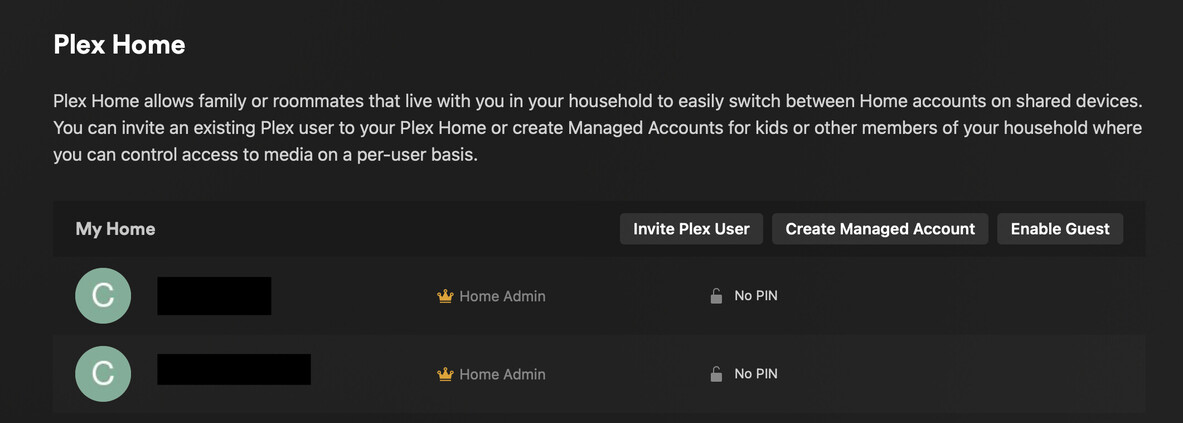
No, that’s… strange. an account can only be in one home at a time. If your niece is in your home, then there is no other home that you can join.
I’ve been informed that the above two issues are supposed to be fixed now.
The cause of these issues has also been found and fixed.
Fixed for us! Thank you!
