Server Version#: 1.29.2.6364
Player Version#: 1.57.1.3358-5fd2a504
A scheduled metadata refresh is set. Can the poster and background be automatically locked after manual modification? Like other metadata (such as tags, titles…), as long as it is manually modified, it will not change even if the metadata is refreshed.
Thanks!
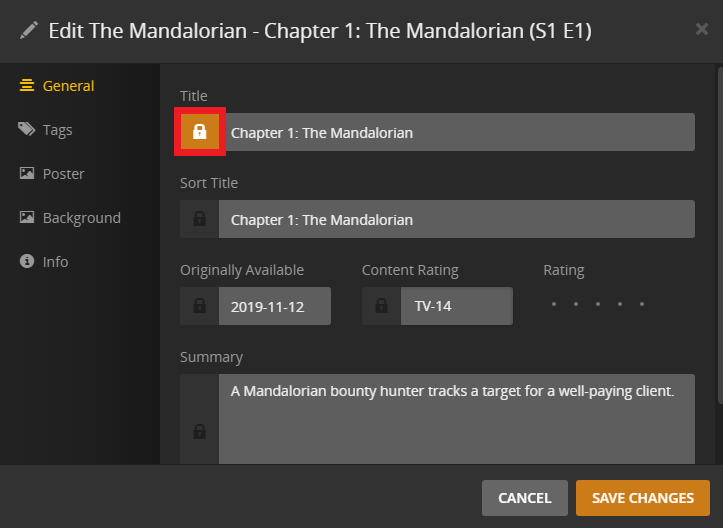
Once you start to edit something manually the lock should engage automatically. As long as you don’t click that box again and it stays orange it’s locked. Don’t forget to save changes at the bottom
When you manually chose a new poster that’s also suppose to lock your choice in, although I’m not 100% sure that always works.
I’ve seen people say their poster choices change but they “should” to remain locked
If you’re talking about refreshing metadata as a scheduled task you should refer to this support article
https://support.plex.tv/articles/201553286-scheduled-tasks/
If I understand correctly that type of metadata refresh doesn’t download all new metadata like you would if you manually click “refresh metadata” for your library
For instance, if I have refresh metadata as a scheduled task it doesn’t refresh things like the posters or IMDB movie ratings. I have to manually do that
Thanks!
The problem I’m having is that after manually selecting a new poster, it changes itself after a while. I don’t know why, it seems that autolock is failing?
Is the poster showing manual changes locked somewhere? Or is there somewhere to set up a lock poster?
Yeah that’s exactly what I was referring to. Once you manually choose a poster it should stay locked
Apparently so
That little check mark is supposed to be the equivalent of the lock symbol for the other fields
The only way to be sure is to enable “prefer local metadata” and insert your own poster into the movie or tv folder named cover.jpg or poster.jpg