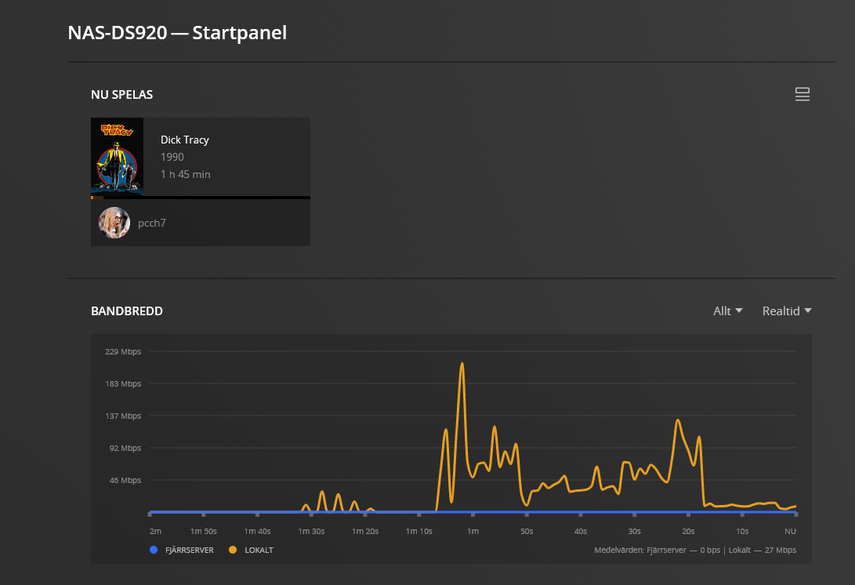
Hello, I recently bought a Synology DS920+ to run a Plex server on. I use my Xbox One to play all the media, it’s all in the same local network with 500 Mbps up and down and wired connections. But with some movies I get crazy buffering and they’re unwatchable. I’ll use Dick Tracy as the example as I just tried to watch it now. For home streaming I’ve tried the recommended settings and also setting the speeds myself but neither helped. It seems my bandwith just get absolutely strangled. I compared to The Phantom which works fine, with bandwith speeds looking normal. Doesn’t seem like it’s using the cpu much. I don’t quite know what I’m looking at with the logs so I would appreciate if anyone could help me.
Plex Media Server Logs_2023-02-21_11-20-18.zip (4.1 MB)


Which image is for which file? I have a suspicion on a cause for this…
A while back, someone had a video that was causing absurd levels of buffering like this. The bandwidth was all over the place. It had something to do with how the data was arranged in the video. Modern video codecs store the video linearly, optimized for streaming. If the video is not organized this way, then the video pretty much has to be sent in its entirety to the client multiple times per second, resulting in HUGE bitrate streams. This can be fixed by re-encoding the file using handbrake or ffmpeg.
I think it would be helpful to see information on the video itself. Click on the triple dot ... menu for the movie, then click Get Info. Show us a screenshot of that screen.
Turn off subtitles when playing Dick Tracy.
Plex is transcoding the video and burning the subtitles into the video stream.
Subtitle burning uses the CPU, even when using hardware accelerated transcoding. The process is also single threaded.
The CPU in the DS920+ is not fast enough to burn subtitles in real time. Therefore, you experience buffering during playback.
When playing The Phantom, the audio was transcoding, but not the video. Audio transcoding occurs on the CPU, but is not very compute intensive, and rarely causes buffering problems.
The Plex Dashboard shows if video or audio is transcoding, but not if subtitles are being burned into the video stream.
The Tautulli Dashboard does show is subtitles are being burned into the video stream.

I was planning to work my way towards FordGuy’s thought, but we might as well jump there now. Are you using subtitles? If subtitles need to be burned into the video, the DS920+ can only do that in CPU, and for some reason only uses one CPU core for that and the overall video (IF YOU USE HW TRANSCODING). If you turn off HW transcoding, it can do subtitle burn-in in real-time just fine, but not if you enable HW transcoding in the first place.
I used to have a 920+ as my server, and ran into this issue a while back. Couldn’t seem to get the point across to the developers about the issue.

yeah the subs were the reason. Who knew subtitles would be such a problem
