It’s the old “Everything used to work but now it’s not.” issue. I used to be able to play anything with no issues ever. Other than keeping up with updates and adding more content Nothing has changed in the last few months.
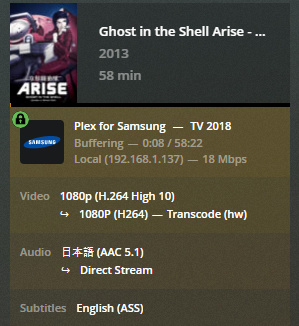
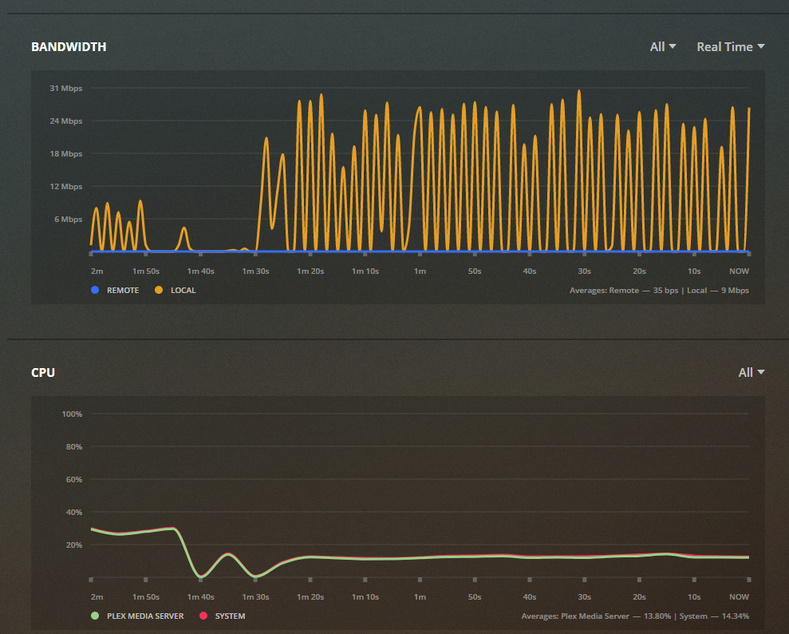
Looks like it’s trying to trans-code when it doesn’t need to. Even still, it should be able to handle a single 1080p transcode on network.
The only change between changing server versions and player versions is one file will now direct play on Samsing 5.0.10, still others do not.
Host is Synology NAS DS916+ DSM 6.2.3-25426
Plex Server Version 4.12.3 - Also tried Version 4.30.2
Clients tried are Chrome player connected direct to NAS IP
Plex for Samsung 4.29.6 and 5.0.10 (Interesting note, 4K tv client sees as 1920x1080) Model UNF75NU8000F
Plex for Android 8.2.18636 pixel 4xl
Turned off hardware transcoding and I can play one file at a time with no problem. It pegs the CPU though and can’t play two at the same time as expected by the compatibility chart. It should support HW acceleration though.
Here’s the file info on one of the files trying to be played but transcodes with buffering when HW transcoding.
Ouch, So the Plex client can’t handle high-10? Most of my newer stuff is using it.
Guess I could run through and re-transcode everything but that sort of defeats one of the key reasons for using Plex in the first place. Transcoding one now, hopefully I can find better settings. I’m only getting 46 FPS on a 30 FPS file. This’ll take forever.
I know I can’t transcode 4K that’s crazy. I was only noting that the Plex for Samsung was seeing the 4K tv as 1080 in the about info screen.
May I see the DEBUG logs please, captured just after attempting a playback which demonstrates this?
Players handle 10 bit. H.264 High10 isn’t standard. This is why I request the logs – to see what we really have.
(upload removed)
Did a little more digging before I saw your last reply. High10 is like you said, not supported in as many players as I thought. This encode looks so good! Hmm…
Thanks for taking the time to look at the logs. Huge help 
To further report:
You are using subtitles which must be burned into the image. The Intel drivers do not support this therefore the CPU must. Synology CPUs, except for a XEON (other NAS vendors), do not have the processing power.
You can see in the segment below the hardware is performing the decode operation.
Jun 28, 2020 15:12:17.097 [0x7f7ae92db700] DEBUG - Cleaning directory for session l3nbttrh9ac8yvvemefpo7xv ()
Jun 28, 2020 15:12:17.097 [0x7f7ae92db700] DEBUG - Starting a transcode session l3nbttrh9ac8yvvemefpo7xv at offset -1.0 (state=3)
Jun 28, 2020 15:12:17.098 [0x7f7ae92db700] DEBUG - TPU: hardware transcoding: using hardware decode accelerator vaapi
Jun 28, 2020 15:12:17.099 [0x7f7ae92db700] DEBUG - [Universal] Using local file path instead of URL: /volume1/DiskStation/Media/Anime Movies/Ghost in the Shell Arise - Border1 Ghost Pain_redown.mkv
Jun 28, 2020 15:12:17.099 [0x7f7ae92db700] DEBUG - TPU: hardware transcoding: zero-copy support present
Jun 28, 2020 15:12:17.099 [0x7f7ae92db700] DEBUG - TPU: hardware transcoding: not using zero-copy because subtitle burning is required
Jun 28, 2020 15:12:17.099 [0x7f7ae92db700] DEBUG - Codecs: hardware transcoding: testing API vaapi
Jun 28, 2020 15:12:17.099 [0x7f7ae92db700] ERROR - [FFMPEG] - libva: /volume1/@appstore/Plex Media Server/lib/dri/iHD_drv_video.so init failed
Jun 28, 2020 15:12:17.100 [0x7f7ae92db700] DEBUG - [FFMPEG] - Format 0x32315659 -> yuv420p.
Jun 28, 2020 15:12:17.100 [0x7f7ae92db700] DEBUG - [FFMPEG] - Format 0x30323449 -> yuv420p.
Jun 28, 2020 15:12:17.100 [0x7f7ae92db700] DEBUG - [FFMPEG] - Format 0x3231564e -> nv12.
Jun 28, 2020 15:12:17.100 [0x7f7ae92db700] DEBUG - [FFMPEG] - Format 0x32595559 -> yuyv422.
Jun 28, 2020 15:12:17.100 [0x7f7ae92db700] DEBUG - [FFMPEG] - Format 0x59565955 -> uyvy422.
Jun 28, 2020 15:12:17.100 [0x7f7ae92db700] DEBUG - [FFMPEG] - Format 0x48323234 -> yuv422p.
Jun 28, 2020 15:12:17.100 [0x7f7ae92db700] DEBUG - [FFMPEG] - Format 0x58424752 -> rgb0.
Jun 28, 2020 15:12:17.100 [0x7f7ae92db700] DEBUG - [FFMPEG] - Format 0x58524742 -> bgr0.
Jun 28, 2020 15:12:17.100 [0x7f7ae92db700] DEBUG - [FFMPEG] - Format 0x30313050 -> p010le.
Jun 28, 2020 15:12:17.100 [0x7f7ae92db700] DEBUG - [FFMPEG] - Created surface 0x4000000.
Jun 28, 2020 15:12:17.100 [0x7f7ae92db700] DEBUG - [FFMPEG] - Direct mapping possible.
Jun 28, 2020 15:12:17.100 [0x7f7ae92db700] DEBUG - TPU: hardware transcoding: final decoder: vaapi, final encoder: vaapi
Jun 28, 2020 15:12:17.101 [0x7f7ae92db700] DEBUG - Job running: EAE_ROOT='/volume1/Plex/tmp_transcoding/pms-4cf22f1c-70d6-46c9-bfb1-02baddac7280/EasyAudioEncoder' FFMPEG_EXTERNAL_LIBS='/volume1/Plex/Library/Application\ Support/Plex\ Media\ Server/Codecs/99c90e0-3095-linux-x86_64/' XDG_CACHE_HOME='/volume1/Plex/Library/Application Support/Plex Media Server/Cache' XDG_DATA_HOME='/volume1/@appstore/Plex Media Server/Resources' X_PLEX_TOKEN='xxxxxxxxxxxxxxxxxxxx' '/volume1/@appstore/Plex Media Server/Plex Transcoder' '-codec:0' 'h264' '-hwaccel:0' 'vaapi' '-hwaccel_fallback_threshold:0' '10' '-codec:1' 'ac3' '-analyzeduration' '20000000' '-probesize' '20000000' '-i' '/volume1/DiskStation/Media/Anime Movies/Ghost in the Shell Arise - Border1 Ghost Pain_redown.mkv' '-map_inlineass' '0:3' '-filter_complex' '[0:0]scale=w=1920:h=1080[0];[0]format=pix_fmts=nv12[1];[1]inlineass=font_scale=1.000000:font_path=/volume1/@appstore/Plex\\\ Media\\\ Server/Resources/Fonts/DejaVuSans-Regular.ttf:fontconfig_file=/volume1/@appstore/Plex\\\ Media\\\ Server/Resources/fonts.conf:language=en[2];[2]hwupload[3]' '-filter_complex' '[0:1] aresample=async=1:ocl='\''stereo'\'':osr=48000[4]' '-map' '[3]' '-codec:0' 'h264_vaapi' '-b:0' '1024k' '-maxrate:0' '1366k' '-bufsize:0' '2732k' '-r:0' '23.975999999999999' '-force_key_frames:0' 'expr:gte(t,0+n_forced*1)' '-map' '[4]' '-metadata:s:1' 'language=eng' '-codec:1' 'aac' '-b:1' '256k' '-f' 'dash' '-seg_duration' '1' '-init_seg_name' 'init-stream$RepresentationID$.m4s' '-media_seg_name' 'chunk-stream$RepresentationID$-$Number%05d$.m4s' '-window_size' '5' '-delete_removed' 'false' '-skip_to_segment' '1' '-time_delta' '0.0625' '-manifest_name' 'http://127.0.0.1:32400/video/:/transcode/session/l3nbttrh9ac8yvvemefpo7xv/c17db215-1900-4bed-be68-3470229006ab/manifest?X-Plex-Http-Pipeline=infinite' '-avoid_negative_ts' 'disabled' '-map_metadata' '-1' '-map_chapters' '-1' 'dash' '-map' '0:3' '-f' 'null' '-codec' 'ass' 'nullfile' '-start_at_zero' '-copyts' '-vsync' 'cfr' '-y' '-init_hw_device' 'vaapi=vaapi:' '-hwaccel_device' 'vaapi' '-filter_hw_device' 'vaapi' '-nostats' '-loglevel' 'quiet' '-loglevel_plex' 'error' '-progressurl' 'http://127.0.0.1:32400/video/:/transcode/session/l3nbttrh9ac8yvvemefpo7xv/c17db215-1900-4bed-be68-3470229006ab/progress'
Image based subtitles (VOBSUB, DVDRIP, and PGS) must be burned
text based subtitles (SRT, ASS, and SSA) can be overlayed by the player if so selected (subtitle mode set to “automatic” in the player)
Thanks all for the effort. Guess I did this to myself with using media that isn’t very standard. I’ll have to go through and re-encode the ones I did wrong. I’ll make sure the codec is H.265 Main and the subs are SRT, ASS or SSA
I tried the Vappi Driver edit with no change. Thanks for the easy to follow step by step.
Heck, if my extra PC didn’t die I’d still be using that as the server instead of this NAS. The PC had tons more power.
Automatic burns ASS subs at my house.
Image Formats Only - doesn’t.
(on most things)
If it’s a Synology thing- my apologies (delete me).
What did I miss?
I can’t learn if I’m not learnt…lol
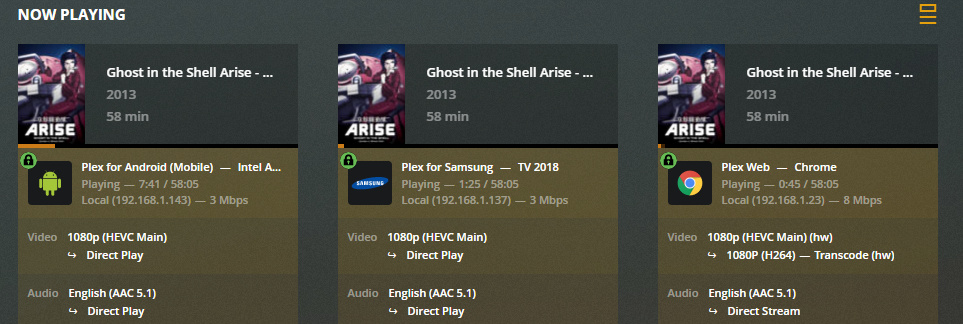
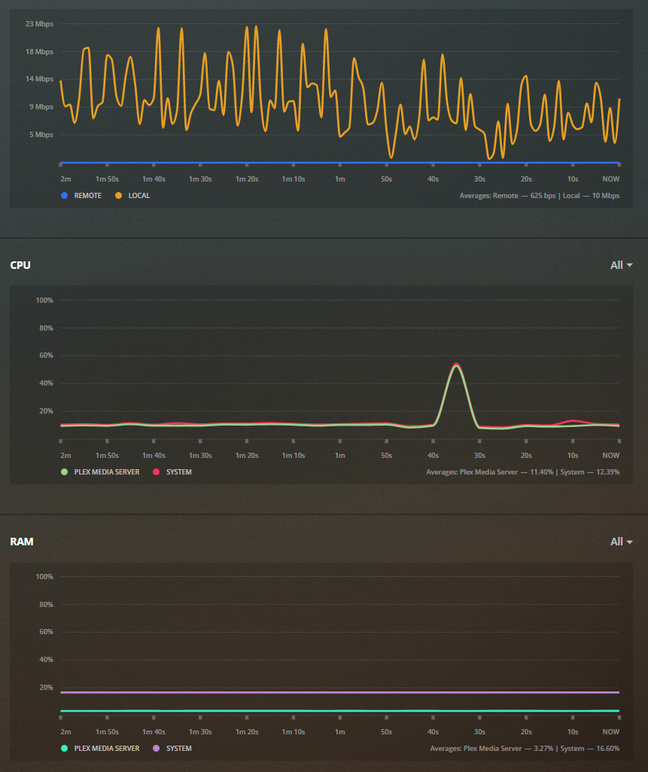
Tried a different encode and it’s easily serving three streams at once. Looks like it needs to be transcoded for the Chrome Plex Web player due to HEVC but it’s not stressing the CPU so all’s good.
Please allow me to restate.
Automatic will overlay SRT, ASS, or SSA IF the player supports it.
Player is defined as the variety of apps for: Apple TV, Nvidia Shield, Roku, Apple Devices, Google (Android) devices, etc, and various televisions with the Plex app installed.