For example the new Synology DS1621+. Can Plex Server be installed? If can be installed, will it support software Transcoding?
Hi, you mean DS1621+ but not DS1621XS right?
DS1621+ is using Ryzen V1500b cpu while DS1621XS is using Xeon.
Both NAS can run Plex?
DS1621+ shall be out in Asia markets, I think that will be available in US very soon. Looking forward to have the plex support details.
To add to Trumpy,
I will most likely be the engineer adding this model to the supported NAS list if it qualifies.
I have worked with AMD CPUs for a long time and already know it will not have Quick Sync Video (hardware transcoding) support.
1 Like
No wonder Quick Sync Video technology is out of the question for AMD CPUs as it’s been created by Intel exclusively for their integrated gpus to support hardware decoding and encoding, just like Nvidia did for their GPUs with NVENC.
Synology just officially announced the release of DS1621+ , with an immediate availability at 2 french retailers.
As I was planning to replace my DS918+ with it and given this announcement, I wonder if ChuckPa could have an ETA on its compatibility check ?
Why wouldnt this work right out the gate? Isnt this x86 just as most synologies?
I considered the 1621+ for its «native» SHR but went for the 1621xs+ instead without even thinking of checking compatibility. I guess I was lucky it worked.
No worry, plex is supported with no hardware transcoding. I am now an owner of DS1621+ and plex can be installed directly from synology package center.
I see some famous nas website will also publish plex performance review very soon.
3 Likes

After the DS1621+ release globally, Synology has updated its page to indicate the Plex Package is supported by the new model.
On the other hand the following page seems will be uploading a plex performance review video soon.
1 Like
Good to see you got this working. I just moved from a Windows box to synology myself and the experience has been great.
What kind of benefits are you seing from adding more ram? And are you using third party?
Adding more ram simply allows the OS to avoid swapping over HDD and to run apps tenfold times faster, depending on the amount you run simultaneously, mostly with VM running their own OS and apps.
Plex dashboard gives you a good oversight of the total RAM being used on your current NAS.
What bugs me with the DS1621+ is that as mentionned on this review , Synology’s compatibility page states that this NAS is compatible only with ECC RAM, unlike its predecessor DS1618+, and as usual they won’t provide support for a NAS with non official RAM.
Which would make it rather easy for their support to spot whether or not your RAM has ECC unlike with their previous NAS.
I don’t know if there is a technical reason or a commercial one (like maybe Synology preferred to produce only official RAM modules with ECC to increase their sales chances despite their hefty price), but the former one would be very odd to me as on the hardware level, ECC should not be mandatory for an OS to run with any CPU or application.
Looks like my system is only using 20% of the 8 it came with. I guess ordering 32 gig wasnt really neccesary. I went for third party, so fingers crossed it works.
I see a lot of disk reads from the unit, Im hoping that may be reduced. I ordered 2 x 1tb SSDs as well hoping to achieve the same.
If I may add here?
Adding more RAM also allows Linux to create a bigger read-cache. Linux will use all the RAM. It will only show what is actively used by programs. The RAM it uses for buffers is not listed because the amount of internal overhead to allocate one of those memory pages is the same as allocating completely free RAM.
Synology does appear to be moving to a ‘closed architecture’ solution. As the primary engineer here for Synology, DSM 7 is proving to be extremely difficult to use. While I can now build a package for DSM 7 beta it’s not viable as a product nor is it remotely close to user-ready at this time. We’ve shared with them where DSM 7 is deficient and can only hope they provide that level of access to the underlying Linux (or a suitable API) prior to DSM 7 being released in final form.
There does appear to be a significant shift in Synology’s “thinking”. As it stands now, should this “attitude” continue, I would never buy another Synology product.
1 Like
Im glad to hear the ram will be put to use. Makes me feel better about the purchase.
Hopefully DSM7 will improve. If not, they surely cant force an update? I dont have experience with their competitors, so I dont have anything to compare to, but Im really happy with DSM in its current state.
That’s strange because this article says the opposite by stating that Linux always uses up most of the free memory for buffers and cache, although we usually see a lot of free memory on our NAS.
My statement:
is totally consistent with that article.
Here is my synology:
free -moutput from the command line
[chuck@lizum ~.497]$ gom
admin@moesern's password:
admin@moesern:~$ free -m
              total        used        free      shared  buff/cache   available
Mem:           7973         394        1984           7        5594        7254
Swap:          2047          84        1963
admin@moesern:~$
and what Synology shows as memory in the widget.
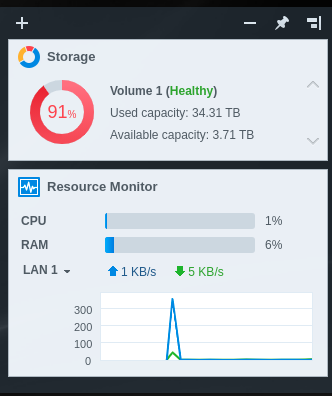
394 is what’s actively used (about 5% of system memory)
84 is what’s already in swap by default
5594 is what’s used for file system buffers
Synology is reporting based on that 394 MB in use, not the 5994 MB used for file buffers / cache.
Why is getting ECC ram a problem? I got 32 gigs of Kingston for next to nothing. Works great.
1 Like
Among the users who moved to a NAS with Ryzen V1500b CPU, am I the only one whose Plex server becomes unavailable until I restart it at least once per day since this migration , only DSM shows my system uses only 21% of its available official ECC RAM ?
This topic was automatically closed 90 days after the last reply. New replies are no longer allowed.
