Hmmmm!
what I see is the following and it looks like thew WAN is my local network ???

if it should be same as on PLEX then how do I change this?
Hmmmm!
what I see is the following and it looks like thew WAN is my local network ???
if it should be same as on PLEX then how do I change this?
It looks like the problem is the setup between your ISP modem and the Asus router.
The ISP modem gets a publicly routable IPv4 address by your ISP (currently 70.68.224.122) – however you only did your port forward configuration in the router which apparently creates its own network/subnet inside the network established by your ISP router.
edit:
basic options are…
is there anyway you make the wan ip address shown above to match the isps ipv4 routable address (noy sure if i am stating the question correctly)
isp address is 70.68.224.122 while mu e=router shows WAN at 192.168…0.10
can this be somehow set in the router so that the ISP ip address shows up in the WAN IP in my router?
sorry but not a lot o strength in networking stuff.
thanks again for your help.
Cheers!
Garry
That very much depends on your router.
I have outlined the two technical scenarios above…
You can configure 2 port forwards – one in your ISP’s modem and one in your router
<public TCP port of your choosing> (let’s call it X) pointing at 192.168.0.10 (your router’s local IP address in the modem’s network) on another <public TCP port of your choosing> (let’s call it Y; X and Y can use the same port number but they don’t have to)Y pointing at the local IP address of your Plex Media Server inside the router’s network on TCP port 32400Manually specify public port and set it to XCheck your router configuration to see if it can be configured in “bridge mode”. That means it’ll extend the ISP modem’s network and not establish its own subnet. This way, all local devices connected to the router will get their local IP addresses assigned by the ISP modem (including the PMS).
That way, you only need to configure a manual port forward on the ISP modem.
The router will no longer need its own port forward, as all devices are inside the network of the ISP modem.
I also have the RT-AC68U.
Asus calls it Access Point Mode. Select Administration under Advanced Settings. Screenshot below.
You can probably run the Quick Internet Setup as well.
Download the User Manual, the Quick Start Guide, and the Device Discovery tool before you start any reconfiguration. If something goes south and you have to factory reset the router, they will come in handy.
Manuals & Documentation Download:
Note: The English language Quick Start Guide is in the QSG Multi-Language download.
Tools Download:
Tom80H…
i just got of the phone with ISP and apparently cannot do anything with port forwarding with my current modem so am upgrading isp modem to their latest where I can do port forwarding. Will take a few days to get here. My plan with ISP is up on Sept/ 27th so I renewed plan with fiber access and new modem.
Once all set up I will post my results here.
In the meantime thanks for your help.
Thanks FordGuy61. much appreciate your insight here. As mentioned above, waiting on new ISP modem before i do much more, but what you say here seems like it might help.
At one point ISP quite a while back, put their internal router within their supplied modem to bridge mode but that messed things up. Cant remember details, but had them switch it back.
2 questions…
I have my own router because I want to control things especially security. If I put MY router into bridge mode will that affect network security in any way?
I want to increase coverage for my wifi network at some point so thinking of “mesh” installation. If my ASUS RT-AC68U router is in bridge mode, will I be able to add a mesh network to it?
No all that familiar with intricate details of networking per se so please excuse me if I dont word things quite right.
Cheers!
Garry
Placing the Asus in bridge/AP mode disables most features, including their mesh capability. It turns the router into just an access point.
Ask your ISP to place their equipment in bridge mode or see if they have equipment that is just a modem (no router/wifi/etc features).
That will let you use all the features of the Asus, including security and mesh features.
that’s what I thought about the router in bridge mode. . Once I get new modem from ISP with their internal router, I am supposed to be able to access it and do port forwarding in there. Not quite sure how that will work but will se what happens. Will post updated results when I have this all figured out.
Thanks again for your help. Much appreciated.
Cheers!
Garry
It will be easier if the ISP can place their equipment in bridge/modem mode, with no routing, no wi-fi, etc. You will not have to configure anything in the ISP device.
The ISP equipment supplies one public IP address to the Asus router. The Asus will display the public IP address as the WAN IP in on the Network Map page (instead of 192.168.0.10 like now).
The Asus then handles NAT, IP address assignment, Wi-Fi, etc.
If the ISP cannot do that, then there are still options, including the double port-forward @tom80H mentioned.
Thanks… good to know. Will contact them when I get the new modem installed.
Cheers
Many thanks to all who have helped here. I received new Modem /router from ISP today and have installed it.
They placed it bridge mode for me and after some resetting of it and my router (power off/on) all is working perfectly now with DL at 500+ MBps and Upload at 100MBps (formerly 300 / 15 respectively…
external IP address in Plex matches what’s in WAN in the router and remote access in plex is up and stable so far.
Thanks again for all your help and furthering my unsderstand of how this all works.
Cheers!
Garry
im stuck with my plex server.
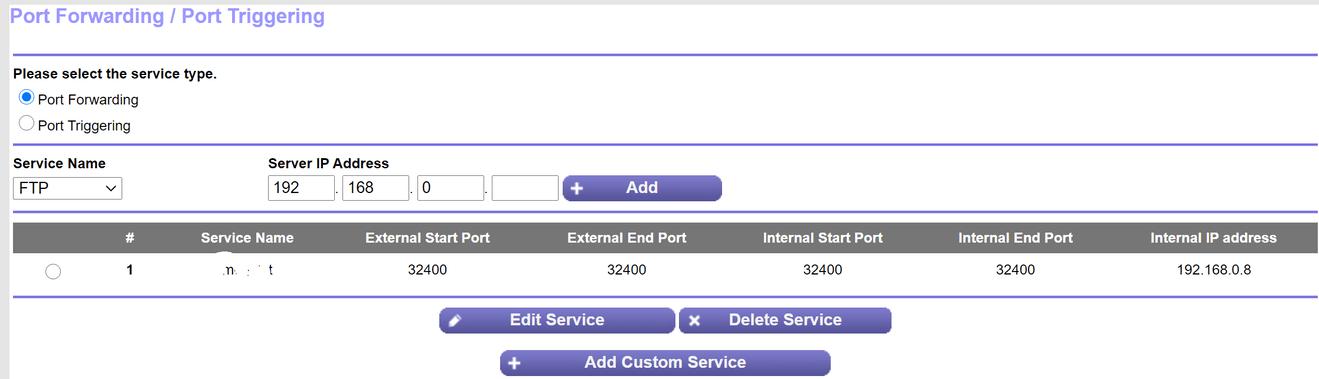
i have one router from my isp thats then connected to my Netgear Nighthawk X6 R8000 , i have port forwarded on both , have exceptions in my firewall and it still saying its not reachable from outside.
i have a static ip set also and the public ip matches what shows up on can you see me.
any ideas?
I’m not familiar with the Nighthawk router. However, your port forwarding rule looks incorrect.
Set the internal and external port to 32400, not to a range.
Make sure it is forwarding the TCP protocol (I don’t see that in the screenshot).
Also, if there is any place that mentions a source or external IP address, do not limit it. It may be left blank, say “any”, or something similar. Basically, you do not know the IP address of the remote client, so you do not want to place any limits on which IP addresses can connect.
No idea about the Services screen. Hopefully someone familiar with Netgear equipment can assist.
i have changed it to what you said and double checked its on TCP. and it wont on the night hawk let me set a blank ip for port foward. i have to select one of the devices connected to the network so i have selected my pc which is the same ip displayed on plex
anyone able to help as i’m pulling my hair out trying to get this to work
This topic was automatically closed 90 days after the last reply. New replies are no longer allowed.