@SlrG thanks mate. I have figured out the reason the case of these missing movies. Its cos these are bluray and DVD movies, and are in all the bluray BDMV/stream and VIDEO_TS format. Kodi scrapes and plays them just fine, but plex do not pick them up and do not catalog them.
Well, i was reading a few older posts, and thats what came to be, that few guys mentioned, however i am not sure, if there is a plugin recently developed that can make the bluray format movies both in bdmv and iso/image format catalog and play the movie?
Update, looking around, the forum, documents, and a bit more googling, i stumbled upon this page.
https://support.plex.tv/hc/en-us/articles/201674343-Scanning-Disk-Image-Format-Media
Looks like there is a Scanner plugin that can be used to scan the non standard video format such as streams from bdmv, video_ts and iso files. U gotta place the files in the locations mentioned and choose the scanner while creating a new library, I am running the library scan through this scanner as we speak, and while i type this… i see the movies that were never added to the catalog before are in plex now… and its working as expected. Will report back tomorrow moring when the the entire scanning and cataloging is complete.
Sorry for the stupid question, but after a corruption to my DB I had to perform a total re-install and I cant remember the optimal settings for the agents (I think the last version made it possible to get plex-pass video trailer added while using the Xbmcnfo for the local media files and nfo description (never got the local actor thumb working on my Synology) is the below order correct (Just need a yes or no  -) Thanks!
I want to get as much information to each TV show and movies as possible (Included the Tag line - didnt that used to be a seperate line before the summary? or did Plex change that again?)


Does anyone know how to update media files (artwork, posters, etc) ? I tried Scan library files + Refresh Metadata, nothing gets updated…
thanks
@casperse:
Sorry, but I have no idea. I’m using only the agent itself. No local media assets and no other agents.
@pstN:
For the movies agent it should work with refresh all metadata. For tvshows that has always been tricky. Plex caches things and I have not found a way to make the agent override that. You have to either recreate the whole library or move the show to another folder outside of the library, scan library, move it back and scan again. If scan does not work, please try the same with refresh. Its a hassle, but there is no other way.
Im not able to get nfo agent working for MCEBuddy exported nfo. I record TV using MCE7 and then use MCE buddy to generate nfo file.
Episode path
ame: Kriminálka Anděl\2017\Kriminálka Anděl - 08282115.mp4
NFO path
ame: Kriminálka Anděl\2017\Kriminálka Anděl - 08282115.nfo
My recordings dont have episode numbers since these are either sport events or news etc , so I use date based scanner that allows me to scan these files with the format above.
Is there any way to remove the check log files complains about ?
nfo file is definitely always unique for each episode as it’s always created with the same file name as video file.
EDIT: I’ve attached excerpt from the log file and nfo below.
2017-09-02 14:53:31,109 (2b08) : INFO (logkit:16) - Looking for episode NFO file d: v-recorded_test\Kriminálka Anděl\2017\Kriminálka Anděl - 08282115.nfo
2017-09-02 14:53:31,111 (2b08) : INFO (logkit:16) - File exists…
2017-09-02 14:53:31,111 (2b08) : INFO (logkit:16) - Removing empty XML tags from tvshows nfo…
2017-09-02 14:53:31,111 (2b08) : INFO (logkit:16) - Looks like an XBMC NFO file (has )
2017-09-02 14:53:31,111 (2b08) : INFO (logkit:16) - EpNum: 1 NFOEpCount:1 Current EpNFOPos: 1
2017-09-02 14:53:31,112 (2b08) : INFO (logkit:16) - Removing remaining empty XML Tags from episode nfo…
2017-09-02 14:53:31,112 (2b08) : INFO (logkit:16) - No matching episode in nfo file!
@wally007
May I ask you to provide a zip of your whole folder of this show, with all metadata (pictures and nfo files) but without the actual episodes itself? Also please provide a link where I can find this date based scanner or is it a setting in plex itself? I will have a look at your problem, but I have no date based files myself and need to setup a testing environment.
@SlrG said:
@wally007
May I ask you to provide a zip of your whole folder of this show, with all metadata (pictures and nfo files) but without the actual episodes itself? Also please provide a link where I can find this date based scanner or is it a setting in plex itself? I will have a look at your problem, but I have no date based files myself and need to setup a testing environment.
Thanks.
1, I’ve attached folder structure of Show\Season\Episode with empty media file.
2,Also I’m attaching custom scanner. Please unzip the content into C:\Users\ USERNAME \AppData\Local\Plex Media Server\Scanners\ (on windows)
and when creating TV Shows section, pick the Custom Plex Documentaries Scanner
@wally007
I must be doing it wrong, because using the Custom Plex Documentaries Scanner I get no results. I never reach the point, where the agent throws the error you are showing above.
Let me document what I have …
Folder structure:
TV Section setup:
Agent:
End result:
Make sure you dont have the video file empty ( it has to be a video file of some sort ). I removed the video file and just placed a place holder in the zip file.
@wally007
Okay I got it working. The problem was indeed the “empty” video file. I created a 100 byte one, like I do with all my testing movies and series normally. But with the modified scanner this does not seem to work. Copying and renaming a real video solved this.
The reason for your problem is, that you have no episode number in your nfo file. Normally the agent checks this, to make sure it is working with the correct nfo for the episode.
I changed it now to assume the episode number based on plex info, when there is no number in the nfo file itself. This should make it working for your files, but it might create problems if plex guesses wrong. So normally I would always recommend to have nfo files which contain as much correct info as possible.
Please update your agent to the newest version and give it a try.
Also having the Local Media Assets activated might give you wrong series and or season posters. The agent will add the correct ones, but it can’t change, what Local Media Assets chooses.
The correct name for the season poster should be season2017-poster.jpg.
Thanks for heads up. My recordings dont have episode nubmers as I dont really record TV shows but rather Football (soccer), Formula 1 etc…
However, I dont really understand why agent NEEDS to verify episode number.
Video Filename and nfo are always the same and unique combination. So if I have Episode 1 - blah.mp4 , I have to have Episode 1- blah.nfo in order to make it work anyway. Why is agent checking episode number from Plex Server at all ?
I will change my ffmpeg scripts to create valid posters and de-activate Local Media Assets as suggested. I will report back this weekend how it went.
Thanks a lot for your help
@wally007
It needs to do this because of multi episode nfos, where one video file contains multiple episodes and thus the nfo does, too. Well I think it should work for you now anyway.
I’m posting this particularly for those looking to get Cast Artwork working while still using the NFO import function. The info is more or less here, but I’m a step-by-step type of person, so for others who have a similar setup to mine and would like to know exactly what works, here’s the steps. I also want to point out that your Cast Artwork can be of this format:
http://location/location2/location3,etc/A/Adam Sandler/folder.jpg
So there’s no need to go in and rip out each individual artwork, rename with an underscore, etc. Just let the scraper do what it does, and keep the existing file structure in place.
Setup:
Metadata Scraper: Media Center Master (Generating Kodi/XBMC compatible NFO metadata)
Movies/TV Shows Location: Synology NAS
Plex Media Server (PMS): Currently running on a Windows PC, but will be moving to my NAS soon
Assumptions:
- You’ve scraped all of your media using MCM (or whatever your scraper is)
- You’re Cast Artwork is stored in a central location (not with each movie in a .actors folder)
- For me, MCM stores them in a central directory, then by first letter, then by Actor Name, then inside that folder is “folder.jpg”
Step 1 - Setting up the Web Server, giving permissions, and moving your artwork
- Log into your Synology, and install Web Station
- That’s it, you don’t need to install phpMyAdmin or MariaDB
- From the DSM Admin web interface, open up Control Panel, select Shares, and you should see a new folder called “web”
- Highlight it, select Edit, then select Permissions
- Give a proper account Read/Write permissions to this new share
- This account will need to be one that your Media Scraper can access as it will need to create new folders and files in this directory
- Now open File Station and go into the “web” folder
- Move all of your Cast Artwork from wherever it is now, to this directory
- So afterwards you should have something like this:
- \mynas\web\ImageName\People\A\Adam Sandler\folder.jpg
- For my purpose, I just created a new folder under “web” called “ActorImages”, then dropped all of the “letter” folders out of People and placed them into ActorImages
- So my final resting place looks like this:
- \mynas\ActorImages"letters"“ActorNames”\etc…
- Test now that you can access an actors image from the web server:
- Open a web browser, and put a FULL link to an actors image in your web browser. For example:
http://“IP-Address-Of-NAS”/ActorImages/A/Adam Sandler/folder.jpg - It should open to the actors image if everything is properly set up. If not, you likely have a permissions issue.
- Now you need to go back to your Media Scraper, and change the location of where it stores Cast Artwork for future scrapes
- For MCM, this is under Settings & Preferences → Artwork → Store actor and crew thumbnails in:
- In that field simply put \mynas\web\ActorImages
- If you use multiple profiles in MCM, you will need to update this setting for EACH profile
Step 2 - Configure XBMCnfoMoviesImporter in Plex
- Open Plex, go to Settings, select Agents, then select the XBMCnfoMoviesImporter
- Scroll down to the bottom, change Actor Thumb Location to LINKED
- In the Path to Move Library file…, put:
http://“IP-Address-Of-NAS”/ActorImages
Step 3 - The Fun…
So, I tried MediaCompanion and MCM for these tasks, and couldn’t get either of them to store the Cast Artwork in the actual web address location. They would only store to a local location, or a network “file” location. As such, the info they are putting in the NFO references those file locations…which of course won’t work with Plex…it needs to be an HTTP address. So this is where “the fun” comes in.
For me, I’m OCD about my collection, so I already had a PowerShell script written that performs various functions on the movies.xml and movie_name.nfo file after the scraper generates them, so it was somewhat easy for me to add an additional step to do a find and replace within my NFOs throughout my collection. There are many ways to handle this, but I’m comfortable with PowerShell, and I already had a post processing action in place, so it was logical for me. You may find a different method that works for you. Also, I don’t consider myself a PowerShell expert, and there are many ways to execute actions in PS that can be “compressed” to how I’ve written, but I prefer to write things so they are “readable” by all. But for those that want to replicate something similar, here’s something to get you started. The below will reference your “movies” folder, store the values of each movie name folder under the movies folder, find NFO files in each movie folder, change the path of the Cast Artwork in the NFO, store it in a “new” NFO, delete the old NFO, and rename the new one to the movie title. So I assume your movie collection will look like this:
\mynas\share\movies\Avatar\Avatar.avi
\mynas\share\movies\Avatar\Avatar.nfo
{
#Change this location to the root folder of your movies
$basePathToMovies = “\mynas\share\movies”
$movieTitles = Get-ChildItem $basePathToMovies | Sort-Object Name
#Looping through each movie folder
foreach ($movieTitle in $movieTitles) {

    #Defining where the old NFO is with the current movie
    $oldNFOPath = $basePathToMovies + "\" + $movieTitle + "\" + $movieTitle + ".nfo"
    #Defining where the newly written NFO will be
    $newNFOPath = $basePathToMovies + "\" + $movieTitle + "\" + "newnfo.nfo"
    #Getting content of the existing NFO
    $movieNFOContents = Get-Content $oldNFOPath

    #Testing to make sure the newnfo.nfo doesn't already exist, if it does, removing it
    if (Test-Path $newNFOPath) {

        Remove-Item -Path $newNFOPath
    }
    #Creating new NFO to write to
    New-Item -Path $newNFOPath -ItemType File | Out-Null

    foreach ($nfoLine in $movieNFOcontents) {

        if ($nfoLine.Contains("\\mynas\web\ActorImages")) {

            $newNFOLine = $nfoLine
            $newNFOLine = $newNFOLine.Replace("\\mynas\web\ActorImages", "http://YOUR-NAS-IP/ActorImages")
            $newNFOLine = $newNFOLine.Replace("\", "/")
            Add-Content -Path $newNFOPath -Value $newNFOLine
        }
        else {

            #Writing the existing contents in the line to the NFO (lines that are not modified)
            Add-Content -Path $newNFOPath -Value $nfoLine
        }
        #Deleting the old NFO
        Remove-Item -Path $oldNFOPath
        #Renaming the new NFO with the proper name
        Rename-Item -Path $newNFOPath -NewName $oldNFOPath
        Write-Host -ForegroundColor Green $movieTitle "nfo updated"
        }
}
}
I couldn’t figure how to get this script above to display properly, so make sure you get it all from “#Change this location…” down to the last bracket. I included some extra brackets to try to get it to group as much as possible, but it still broke it apart a little.
Step 4 - Updating your existing library
So you will have likely already scraped a large part of your collection, and it will likely have incorrect references to where the Cast Artwork is located
Now that you’ve updated your Cast Artwork location in MCM (or whatever scraper you’re using), load up your collection in your scraper and Fetch Metadata again. This should overwrite any existing NFOs with the new Cast Artwork path, and then you can run the PowerShell script above to post process the NFO with the “web address” pointing to the web server
And lastly - I couldn’t get any existing libraries to recognize this change. In order for Plex to pull the changes in, I had to do the PlexDance (Remove library - add library back with proper settings)
Once you get all of this set up, it’s as simple as Fetching metadata with your scraper like you normally would, running this post processing script (which runs through 100 movies in about 2 min or less - depends on your computer), then move your movies to their final resting place (I tag and organize in a “temp” directory before putting into my collection). In MCM you can even put post processing script actions to be automatically performed for you - if you desire.
Sorry this was so long. I spent the better part of 2 days trying to figure out how to make this work “for me”, and thought some specific info might help others that are trying to do this, or are just starting out down this path. I also realize there are possibly other, better, ways to do this, so if you have a variation of how you are handling modifying your NFO’s, or the Scraper you’re using allows to create Cast Artwork to the web directory directly, I’m all ears.
Thanks again to the creator of this NFO importer! Has saved me thousands of hours - and my sanity. Now if I could just figure out how to put the IMDB “image” next to the rating instead of the generic star - I think I’d be all done 
@rdstevens79
Thank you for your contribution. It will help a lot of MCM users to get the actor artwork working.
The IMDB image next to the rating is still on my TODO list.
OK, so I feel like an idiot somewhat. Guess I didn’t understand the difference between local, linked, and global initially. I used the global option, which meant I didn’t even need to update my NFO’s as the agent would look in that path first regardless of what was in the NFO - SMH. (found this out on a library I hadn’t scraped/updated with the paths put into my NFOs yet - there was Cast Artwork!)
I did give “local” a go in the beginning trying to use local and network file paths, but that never worked. I’ve already done it so I’m not changing the web server setup, but just to make sure I understand correctly it seems no matter what option you use you’ll need to have a web server, correct?
So to simplify things, 1)Set up a web server and drop all your files there, 2)Update agent to LINKED, and put in the root path to the artwork, 3)Refresh all metadata or do the Plex Dance, 4) Done
**Updated:**Corrected original post and this one to reflect info from SirG
No reason to feel bad.
In your case, where you have the actor images in subfolders and named folder.jpg \A\Adam Sandler\folder.jpg the normal Local or Global processing would not work. It expects the actors name as Adam_Sandler.jpg.
Lets start with “Linked”, that will take the link from the nfo and try to access that. Normally this will be a link to some online source. As some of us want fully local libraries, they can in case of failure restore without an internet connection, that is no perfect solution.
For “Local” and “Global” you will indeed need a local webserver as plex only understands working http links as actor images. (Thats stupid, as it makes things much more complicated, but I can’t change it.)
The agents are designed primarily as XBMC (now Kodi) importers, as the name should make clear.
“Local” is for those, who have an .actors folder with actor images for each of their movies. All of those have to be served by a local webserver for it to work. On my unRAID that is the initial setup. No need to do anything else.
On other NAS this often is more complicated to setup (albeit more secure).
“Global” is for those, who have a single actors folder without subfolders and the images names as Adam_Sandler.jpg.
You now probably have the question why does “Global” work for you, if you have another folder structure and other image names? The reason is, it doesn’t. It simply falls back to “Linked” automatically, if it does get no working file with “Local” or “Global”. And as you have changed the links in your nfos to the correct local http locations, they will get used perfectly fine.
As why you have got artwork without changing the nfos, that was probably online artwork getting pulled on fallback to “Linked”.
You made this change a few weeks back, maybe something changed as Plex doesnt add the “Collection” bit to imported collections so now everything looks like this

EDIT: So removing your changes fixed everything

I now have gone from this

to this
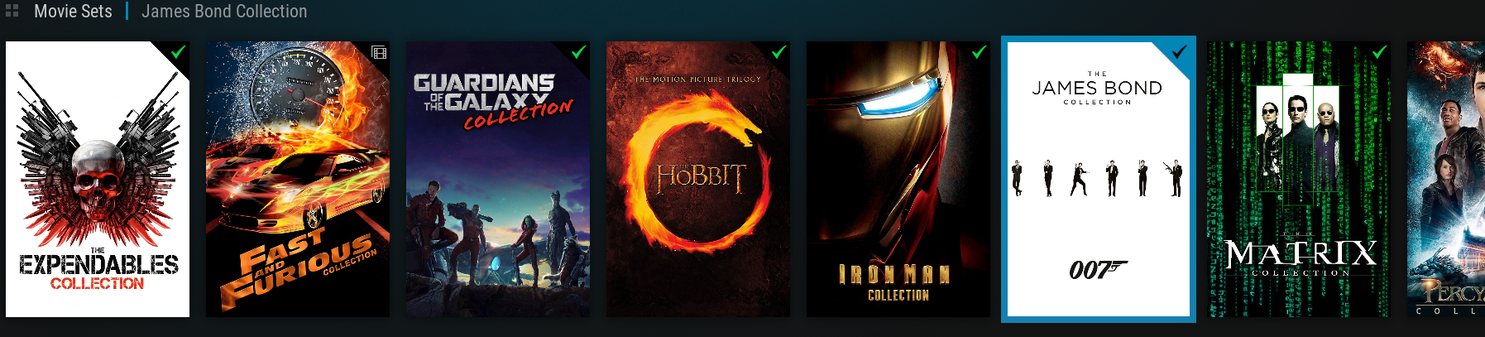
Thank you for the additional info, that makes perfect sense 
As for why I was getting some cast artwork to come in, and not, I honestly couldn’t figure that one out…and I gave up trying to diagnose as I was just going to be overwriting anyway. I’ve updated my original post with the correct information now in case anyone else stumbles across this.
Thanks again for an awesome plugin, and for your help!
I have been building a new server and as a result have gone back to playing with the setup of my agents. You can get ratings logos if you leave the rating in the nfo empty, as that way the plex agent ratings don’t get overwritten.
It would be handy if you could add another option to the movies agent to not load the ratings at all. That way folks would not have to remove them from the nfo (Or, as I have done, hack the code).
