I’ve seen similar topics but they where all closed as solved. As I have a similar problem I’d guess it’s nature is similar but it isn’t the same bug.
I’ve noticed that parts of the subtitle are missing when watching TV Series with .srt subtitles.
The problem is independent of player or server. I’ve listed the versions below. I also tried to “burn” the subtitles via the server but nothing solves this for me.
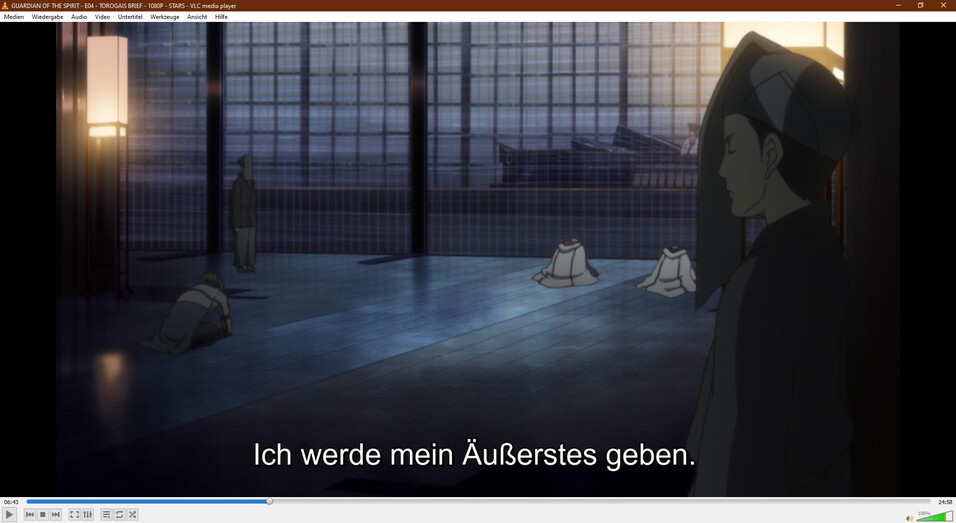
The subtitles play fine in other players like VLC.
This issue doesn’t seem to be random but reproducible for specific parts of the subtitle. I haven’t thoroughly tested it tho. It only seems to be happening with SRT subtitles tho. And my guess is that it’s caused by characters that PLEX doesn’t seem to understand, like the “ß” in the example uploaded below.
This makes it hard to enjoy watching on PLEX.
Used Software versions (for the example uploaded below):
Server: 1.21.3.4021
Web: 4.51.1
AndroidTV: 8.12.4.22902
Windows: 3.2.20-25990c77
Here is a clip with the subtitle missing: clip_with_missing_sub.zip (688.8 KB)
An an Image with the missing line in VLC:
One thing to contend with about SRT files is they often are DirectPlay of the subtitle (not burned in). In those cases, it means the player itself does not have that character in its character set map
I’m not sure if it’s related to the character at all. Just a wild guess from my side. As those subtitles are usually missing it’s hard to exactly see what’s wrong with them or make out a pattern.
Like mentioned it happens if the subtitle direct plays and also when the subtitle is burned by the server. It happens with all listed software versions. That’s all the ones I regularly use.
The character isn’t missing, as I can type in on this computer in this browser just fine but in PLEX Web the complete line is missing. I’m sure it’s not related to the system or browser I’m using as it happens on every device I use with every PLEX client I use.
I can provide files if needed. But as they come with copyrights attached I’d have to send them via PM or any other non public form. Just let me know if they are needed.
This also isn’t the first time this happened. Usually there are 2-3 lines missing per episode and in some movies I had like 5-10 lines missing.
Are you ripping your own SRT files? I often have to go back and review my SRT files, after I rip them, with an editor to ensure all the lines and text are accurate. Often I find missing lines or bad text even in English.
The subtitles themself are fine. There are no problems or errors with other players.
The SRT files are encoded in UTF-8, I’m not sure what difference the BOM should make. Looking at the .srt in a hex editor it does start with a BOM (0xEF, 0xBB, 0xBF) but other players don’t seem to have a problem with this. Before I’d re encode all subtitles in srt and remux them, I’d rather convert them to .ass as this doesn’t seem to cause problems, ever. I’d rather not do that tho.
Careful: some client types can trigger transcoding for ass subs, while SRT can be played directly.
I’ve inspected your file and haven’t found anything wrong with it, except the presence of the BOM. But I doubt that it has anything to do with the issue.
Nonetheless, I’d try and make a version of the subtitle without BOM, just for testing it.
Chuck you never have gotten a bad text? Words not accurately captured, letters not misread when ripped? Has me wondering why when I rip them some of my text gets misread. A big thing that often happens is “L” often becomes an “I” or “|” or “O” becomes “0” and letters sometimes just go missing.
Don’t know about Chuck, but I haven’t had an issue like that with a text (UTF-8) file.
Ever.
I will note that if you have two lines with the same timestamps like those fancy Japanese Subs - your client may have to pick one and it might pick the wrong one.
This sounds to me as if you are not just ripping the subtitles but are also sending them through an OCR process.
You should always keep the original VOBSUB / PGS subtitle streams for reprocessing, should you encounter issues like these.
Thanks, I will look into my process. Think I have a bit more learning to do then. It will be much easier to get it right the first time instead of having to review everything for small edits.
I use Bytecopy from Pavtube. Maybe not the best software then for this. I am guessing it reads the video instead of just grabbing the srt itself. That might explain it as an OCR issue.
Though what is nice about it is no matter the framrate the timing is always right when I do it that way.
Subtitle Edit - allows you to ‘help’ the OCR program, by checking unknown words against a dictionary in your language and alerting you to correct oddball words that aren’t in your Dictionary.
That, in itself is painful…
and time consuming…
That’s why I go here first - so maybe I won’t have to OCR…: https://subscene.com/
If that fails I can always OCR. <— and hate every minute of it…lol
I’d rather transcode than occasionally have subs missing. I thought forcing to transcode all subtitles would fix it, but unfortunately it doesn’t.
The BOM doesn’t seem to have an influence on this. I looked a bit deeper at the files tho and noticed that there are indeed formatting problems with those lines that are missing.
I noticed that exported subtitles via MKVExtract don’t have a problem (BOM or not doesn’t matter, mkvextract already fixes the subtitles) but when I loaded the subtitles with AegiSub directly from the MKV I noticed that the missing lines are malformatted.
But even if I export those malformatted files and then load them as external or remux the .srt they seem to work fine. So I’m not 100% sure where the problem lies.
The problematic lines have \N\N or 0x0D 0x0A 0x0D 0x0A or CR LF CR LF (Carriage Return and Line Feed) preceding the actual text. gMKVExtract cleans this error and as such the exported srt aren’t problematic. So a problematic line is looking more like this:
50
00:06:42,270 --> 00:06:45,230


Ich werde mein Äußerstes geben.
As other players like VLC and tools like MKVextract can handle this problem, is it reasonable to expect that PLEX should also be able to handle this? Or is it a problem that I have to fix to be able to play those files in PLEX (I’d rather not)?