I am running Plex on Windows 11. I have just started adding movies and some of them come with extras. I have placed the extras in the right folder I think…. (see below). but all I get on the screen for the movie is the following picture and no extras. What am I doing wrong? I have a lifetime flex pass.
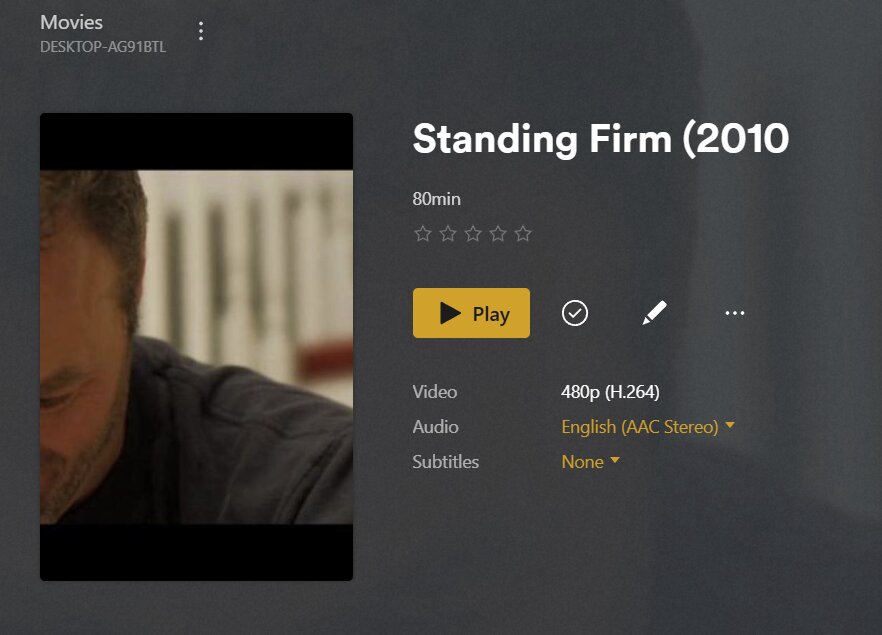

Plex doesn’t recognize an Extras directory. You should use dedicated subfolders for specific extra types, e.g. Featurettes, Behind the Scenes, Interviews, Deleted Scenes…
Take a look at this support article for all details.
https://support.plex.tv/articles/local-files-for-trailers-and-extras/
I will look at the reference you linked and see if I can figure this out. I am also wondering why I do not get any standard movie covers and descriptions of the movie showing up. What setting provides that? It seems that plex took some picture from the movie I loaded and used that. I have the same issue with the few other movies I have loaded up. No description of the movie and the picture of the cover looks like it was generated from the saved file rather than from some database.
Plex is not matching the movie to its online database. Notice Plex displays the name with a missing parenthesis, the same as the file name. If matched, that would not happen.
How are the files organized? What is the path and which folder is added to the library? It should be similar to:
/movies <-- folder added to movie library
  /Standing Firm (2010)
    /Standing Firm (2010).mkv
Which agent/scanner are selected for the library? Edit the library → Advanced. Plex Movie is the default agent and scanner.


Upon further discovery, it looks like I have to match manually to get the info about the movie from the outside sources. Any way to match automatically?
Plex should match automatically.
Let’s see if the server log files show anything.
Please do the following:
-
Settings → server_name → Library: Enable Scan my library automatically (adds additional info to log files).
-
Settings → server_name → General + Show Advanced: Enable debug logging. Disable verbose logging.
-
Stop Plex Media Server.
-
Wait one minute.
-
Start Plex Media Server.
-
Wait three minutes for Plex to start and fully log the startup sequence.
-
Manually refresh the metadata for Standing Firm (or another unmatched movie if Standing Firm is already matched)..
-
Pull and post the server log files (Settings → Troubleshooting).
For some reason the information is now being updated as it should. Not that I changed anything. It is now pulling down the correct internet info. So I did not have to go through the steps to determine why it wasn’t. Thank you for your help.
