I’m sure this has been raised a few times however I was reading this: Multi-Version Movies | Plex Support
Which clearly stated this:
’ Note : This feature is not intended for situations where you might have, for instance, both a “theatrical” and “director’s cut” version of a movie. Likewise, it is not appropriate for 2D vs 3D versions. Those situations are best handled by Splitting the movie into separate library items."
Fab - totally useless, why would I split the same movie into separate library items to clutter up Plex? …anyhow so I went to this: Merge or Split Items | Plex Support
and it STILL does not allow for easy identification within Plex of the different files of the same movie!
So why bother having a completely useless “Splitting” function, when by definition its the same movie?
Using the Multi-versions function to simply put text labels on which version is selected resolves this and allows easy selection on which to play. The actual file formats are valid - great to pick from…so whatever 'label’s admins assign to the filename (ie “This Movie (2000) WhateverTextAdminsLike.mkv”) should be displayed in Plex as part of the text to pick from…it has no impact to Plex, the formats are still the same.
eg.
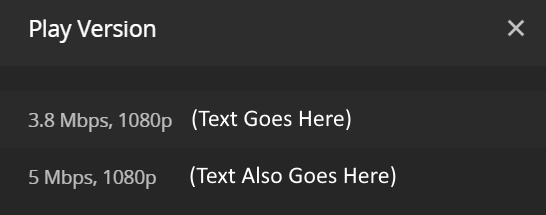
Remove the useless “SPLIT” function as its bloatware and does not accomplish the job anyhow - just use the existing function with text help with what is being selected. That way if no text exists in the filename (as some admins would want), no text appears in Plex.
It would be unfortunate if the requirement to easily identify the different files of the same “movie” are ignored (again) by a company that doesn’t listen to their customer-base…
Directors-cut, SD/HD version, MyFav Version, Clearer, Proper, 2D/3D/4D, SomeRandomText etc. are all just made up filename ‘identifiers’ of the SAME MOVIE - give Admins some control over how they’re displayed in Plex.
