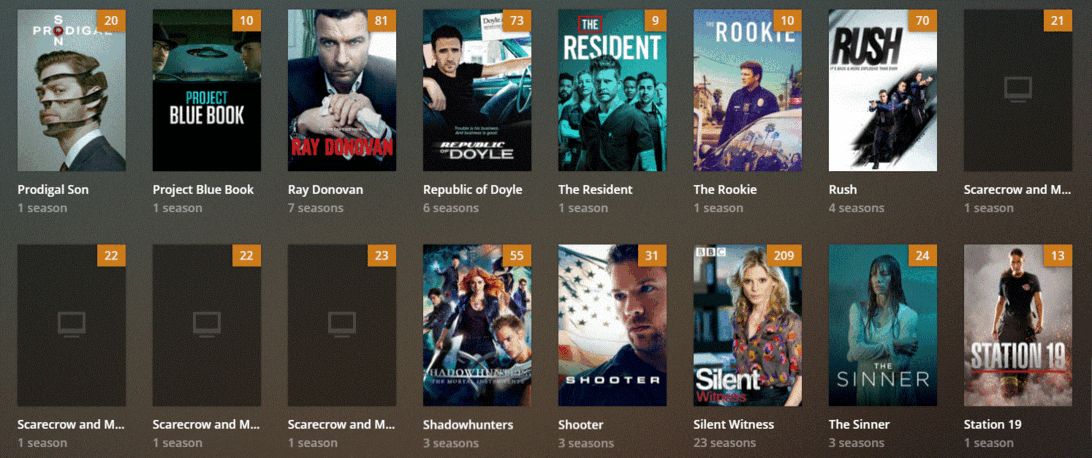
Problems: Scarecrow and Mrs. King…4 seasons show separately instead of a complete show.
Problem: Laverne…Ist thumbnail is S02 and S08, the other seasons list separately. Also, some episode thumbnails load and others do not. Also, some episode titles show and others don’t.
I’ve checked my other similar shows and all my files are labeled the same, yet only these two shows are problematic.
Can someone help, please, or direct me to the correct article that can?
Then the other possibility is that there is embedded data in your files so PMS thinks these are different shows. Using the Windows File explorer, find one of these files that has the blank picture and look at the file properties.
I think I have stumbled on the problem myself. My Library was for I:\TV\multiple show folders here. These two shows I was trying to add were in E:\TV\Laverne & Shirley and G:\TV\Scarecrow and Mrs. King. I tried copying the two troublesome files to I:TV, both shows loaded without any problems! Obviously PLEX doesn’t like folders from different drives in the same library. Who knew? Do you understand why this folder transfer corrected my problem? Is there a help article addressing this issue?
That’s where the problematic files were when they caused all the problems. When I moved everything into the remaining file, they loaded smoothly. In addition, I created a TV Test library and added folders from 4 different drives and the folder was created without any problems. One of these drives, however, had problems with 2 folders I tried to add (they didn’t load) but all the others added smoothly. So, those problematic folders must have some sort of labeling problem that I’m not seeing.