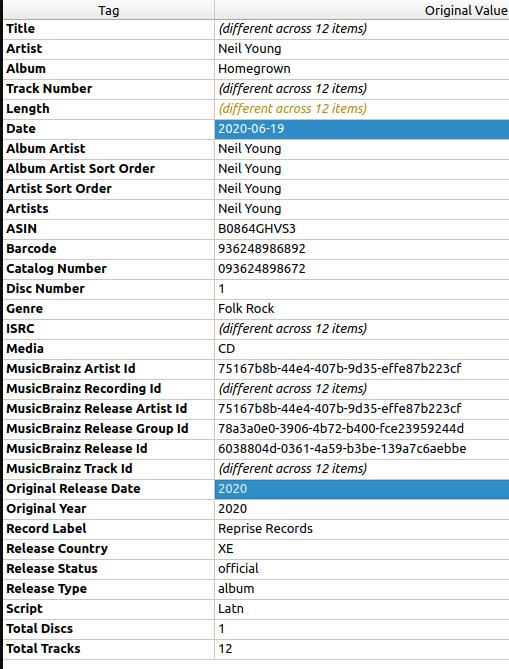
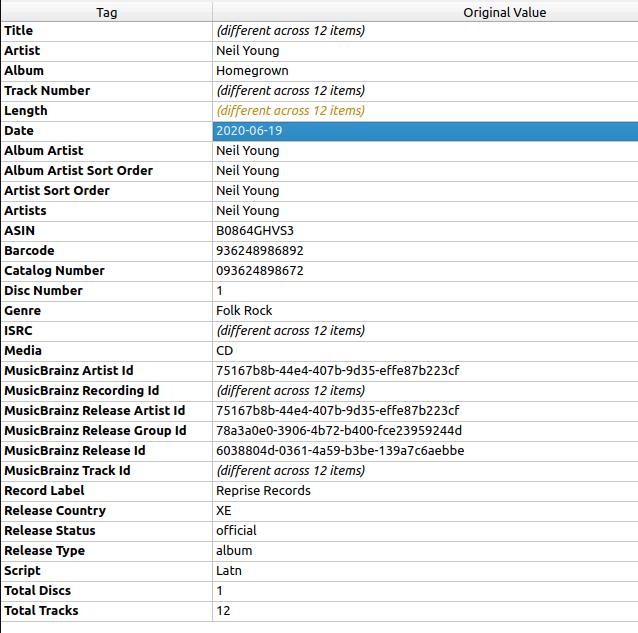
So, the specifics, for the ID3v2.3 date tag it supports yyyy-mm-dd whereas originaldate only supports yyyy. See screenshot below for details:
Then when everything gets matched with plex the Originally Available (which is populated from originaldate) come into plex using yyyy adding the default 01-01 for the 1st Jan.
Why is this a problem, well date sorting is a mess. Sorting is only done on the year and it also makes the plexamp feature of On This Day useless.
So, I’m looking to see if there is a way I could somehow workaround this limitation. Was thinking if there was a override I could use to force plex to use the date tag instead ? If so as it supports yyyy-mm-dd I could just ensure the date tag is correct and all would be well.
Not using Prefer local metadata is not an option for me. Also, with ID3v2.4 the originaldate tag supports yyyy-mm-dd but that’s not an option as it breaks releasetype.
Anyone any other recommendation ? Manual editing multiple thousands of albums is also not really an option.
I’ve been able to workout a solution to this and I’ll post it here for anyone else who might find it useful.
Basically I asked myself what if… the originaldate tag didn’t exits in my files, would plex fallback to just use the date tag? It does!
So, I removed originaldate and for good measure originalyear so my tags updated to this …
… and then done force refreshed the album (didn’t even need a plex dance) and boom the full date came in !
So I think what I’ll do to workaround this is a two step approach:
When I initially add my tags I’ll make sure to set date = originaldate, something like this $set(date,$if2(%originaldate%,%date%)) but will need to test some more to get the code right.
Then do a second tag update to JUST remove originaldate and originalyear leaving everything else untouched.
EDIT: Was able to do the above with one step by adding the following code to my musicbrainz scripting under options:
After a update of my embedded tags and force refresh of my entire music library I can confirm this worked. See screenshot below and the actual release dates sorted correctly.
Also, on this day is now working on plexamp as a released album for today showed up bringing back this functionality.
Approx <5% of my releases have just yyyy now but that’s because musicbrainz itself does not contain the full dates, them I’ll add to musicbrainz if I can find accurate information on the actual date.
I’m now back to adding my remaining 5,000 or so albums
It’s my reading the above issue refers to supporting the five tags that are allowed to have multiple values according to the 2.3.0 spec.[1] TCOM - Composer TEXT - Lyricist/Text writer TOLY - Original lyricist(s)/text writer(s) TOPE - Original artist(s)/performer(s) TPE1 - Lead performer(s)/Soloist(s)
e.g. TPE1 - might be set to P. McCartney / J. Lennon
but FFmpeg was leaving out anything after the / and you got P. McCartney
Do you use multi value tags very much? It’s not in your picture, but it’s obviously useful for artists.
Next question, you specifically mentioned UTF-16. What’s problem was solved that existed with UTF-8 in your media? Sorry if the answer is obvious for some. I’m from the USA .
search the id3v2.3.0 spec for seperated with and yes that spelling error is in the standard. You can be sure that was not good for the Internet ↩︎
The releasetype tag is very important to me. With ID3v2.4 tags album; compilation becomes album when it gets consumed by plex due to this bug which then breaks the Group albums by type functionality. This is why I use ID3v2.3.
For me, the problem is that ffmpeg (and therefore Plex) doesn’t read properly formatted multiple value tags in ID3v2.4. Only the first value is read. The solution (or workaround) is to re-do all of your files with ID3v2.3 tags, and only use multiple values separated by a semi-colon. I use multiple values in genre all the time, as well as those tags mentioned above. But they are not “plex-ified” so I end up with single values for all them.
I’m stubbornly waiting for a fix, as the previous scanner/agent read the mulltiple tags properly. I’m NOT holding my breath.
@anon5074910 Ah okay to fix a Plex grouping issue. May I ask do you get the group functionality back now when as pictured you list releasetype as a single word like album?
@leelynds Thanks that helps clear up why I see a ; more than I thought I would. I think the fix is already in the ffmpeg dev branch and will make it into the next ffmpeg minor release.
Using the primary type album would not be the question, but using the secondary type compilation on its own would be interesting to know what plex does. I’ll have some time later to run a test and see what happens …
EDIT: Made no difference. Just using compilation for releasetype still left it grouped under album after switching the tags. Checking the xml of the album I can see the tag still came in as album with no subformat.
Bumping this with a seemingly related issue I’ve run into with dates. I pretty much just use the date field on my music, but have run into an issue where Plex has stopped loading from this field for id3v2.3 or id3v2.3|id3v1 mp3 files that are newly added to a library, instead populating with 1969-12-31. It looks like only mp3 files I’ve added since the start of October are affected, files that were imported earlier haven’t had their dates reverted. This is happening regardless of Prefer local metadata setting. Rewriting a file’s tags to id3v2.4|id3v1 and performing the Plex Dance successfully populates the dates correctly.
Without additional details or logs it would be my guess that plex is having a problem reading your date tag for some reason. Earlier this year plex moved to using epoch formatted timestamp in their internal tables of their database. The date of 1969-12-31 is now the default date plex assigns when it cannot read a date from an embedded tag.
Can you provide a screenshot with all the tags so we can take a look. Also, are they UTF-16 text encoded ?
My apologies, seems I rushed to call this a bug a bit too quickly. I’ve recently started using YYYY-MM-DD date structure for new files in my music collection instead of just YYYY, which I populate using Foobar2000’s tag editor. After looking at the id3v2.3 and 2.4 specifications and at my files’ tags using MP3Tag, it looks like when I set the date like that on id3v2.3 tags Foobar puts that entire string into the TYER tag (which it just refers to as Date) which for id3v2.3 is specified to only be 4 characters long and contain just the year. The month and date should instead get added to the TDAT tag as MMDD. This overflow is why I think Plex was getting mad at me, as I only had this issue on files with this date structure and tag version. Updating those tags to id3v2.4 moves that date information into the TDRC tag, which supports proper ISO 8601 up to yyyy-MM-ddTHH:mm:ss, making Plex happy.
And unfortunately, this means I have to suffer through that multiple values bug you linked in the OP which is going to have me manually updating genres for new music.
Ok. So figured out that the manual tagging didn’t work due to mapping with MediaMonkey my music tagger. Please see below suggested reconfigurations, may some advise me, my brain hurts.
Not the response you’ll most likely want but if you ditch MediaMonkey and tag with musicbrainz picard, it’ll pull everything you will need. It also maps well enough within plex.