Curious to see how people are managing this. I’ve followed the guide I think correctly, naming the videos per the track they correspond with for the albums from this guide:
Adding Local Artist and Music Videos | Plex Support
Using these conventions as a template from it.
/Music
/Bob Schneider
/I’m Good Now
01-Come With Me Tonight.mp3
02-Medicine.mp3
02-Medicine - Medicine (extended jam)-lyrics.mp4
03-A Long Way To Get.mp3
Saxon Pub Dec 29, 2014-live.mp4
Stephanie’s Rock Show-interview.mp4
/Lonelyland
01-Metal and Steel.mp3
01-Metal and Steel - Metal and Steel-video.mp4
02-Big Blue Sea.mp3
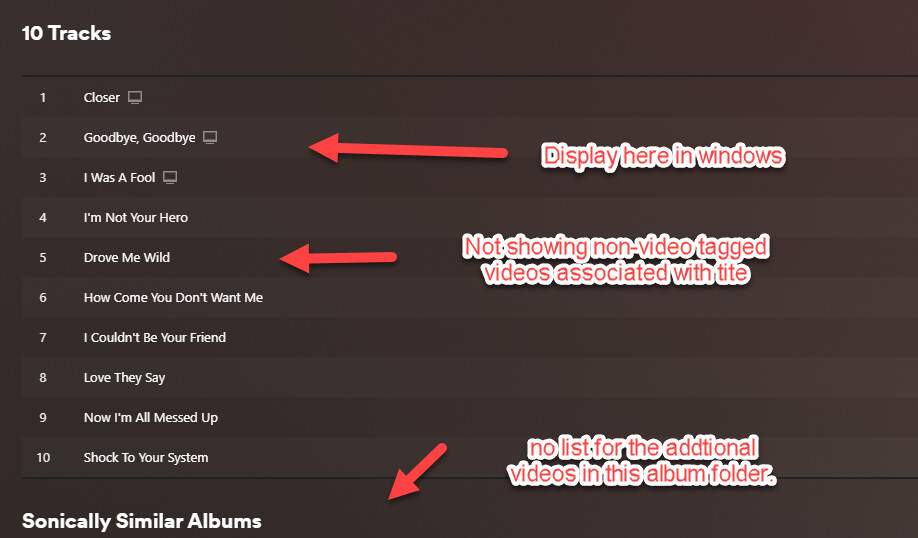
They don’t seem to display like I thought they would? Under albums you can see the videos next to the track as an option, but they don’t really display on the PS5 App the last I checked. There are some that don’t display correctly at all. For this album I have two sets of videos associated with each track, the official video, and a commentary video. Only the official videos show and the commentaries only display in an unsorted mess under the artist page. Any video in an album folder not associated with a track number only shows under that artist page too, not in the album folder where it makes more sense context wise.
album folder:
Artist page shows videos not showing in the album folder but it’s a mess and not in any real order.

Just curious if this is just how it is or if it’s something that’s being looked at or if I’m doing it wrong. Seeing the playable videos under the albums they are in seems like a preferred option on top of other suggestions I’ve seen.
Any help if there is a fix to this would be appreciated. It’s a great idea but it feels half finished with no “Play Videos” option in the library or under the artists as well.
