I have two ISP and both of them are available outside with different domains.
Is there any method to choose certain ISP to connect my PLEX?
I can type the ‘url A’ in browser if I need something through ISP A or ‘url B’ when ISP B is needed when using other service.
But I cannot do that for Plex.
That’s probably a setting in your router/switch or OS. Plex is just asking the OS on how to go online, and I don’t know what your setup is, but if you have two ethernet cords going into your Server, it’s an OS setting, if you got one eth cable going to your switch/router that’s then being split, it’s a port forwarding rule in your switch or router.
Plex server can report several URLs to Plex.tv
Which of these URLs is then later used by clients to access your server depends on a number of factors. Among them are the presence of a valid encryption certificate.
Clients usually test them in a certain order and settle with the ‘best’ connection.
However, this is hardly a good way to “load balancing” the two ISP routes. It will only serve to pick the other one, in case the first doesn’t work.
How are you hosting Plex? Is it ona NAS, where you can just specifiy the Gateway address in the NAS Internet/DHCP settings
You mean if I provide several URLs then clients will choose the best one automatically?
That’s my requirement.
I don’t need load balancing.
My plex is reserved by nginx which have several nics with different subnets
So you don’t have a physical server at home?
Your probably unable to do anything as you can’t control underlying hardware and routing unless you can do something with DDNS. Without knowing whats available by the host company only they can probably asist.
What are you trying to acheive? Am I reading it wrong? Can you be more precise?
Yes I have a NAS at home.
And I have two domain names pointed to different ISP.
All I want to know is how can I use the best Url to access my PMS.
Easiest way then would be to set up a subdomain DNS entry (A record) on one of your domains…
Something like Plex.yourdomain.com and set it to point to your home IP address, not forgetting to use the port number when entering the URL, 32400 which port forwards to your Nas.
So when accessing your Plex remotely it would be http://plex.yourdomain.com:32400
When you said multiple ISP it sounded like you had 2 Internet service proviers, you mean you have 2 x web domain hosts not ISP’s? Do you have a static IP address at home because if not then it will need your domain host to provide Dynamic DNS service which not all do.
How you make the actual network setup/configuration is up to you provided actual transport is transparent.
Remember, PMS is an application, sitting on a host, with a given IP address, waiting for input connections. How those connections arrive and where from is immaterial to it.
Best advice is to use a single ethernet adapter. PMS wasn’t designed for multi-network homing.
To specify access URLs to publish, you define them in Settings - Server - Network - Show Advanced.
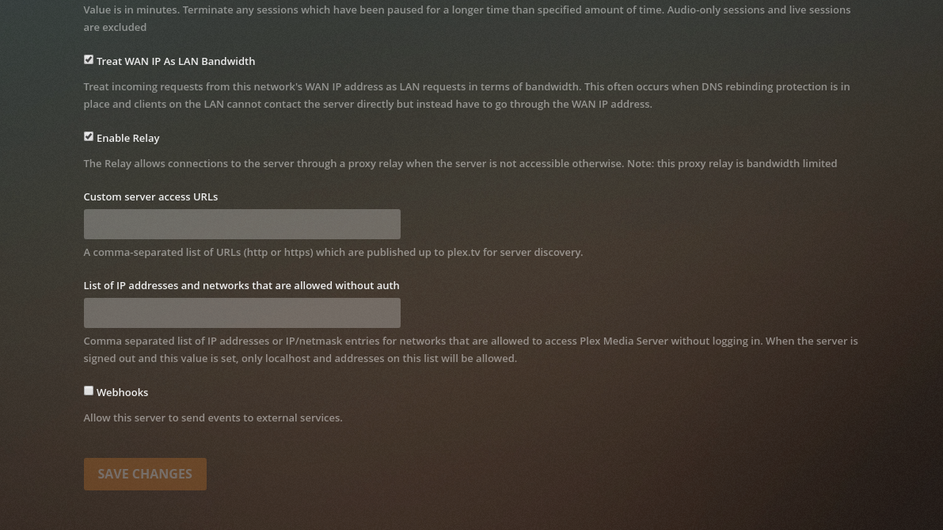
Be advised, you must also allow PMS to import (become aware of ) any domain name / certs used. If the cert overrides PMS at the host level, PMS won’t be able to communicate with Plex.tv
If I may, what are you trying to accomplish.. all the way down at the very essence?
It’s not clear to me (but maybe not enough  yet either
  )
)
