I am trying to run plex and store files on my unraid server.
Should I try to load
Plex Media Server
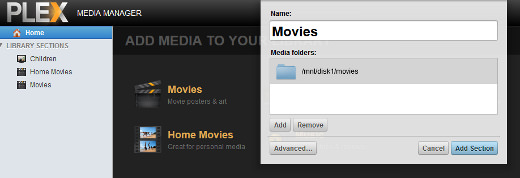
- To install Plex Media Server, type installplg plex-media-server_mod.plg in the /boot/config/plugins folder
- Go to http://tower/Settings and click “Plex Media Server”
- Change the folders and enable the Plex Media Server
- Now, go to http://tower:32400/manage/index.html to manage your media files with the Media Manager.
on my NAS?
bring up your unraid UI in a web browser and click on the docker tab
Once you have that up showing all your running dockers left click on the icon for plex docker and click on the Web UI option. A Tab should open for your Plex server running on Unraid
When I do that I get
This site can’t be reached
IP refused to connect.
So you can not access your unraid server? or the docker tab? or the web ui for Plex.
You got to help us out by giving better details
Chad,
I have been expressing everything here as well as on the docker forum. I included screen grabs.
OK but which one of the three options is it
- you can not access your unraid server?
- or the docker tab?
- or the web ui for Plex
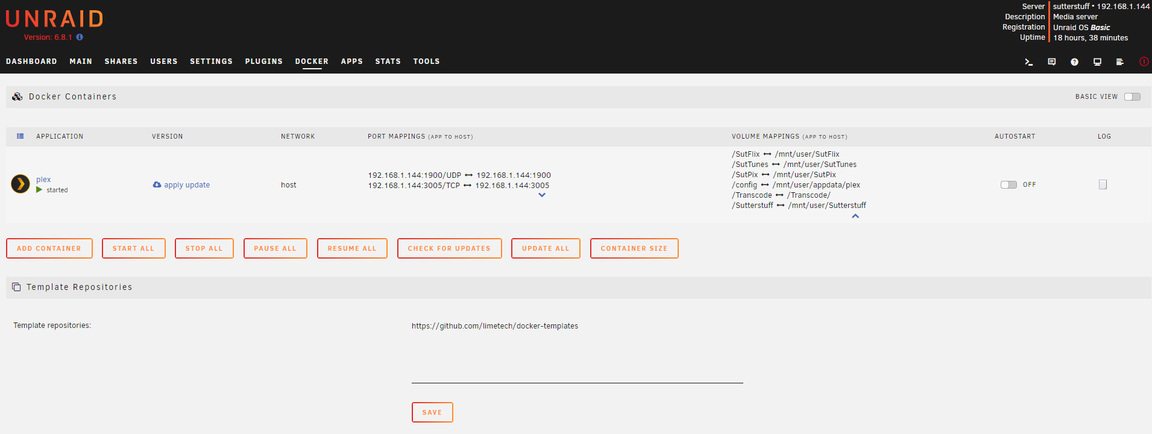

If I type in the IP for unraid, I have access
The docker is available and plex is running
I CANNOT access the WEB ui for Plex. I cant cant connect
can you get back to the plex docker settings by clicking on the edit option from the docker page? If so screen capture your settings

Here is something that I am unsure about…
If I use my UNRAID and load plex docker (which is the linuxserver/plex version) and load and then do the volume mappings for my assets on my NAS (unraid) by the following
Name: Movies
Container Path: /movies
Host Path: /mnt/user/SutFlix
and then click on the directory for the 'SutFlix" on UNRAID and continue to do this with other assets. I then click apply and update the container. I eventually get this:
Stopping container: plex
Successfully stopped container 'plex’
Removing container: plex
Successfully removed container 'plex’
Command:root@localhost:# /usr/local/emhttp/plugins/dynamix.docker.manager/scripts/docker run -d --name=‘plex’ --net=‘host’ --privileged=true -e TZ=“America/Los_Angeles” -e HOST_OS=“Unraid” -e ‘VERSION’=‘docker’ -e ‘NVIDIA_VISIBLE_DEVICES’=’’ -e ‘TCP_PORT_32400’=‘32400’ -e ‘TCP_PORT_3005’=‘3005’ -e ‘TCP_PORT_8324’=‘8324’ -e ‘TCP_PORT_32469’=‘32469’ -e ‘UDP_PORT_1900’=‘1900’ -e ‘UDP_PORT_32410’=‘32410’ -e ‘UDP_PORT_32412’=‘32412’ -e ‘UDP_PORT_32413’=‘32413’ -e ‘UDP_PORT_32414’=‘32414’ -e ‘PUID’=‘99’ -e ‘PGID’=‘100’ -v ‘/mnt/user/SutFlix’:’/movies’:‘rw’ -v ‘/mnt/user/SutTunes’:’/music’:‘rw’ -v ‘/Transcode’:’/Transcode’:‘rw’ -v ‘/mnt/user/SutPix’:’/photos’:‘rw’ -v ‘/mnt/user/Sutterstuff’:’/stuff’:‘rw’ -v ‘’:’/tv’:‘rw’ -v ‘’:’/transcode’:‘rw’ -v ‘/mnt/user/appdata/plex’:’/config’:‘rw’ ‘linuxserver/plex’
3fb5a5e676c36c4c61246fe525f6c8a4d24a71162bf4237b0a3a6a9db8554479
The command finished successfully!
I then click DONE and try to launch Web UI and the connection is refused. Could this be either a naming issue with the volume mapping or a network/firewall issue?
I do not know if this applies to unraid, but normally you should never have media stored or mounted in user folders.
move them to a dedicated media share/path, then you mount/point plex to that.
/mnt/nameofdatavolume/media/movies > /movies
/mnt/nameofdatavolume/media/tv > /tv
/mnt/nameofdatavolume/media/music > /music
etc
the reason is this, user folder normally has special permissions that do not allow any other user/process to access them.
again, I don’t know if this apples to your system or unraid or dockers (and dockers make things more complicated that necessary).
I will try…
so if my nameofdatavolume is SutFlix
you are saying that I should map
/mnt/SutFlix/media/movies
and repeat for other types of assets?
If I do that when I type the host path I am not able to pick the asset folder for SutFlix (the movies)
you would need to move the files to the media folder, instead of the user folder.
but again, that may or may not be the problem.
you could try it with empty folders, to see if you can actually start plex and get to where you can add the libraries.
once plex is up and running, you can add a library and navigate the paths that are accessible to your docker

in my example, /data is a raid volume, /data/media is a root media folder, /data/media/movies is a movie root folder.
my movie library consists of the path
/data/media/movies
I was told by PLEX that I should not load Plex Media Server on my desktop. I was told that I should only run the plex docker through the UNRAID software on the NAS. Originally I did load the PMS on my desktop and one of the available devices was the NAS. At that point, it was easy to link MOVIES to the directory on the NAS and continue with the other assets.
On PMS, I can link movies to a ‘mapped’ network drive which works but if my desktop is OFF, I assume that the connection will also be broken to access movies, etc from the NAS.
Thanks for trying. I will load again and see if a fresh install will ‘see’ the nas
you do not need to run pms on both the unraid and your desktop.
when you run pms on unraid, then your paths are LOCAL (plex and media on same machine).
/movies
when you run pms on desktop, with media on nas, then your paths are REMOTE (plex on pc, media on nas) and you either have to map drive letter like
M: = \\nasname\media\movies or use network path like
\\namename\media\movies
before you even worry about your media, you need to get plex up and running so you can configure and add the paths to wherever the media is stored.
Tekno,
Do I literally go to the NAS, power down and take the thumb drive that has the OS and put a plugin on it to execute to load PMS to run on the NAS? I ‘thought’ using a DOCKER in UNRAID would be the same thing. I do want LOCAL files coming from the NAS that has PMS loaded. This is what I want.
Should I follow this even though I don’t care about tvheadend
On the DOCKER:
If I have called the /movies something else, does Plex need to recognize mnt/user/movies
or is there another naming method to volume map through the docker.
In the past, I would simply load a Docker Container (Plex Media linuxserver/plex) and add the volume maps.
This is the thing: I named movies SutFlix and the directories are named that. Could I simply remap the volumes as /mnt/user/movies and link to SutFlix?
