Update: also tried the official Plex docker implementation with the claim code imbedded in the compose file (and loaded with the 4 minute claim code expiration time) - still unable to get claim server to work.
Unable to claim server. Claim Server button does nothing. Logged out of Plex, and back in - same problem. Added claim code to Docker compose file - same problem.
Any advice on how to claim the server would be greatly appreciated!
The script supports manual mode (Special use cases) in the README.
Special Usage cases
If your PMS configuration is not using one of the above predefined configurations, You may specify the path to the Preferences.xml file using the -p option.
Using -p "/path/to/Preferences.xml" bypasses host type checking.
However, it does confirm PMS is stopped and sufficient “root/admin” privilege is active.
Example:
[/tmp] # ./UserCredentialReset.sh -p "/mnt/docker/Plex/Library/Application Support/Plex Media Server/Preferences.xml"
This can be run from outside the container .. with it stopped.
I’m not the most experienced at Debian command line. Here’s my attempt at this:
root@openmediavault:/srv/dev-disk-by-uuid-8779471c-bc2d-40ae-beb1-a735eb79da9a/appdata/plex/config/Library/Application Support/Plex Media Server ./UserCredentialReset.sh -p /srv/dev-disk-by-uuid-8779471c-bc2d-40ae-beb1-a735eb79da9a/appdata/plex/config/Library/Application Support/Plex Media Server/Preferences.xml


root@openmediavault:/srv/dev-disk-by-uuid-8779471c-bc2d-40ae-beb1-a735eb79da9a/appdata/plex/config/Library/Application Support/Plex Media Server# ./UserCredentialReset.sh -p /srv/dev-disk-by-uuid-8779471c-bc2d-40ae-beb1-a735eb79da9a/appdata/plex/config/Library/Application Support/Plex Media Server/Preferences.xml
ERROR:  Cannot access given Preferences file '/srv/dev-disk-by-uuid-8779471c-bc2d-40ae-beb1-a735eb79da9a/appdata/plex/config/Library/Application'.
Exiting.
so… I have my “old” PMS running on a QNAP NAS at 192.168.4.51 called “wheelerNAS2” AND this new PSM running on a OpenMediaVault NAS at 192.168.4.89 called “OMV”
Only the wheelerNAS2 server is visible in the server list (see below)
ok… I closed the web app and restarted the docker container where the new plex server is running. I logged back into the web app.
I still only see the old “wheelerNAS2” server (that’s good - I want to keep that one). The new “OMV” server still is not showing up. I feel like I’m missing something obvious…
The OMV operating system is the host (at 198.168.4.89) - it’s not running in a container or virtual machine. Plex Media Server is running in a Docker container on the OMV server. The PMS is running in host mode, and has the same IP address as the OMV host
(this flag, when present, tells pms to talk to Plex.tv (publish IP addresses) before Remote Access is enabled. (Normally a server on a different subnet WILL NOT be visible until Remote Access is enabled).
( Network broadcasts looking for servers do not cross subnet boundaries – per rules of TCP/IP)
I deleted the PMS docker container and all the supporting folders
I rebuilt the PMS docker container, then started the PMS server
When I logged into the web app, the new PSM instance was visible, and the app was at the setup screen for new servers. I named this new PMS server “plexOMV”
I set up two media libraries on plexOMV, one for music, and another for movies.
In the web app the plexOMV server was marked unclaimed
I shut down the plex server container using Docker Compose
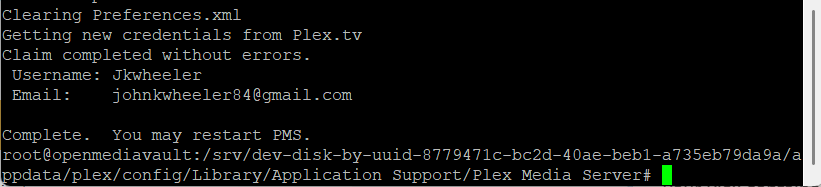
I entered the container and followed the instrcutions to run UserCredentialReset.sh -p Preferences.xml. The code returned claim successful with my plex username and email.
I restarted the plex server using Docker Compose
When I logged back into the web app this new server was missing. Same behavior as previous attempt.
also, yes, the Preferences,xml file DOES contain the PublishServerOnPlexOnlineKey=“1” key
I should mention that in order to verify my Docker instance is set up correctly I deployed two other unrelated containers. Both worked as expected.
I retraced all my steps in setting up this new server. I discovered a missing internet gateway address in the NIC setup. I added this information and rebooted. upon logging back into the Plex app, the “plexOMV” server is visble and claimed.