Server Version#: 1.19.4.2935 QNAP
Player Version#: 4.30.2
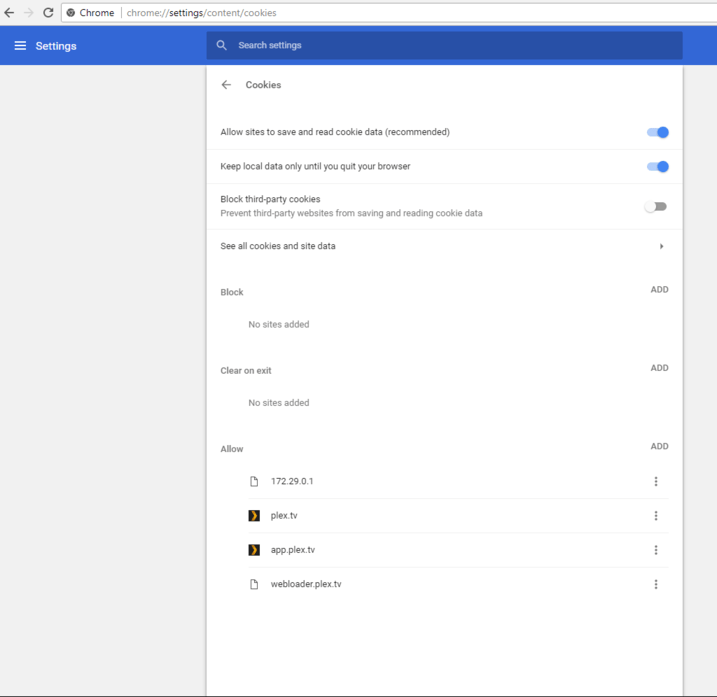
I am using Microsoft Edge on the Mac and it has been a few weeks now since I need to signin and activate my browser everytime I have restarted the edge (See Screenshots). If I correctly understand the reason is that _my-plex_session_32 cookie gets deleted everytime I close the browser. What I don’t understand is why does it get deleted, and why only this cookie and not all other plex.tv cookies?
It might not be a plex.tv cookie at all.
Try whitelisting your local domain name as well (although I recommend you to use the IP address instead – whitelist this as well).
My local domain is whitelisted. When I activate clear “Cookies and other site data” on close the issue occurs otherwise I just found out that I don’t have the issue. If I use app.plex.tv I will have to open my firewall and give access to my NAS which I do not really want to do. Any idea where exactly the client info are saved on the local browser ?
Basically I want to keep any cookie, storage etc … from Plex, but not at the cost of keeping all other junk cookies
The web app, as its name implies, is an app and not an interactive website.
Which means the only thing that needs access to your server is the web browser where the web app is running.
It doesn’t really matter from where the web app is loaded into the web browser’s memory.
I understand all that :). and I do have a lot of cookies and allowed stuff. The cookies for [.]plex.tv, [.]fritz.box are also kept. But there seem to be something else, that I have overviewed. I even discovered that on cookie was using “.app.plex.tv” as domain (instead of app.plex.tv), but that is not the issue. I currently have no clue why this is occuring. I suspect Edge to have some issues too (it takes 8 Sec to close when cleanup is enabled)
I just set this in Edge:
Settings - personal data protection and services - Tracking Prevention - Exceptions
[local IP of server]
plex.direct
plex.services
plex.tv
app.plex.tv
Erase Browser data - When closing Browser - Cookies and other website data -
Don’t erase: same list as above
Close Edge, reopen Edge and I am fully logged in and all my Plex preferences are still intact – except for ‘Automatic Logon’ and ‘Disable Settings Sync’.
I will enquire about these internally.
Yes, it looks like what I am having “Automatic Logon” not working, some settings not synched and everytime a new browser appears in the authorized devices.
Confirmed. I have forwarded this to the developers. Right now it appears to be an incompatibility with Edge.
It doesn’t happen in Firefox, Safari, or Chrome.
Do you know it this will be fixed any time soon ? Plex is the only reason I have to keep all other cookies right now. I just tested with the latest version of Edge and the Latest Plex Server, the issue is still here.
Sorry, I have no further info.
As a workaround, how about adding a second web browser, just for Plex use?
You can create a shortcut on your desktop or in the start menu which combines starting the .exe and the URL of the Plex web app into one action.