I haven’t tried it yet, but can you group movies into folders within a Movie Library or must all the movies be in a unified folder?
Your question seems to be can I group them or must I group them.
Anyway the proper guide is here :
There is a lot of leeway when creating your movie library though. For instance I group them in Movies/Genre/Year/MovieFolders:
example : -=Movies=-\Comedy-Drama\-=Comedy=-\2013\3 Geezers! (2013)
So you can do pretty much what you want as long as the movie folder or name is recognizable as a movie for Plex.
Plex uses file and folder names and structure to match media efficiently. While Plex often works with arbitrary file and folder naming, it may not work consistently. There are also performance improvements with the recommended structure.
Each movie file should be located in a The Moviename (2021) movie folder. This is perhaps the most important rule.
The immediate parent folders of those movie folders should be added to the Plex Library. Multiple folders can be added to a Plex Library.
Arbitrary nesting within a Plex Library folder isn’t recommended.
This is fine:
D:\Movies\                                    <- Added to Plex Library
D:\Movies\The Moviename (2021)\
D:\Movies\The Moviename (2021)\The Moviename (2021).ext
D:\Movies\The Othershow (2022)\
D:\Movies\The Othershow (2022)\The Othershow (2022).ext
This is fine too:
D:\Movies\                                    <- *NOT* Added to Plex Library
D:\Movies\Comedy\                             <- Added to Plex Library
D:\Movies\Comedy\The Moviename (2021)\
D:\Movies\Comedy\The Moviename (2021)\The Moviename (2021).ext
D:\Movies\Action\                             <- Added to Plex Library
D:\Movies\Action\The Othershow (2022)\
D:\Movies\Action\The Othershow (2022)\The Othershow (2022).ext
This isn’t recommended:
D:\Movies\                                    <- Added to Plex Library (not recommended with subfolders)
D:\Movies\Comedy\                             <- arbitrary nesting not recommended
D:\Movies\Comedy\The Moviename (2021)\
D:\Movies\Comedy\The Moviename (2021)\The Moviename (2021).ext
D:\Movies\Action\                             <- arbitrary nesting not recommended
D:\Movies\Action\The Othershow (2022)\
D:\Movies\Action\The Othershow (2022)\The Othershow (2022).ext
If this folder structure was in place, the top-level -=Movies=- folder shouldn’t be added directly to the Plex Library. Instead, these folders could be added to the Plex Library:
-=Movies=-\                                   <- *NOT* Added to Plex Library
-=Movies=-\Comedy-Drama\                      <- *NOT* Added to Plex Library
-=Movies=-\Comedy-Drama\-=Comedy=-            <- *NOT* Added to Plex Library
-=Movies=-\Comedy-Drama\-=Comedy=-\2013\      <- Added to Plex Library
-=Movies=-\Comedy-Drama\-=Comedy=-\2013\3 Geezers (2013)\
-=Movies=-\Comedy-Drama\-=Comedy=-\2013\3 Geezers (2013)\3 Geezers (2013).ext
-=Movies=-\Comedy-Drama\-=Comedy=-\2014\      <- Added to Plex Library
-=Movies=-\Comedy-Drama\-=Comedy=-\2015\      <- Added to Plex Library
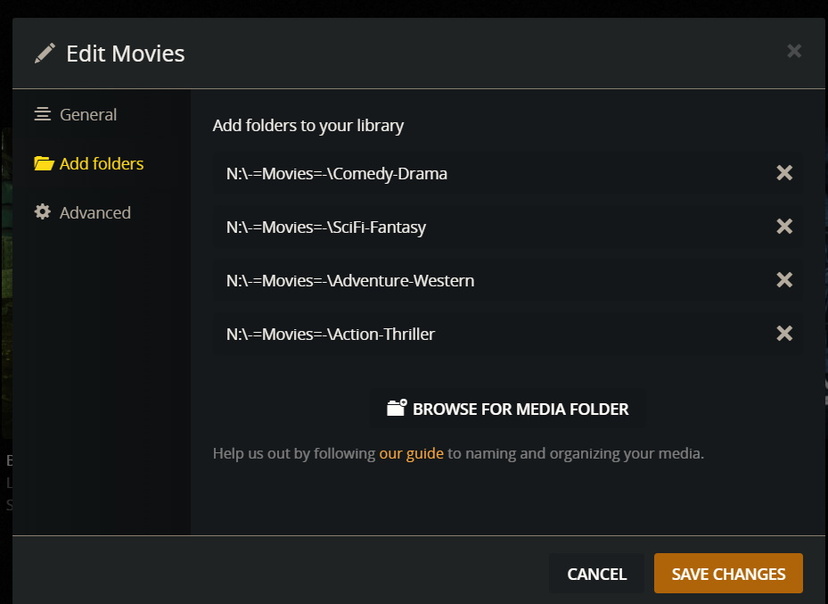
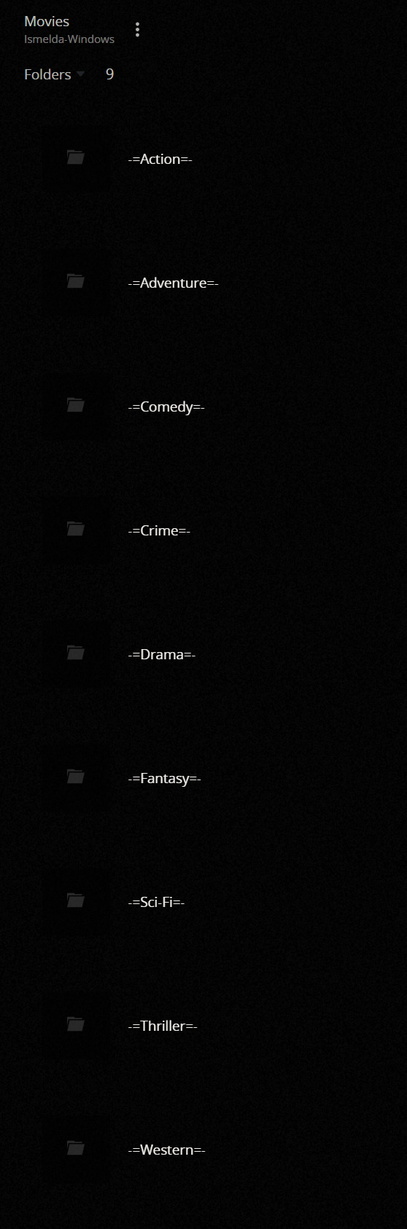
There are still ...\-=Comedy=-\ and ...\-=Thriller=-\ and ...\YYYY\ year folders underneath each of those?
If there are, I’m still not surprised that it’s working. Plex does a great job, especially if the file names and immediate movie folder names are clear.
But it’s not recommended to have additional levels of nesting.
Unrelated, dividing by genre annoys me. What about Action-Comedy movies? SciFi-Western movies? What about other ways to organize?
So I’m a big proponent of not organizing the filesystem this way, and instead using the tags inside Plex, because multiple tags can and do apply to each movie.
But to each their own. 
Hi! A friend of mine who is a techie agrees with you about using Tags. But I watch so many foreign films that I have to stash the German ones all together. So it’s more of a practical separation because not everyone here speaks German.  . Thanks for your help. I think the easy solution is just to add the subfolders to the library. I overlooked the easiest solution.
Thank you. I overlooked the obvious solution to just adding the subfolders to the library.
Glad this is an active site. Plex is incredible but sometimes frustrating. For example, why can’t I change the name of a movie as listed in the Plex library. I can add a picture but not change the name. I collect a ton of Foreign Language films and like to override the American title with the original one.
If you do that, don’t add both parents and nested subfolders to a Library.
For instance, don’t add both of these to a Library:
D:\Movies\
D:\Movies\German\
Instead rename the German folder and move it up a level, then add that.
D:\Movies\
D:\Movies-German\
You should be able to do this. What happens when you try?
https://support.plex.tv/articles/201272763-edit-details/
You can also try the Advanced Library setting Use original titles. With that enabled Plex may automatically select the Titles you’d like to see.
Yep years in each of the genre folders. The point was to minimize the search in each folder when viewing from folders in Plex. I have more than 11000 movies so searching for one in just one big list won’t do.
For this i would advise a second library with only your German movies and set the language of the library to German like I do for my French movies.
Then you can share or not with your friends the German Movies library depending on who needs it.
Well it must have been a temporary issue. I can change it now. Here is a question. I name the file for example:
Berlin Ecke Schönhauser (1968).DDR.EN.mp4. Indicating the name of the movie, the date of release, the primary language, and the subtitle. But when Plex lists the movie it lists as Berlin Ecke Schönhauser DDR EN. I suppose everything after the date is consider part of the movie title. Anything other than a period that might stop this? Its a minor issue now that I can rename. Thanks.
Excellent idea… thank you. Plex does so many things, I am sure I have only scratched the surface. I do wish there were another source for subtitles, rather than opensubtitles,org which seems to be offline just at the time I need to search for one.
