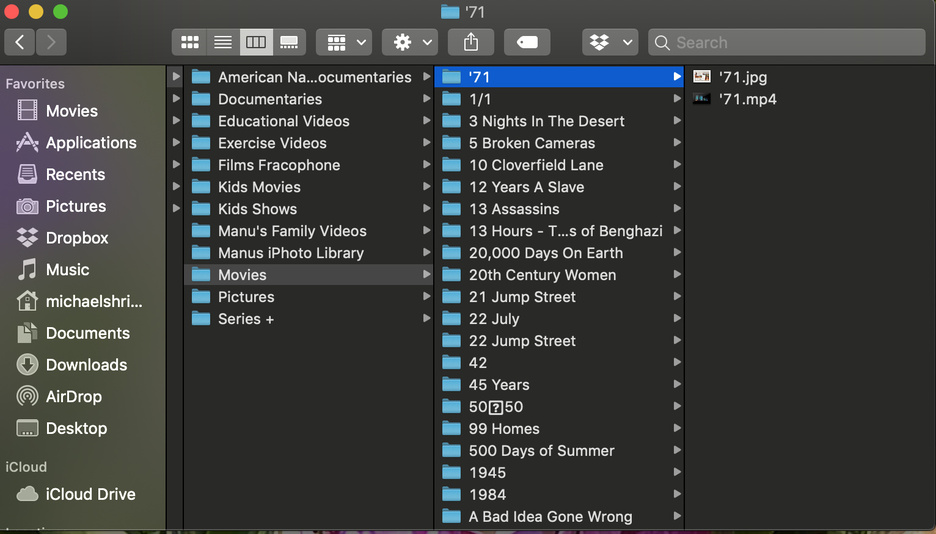
Hi all. Looking fir help with my setup and missing movie folders. I’m running my Plex media server on a macbook pro and my media resides on an external hard drive that’s connected to my router via a usb connection. For some reason Plex chooses to ignore a lot of the content in my library. I’ve carefully followed the naming instructions but I’m still missing more than 250 folders in my Movies library and probably missing other folders in my other libraries as well. I’ve been trying to resolve this issue for several months now with no success. Does anyone have any idea how to fix this issue?
Post how your media is organized on the drive. My guess is you’re adding all the movies from the root level.
If you have 250 folders, how many movies do you have in each? If you only have one, PLEX will ignore the file name and go with the folder name. Only put movies in folders if you have more than one movie in each folder. Techincally you can pour them all into one. I have them in folders by alphabet and within those folder for movie collections that have at least three films.
This is just not true
You can do it but the name of the folder and the file name of the movie have to be the same. I dropped Snow White (1939) in a folder called 1930’s and it came in called 1930’s.
The way my drive is organized is by folders. One folder i for each of the following categories: Documentaries, kids movies, kids shows, movies, series etc. Inside each one of these folders reside other folders. One for each individual video that contains one mp4 or mkv file and one jpeg file.
there is a total of 10 folders. One of each category of video genre. Inside each genre folder reside many other folders. Each one contains 1 MKV or mp4 file and 1 jpeg file. Some also have SRT files. The genre called “movies” has more than 1500 folders but Plex is only finding 1256.
the folder names and file names match.
There’s a number of possible reasons why Plex might ignore individual files.
Before we go there… what happens when you sort your library by anything but “by name”? If the number of items changes that implies your Plex server has created a number of collections – by default, collections will hide their items which could explain your gap.
If you are adding the drive root as a library this will fail. You should read the naming guide here:
https://support.plex.tv/articles/naming-and-organizing-your-movie-media-files/
Your organization is wrong, UNLESS you are adding each top folder as a library, which it doesn’t sound like you are. Even then you should not have that many subfolders inside.
Again, refer to the guide carefully and re-orginize your files (and rename by convention if necessary)
You also CANNOT mix TV series and Movies in a folder. They will end up in the same library and that will always fail.
Perhaps if you posted a screenshot of your folder/file organization we can stop guessing what the problem is and just work it out 
That’s why Plex has a naming convention. Read the guide. Folders are in fact very useful for containing other metadata items for movies, subtitles, etc.
True, but all that stuff is not required to be in a folder at all.
What are the file names of a few of the movies it can’t find?
What are the file names of a few of the movies it can’t find?
This question is irrelevant if the folder structure is too deep, libraries are added at the wrong level - which is why I asked for a screenshot of the organization.
How deep is too deep?
The naming guide explains it quite clearly, which is why I’ve referenced it twice, to both you and the OP.
Yeah, and I’ve read it and it doesn’t say. It has examples. But I’m asking you. How deep is too deep?
I am adding each folder as a library. How else would i have each individual movie if not in a separate sub-folder. Each movie has its artwork and sometimes subtitles. If they’re not in separate subfolders it would be a total mess.
the number of items in the library does not change whether I’m sorting by title, date released or anything else.