I’ve had an account and working Plex for a while. I understand how to add libraries.
I made a new account because I do not have access to the email attached.
The new account does not have the option to add libraries. No option. Nothing.
It just keeps offering to download the server.
I’ve downloaded it.
I’ve tried this on my raspberry Pi and OSX. Both have the same result.
I’ve tried to create another new account. Same result. No libraries can be added.
If I log into my old account I can add libraries.
What’s going on. How do you add libraries.
Please don’t tell me to follow the steps in whatever article. The options are not there to follow.
Creating a new plex.tv account won’t change automatically, to which plex account your server and your plex clients are connected.
Log in to your old account.
Then use the web app and go to
Settings - Server - General
(I am NOT talking about the “General” menu item that’s appearing under the “Plex Web” category.)
It should show your old email address and a big SIGN OUT button.
Use it.
Now your server is no longer connected to your old account.
Now sign out the web app itself from the old account. (Yes, it is treated separately from the server.)
Use the Sign Out menu item that’s appearing under your user avatar in the upper-right corner.
Now clear the cookies from plex.tv from your web browser. Clear the browser cache as well.
Now open the local web app from your server machine. If the server is on the same machine as your web browser, use simply http://localhost:32400/web or http://127.0.0.1:32400/web
Log in to your new plex.tv account, then just let it sit for a few minutes.
It should inform you eventually about an “unclaimed server”.
Now claim it.
Then let it sit for while again. Reboot the server machine after a while.
Thank you! this solved it. Can’t believe it was so difficult and there was no automated messaging from Plex to step you through the problem (and the errors) that cause this. Why would anyone want to set up a Plex account and not have any media or libraries attached!?
They might make an account because a friend says they will give access their server after they do. “hey joe make an account then tell me the user name and i will share my server with you”
Well, you’re not wrong. But Plex… please pay attention and provide some clarity here.
I thought this was resolved but it’s not. While the instructions worked to finally be able to add media from my Mac I also had libraries added on my raspberry pi. I do not have the ability to add libraries from the Pi.
Before: I had 2 libraries linked from the Mac + 1 library added from the Pi. And, on the original account it just offered for me to be able to add new media from where ever. Also, I could just plug in a USB with new media and there would be the option given to add a new library.
Now: Plex refuses to allow access to new media, to link new libraries.
- Why doesn’t creating a new account give a scenario where you are allowed to set up the service like it did for the first account with Plex? (ie give you the option to connect media)
- How can I add ALL the libraries across all the devices into the same account? Mac + R Pi libraries.
- Wow, why is it so difficult?! is there a way to set up a new account where you get the experience outlined in my “Before” Ie any persons first time set up with Plex.
Just tested the old email account: I can sign in to my old account email and I have all the privileges of the “before” experience. ie I can see all the libraries across all devices + I have the ability to add more media. Surely Plex has not banned use of more than 1 account per household. Is that what is going on here?
The server and the web app are two different things. Making a new account and signing into the web app does, not sign the server out of the original account.
It sounds like you have two different servers. one installed on Rpi and one installed on your Mac but I’m not really clear what you are doing with the rPi. if your rpI server is also still signed into the old account you need to sign into the web app with that account to access it and sign the server out of it.
You claim/sign into each server separately with the same account and they will both be available in the web app or any other Plex Player. I have three servers at my house I am the admin of, all available in the player app such as the web app. Again the web app is not the server.
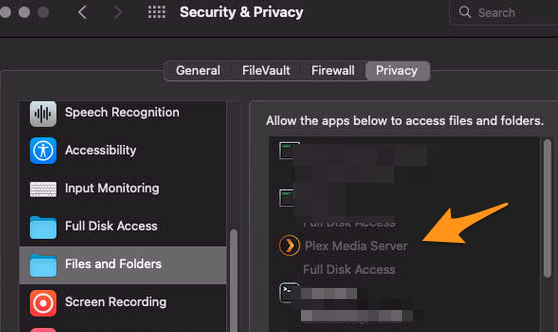
On Macs apps have to be granted permission to see external or network drives. When you create a library it will not be able to see the external or network drives until it is given permission. This has nothing to do with Plex and just how MacOS is now. In System Settings>Security & Privacy>Files and Folders you need to give Plex Media Server permission to access network and or removable drives, such as USB drives. You can also give it Full Disk Access
Thanks for your input. I’ve got the Web app - which on Mac, Plex named this “Plex Media Server” and I have the Server app (that you’re prompted to download from the web portal) which on a Mac, Plex calls “Plex”. Confusing!? Yes.
I would love to be able to “claim” each of the servers from each of the old and the new email address accounts I have. But unfortunately this is not possible. There is just no available three dots to add media or libraries. I’m not sure what wizardry you’ve managed to get it working where you are, but the options are just not there to click. After sign out (following your instructions) I could claim the server on the new email account. But I could not claim ALL my servers. only 1.
Using the Mac Plex app (what actually is the server app) this does not allow adding any libraries or media on Mac on the new account. You get the option to pin the favourites only.
I have granted access for Plex to see the folders. After new sign ins I have cleared this and re done it to ensure there is no issues.
Still, I can not add media.
I just want to create an account, get into the portal, add media like I was able to on the Primary account. How can I make that happen?
If it just called “Plex” that isn’t the server.. It is the desktop player. which looks like the web app player. .server and player are not the same thing.
The server is called Plex Media Sever. https://www.plex.tv/media-server-downloads/
Yes, thank you. I have download that over a dozen times because this is the only option given by Plex when you sign into a new account. You do not get to add media or libraries, just continually told to download the server. The server app, opens the web portal on Mac. that’s it.
I’ve given permissions, removed permissions, given them again and are familiar with the system privacy settings in your picture.
There is no way to claim a server on a new account. There is no way to add libraries on a second Plex account. which baffles me.
For a person who just wants to create new account and connect their own media. How can they do this?! I cannot understand why Plex has made it so difficult.
if the server is already installed and signed into/claimed with the old account, the new account will not be able to access it because it is not the admin of the server the old account probably still is. Do you not know the username/email and password of the old account anymore?