Server Version#: 1.28.2.6106
Player Version#: PC Web 4.87.2
Tuner Make/Model: HDHomeRun HDHR3-US
Guide/Lineup name: Local Broadcast Listings for 80301
Using XMLTV?:
Channel number/Name: 6.1/KRMADT
Since the previous “Bug In Channel Matching” thread is closed, I created this thread for a new problem with the channel matching I just discovered.
The problem is that I have two signals for PBS here in Boulder Colorado, both have call signs KRMADT on program channel 6.1, but one is broadcast on tuner channel 24, and the other on 33. I see two options for the 6.1 signal in the right side of the Channel Matching window, one is called K24HQD, which I assume is from a channel 24 tower south of Boulder, but its weak. The other signal says KRMADT, which I assume is the channel 33 signal out of Denver, which is strong.
The problem is that no matter which of the two signals I pick, the plex tuner is always using the broadcast channel 24, never the 33. I can see this using my HDHomerun app that shows what each tuner is doing and the signal strength. I don’t know when this started, but I don’t think it was happening with Web 4.75.
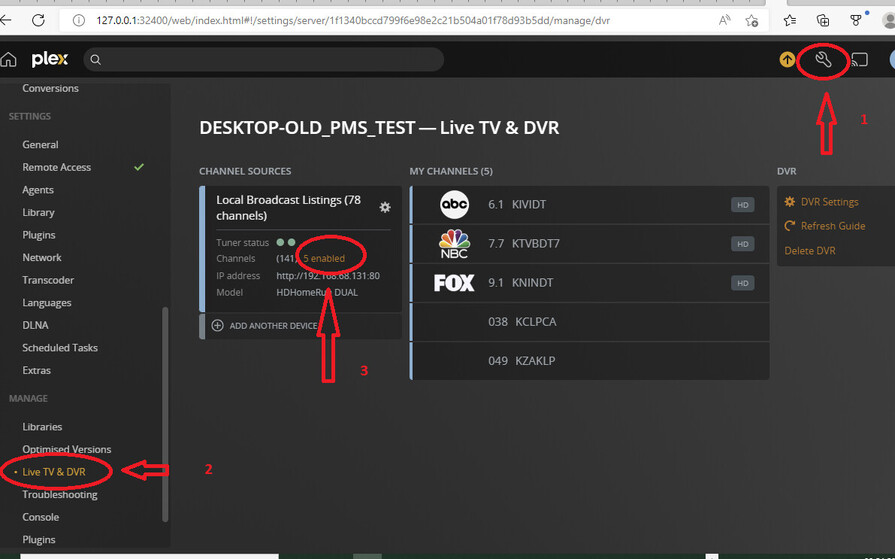
You will need to override any automatic channel matching by going into the DVR settings
Select Settings → Server / Live TV & DVR
You will have a screen that looks like this (this is just an example) - once the Live TV & DVR settings page is displayed, click on the (xx enabled) text to change the mapping of channels and override the automatic mapping
After clicking on the x enabled text, you will get the list of the tuner channels on the left and the mapped EPG channels on the right. Go to each of the 6.x channels and select the right EPG entry for each from the dropdown on the right
Thank you, everything you have shown looks exactly like I see it. The issue still exists:
I selected the K24 signal for 6.1, saved and reloaded the Guide, and then recorded a show. While it was recording, I used my HDHomeRun Config GUI to see which channel the tuner was using. It was using broadcast channel 24.
I went back and changed the selection to KRMA-DT, saved it, refreshed the guide, and then recorded a show on 6.1. I again opened HDHomeRun Config GUI, and saw that it was still using 24, instead of 33.
I tried this with 6.2 and 6.3 as well, same result.
Since then, I figured out a work-around: while channel scanning, when Plex gets to channel 23, I turn off the signal booster to my antenna, which makes it undetectable to Plex. I then turn it back on when it gets to 25. Now Plex doesn’t know about signal 24, and always uses signal 33.
one set of duplication is on the tuner side where you have vcns 24.1 for K24HW-D and 33.1 for KRMA-TV
the second set of duplication is on the EPG side where 6.1 appears twice
So to switch to 33 KRMA-TV you need on the channel mapping screen in DVR setting to untick selection of channel 24.1 to disable it and instead tick channel 33.1 to enable it and then on the right hand side select 6.1 KRMA-TV channel in EPG
Is this what you did ? Disable one and enable the other ?
If this is what you did, i would need debug server logs after doing this and refreshing the guide and then recording 6.1 and would also need download of the Plex Media Server database - through the web page that you would use for downloading the server logs