…and correcting it at its source is not a UX friendly process.
If we all corrected it locally with a simple single category selection couldnt that be used to crowd source a definitive category but leave individuals to overwrite
…and correcting it at its source is not a UX friendly process.
If we all corrected it locally with a simple single category selection couldnt that be used to crowd source a definitive category but leave individuals to overwrite
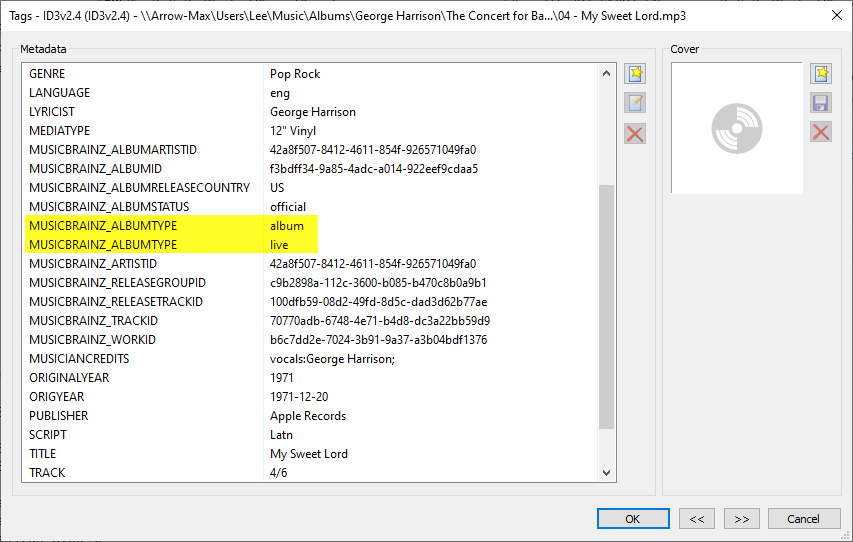
If you use MusicBrainz Picard to tag your albums, and import the metadata from the MusicBrainz website, there is an ID3 tag added for album type. The tag is MUSICBRAINZ_ALBUMTYPE. I have Picard configured to use ID3v2.4, even though I’ve read here not to use that format. Albums (specifically, tracks) can be given multiple values, such as the the example below from George Harrison’s Concert for Bangla Desh from 1971. It is classified as an album, as well as a “live” album. It only shows up in Plex as a live album. The screen shot is from the extended view panel of MP3Tag, (Picard doesn’t actually show the actual name of the tag, just displays a generic “Release Type”)
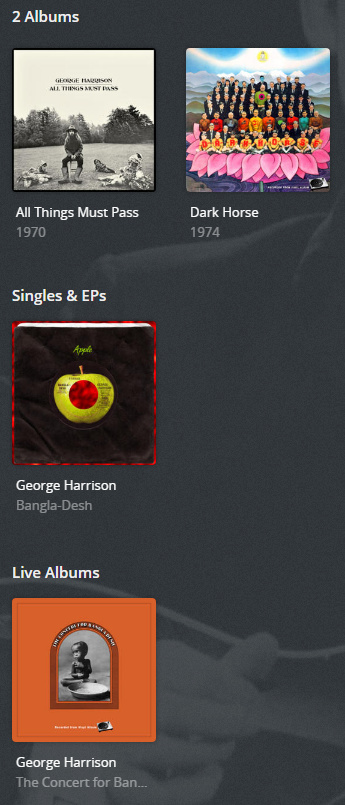
The ID3 tag can be created with MP3Tag using v2.3 as well. I believe I read one time that Plex read MusicBrainz tags (on a server update some time ago), perhaps this is a tag it doesn’t pay attention to. If not, maybe it’s a tag that Plex might someday use 
For those of us that have “prefer local metadata” set in the advanced options for the library, adding the tag to a file and a refresh would be a fix that would solve the problem. I realize that wouldn’t be a solution for everyone.
Thank you.
That was my understanding, which is why I tried to refresh all metadata. That didn’t work, and I’ve now been through and refreshed each artist individually (which worked). No idea why refresh all would fail.
As far as I can tell, all settings were set to honour local data. Is the genre setting new? I don’t remember seeing that, it’s something I would have changed, and my genres have always been picked up locally.
We might need to see logs to understand that, assuming you haven’t already done them all manually.
The genre setting came with the upgrade, and might have been defaulted to Plex Music, which was an unfortunate edge case for people who preferred local metadata. However, refreshing all metadata should really fix all that, so I’d like to understand why that wasn’t working.
Doesn’t seem to work. I switched sorting back on, added those tags to a miscategorised album, prefer local metadata is still set, refreshed the metadata on the album… and it’s still grouped incorrectly.
Not everything can be corrected on Musicbrainz.
People have unofficial releases, fanmade compilations, all kinds of stuff that does not belong on a metadata source like Musicbrainz. Sometimes there is no oficially correct categorization for a release or I want to have it listed differently on my library than what’s considered “correct”.
Musicbrainz is supposed to be a general source for correct data about official releases, my library is my library and I might want to have things differently on there.
I’ve already refreshed the whole library one artist at a time I’m afraid.
If I don’t use local metadata, I end up with a bunch of odd categorisations and a huge number of genres. With local metadata, I have a structure of maybe 20 genres which makes it easy to browse my library and get into the ballpark of the kind of music I’m looking for. If I wasn’t using local metadata, genres would be useless to me. I can see how it’s useful for people with smaller libraries an dirty tags though.
I’ve just tried it with one miscategorised album. It’s infuriating. I can’t find any way to remove a subtype in a release group, so I’m stuck with a studio album being categorised as remixes in Plex. Which again, makes this feature totally unusable for me. I want it to work, but it just isn’t fit for purpose at the moment. All it needs is a local toggle (and the carousel removed or the option to disable it), and we’re good to go.
I didn’t think Plex read the album type tags, they’re very selective on what tags they use when you have “local metadata” enabled, and would prefer that we all use the metadata provided by MusicBrainz, etc. As I said before, maybe Plex could consider using that tag someday. It’s a tag that is automatically added to you files if you use MusicBrainz as a source to help you tag files.
Makes sense. So from what I can work out then, there’s no way of changing categorisations locally.
Although it’s not really a route I want to go down (I don’t want my music organised by third parties), I’ve tried signing up an MB account. First album I recategorised as “live” is correctly matched in Plex, but still not grouped as a live album. I have another album with a subcategory of “remixes”, which is incorrect, and I can’t find a way to remove a subcategory on MB. Plus a ton of singles and EPs that don’t even have entries - really not sure I want to commit all the time involved with getting them added.
Overall, still forced to conclude that this feature is useless without the ability to override locally.
Not disagreeing that local editing would be useful in plenty of situations, but to just address a couple of your issues with MusicBrainz:
Thanks.
Selecting the blank entry doesn’t seem to save. It’s a clunky, horrible interface. I’m giving up on it.
That is an absolute deal-breaker for me. I can’t make changes to my library without it being user-approved (I see the logic, but if I kinda want to be the one to decide how my music is organised in my own library, I don’t want one album sitting under “remixes” because one release happened to include some bonus tracks). And waiting ten days to see if a change has been approved and had the desired effect… that’s just not viable.
This feature already ticks a lot of boxes for a lot of people. I can absolutely understand where you’re coming from, and in its current state this feature may not be ready for what you need of it. If you’d like, it can be disabled from the server settings until such time as it meets your needs.
The devs are aware of the current shortcomings, and whilst I’m not clued in on future plans to enable local editing, I wouldn’t be surprised if this is added at a later date.
I’m aware of all that thank you. I was attempting to find if there was a way of leveraging it into a useable form currently. Seems there isn’t, and like I said, I’ve given up on it.
yes please! my some of my dmb live trax are showing under studio and it is driving me nuts.
I posted the how-to here:
Thanks! Will check it out and get those things updated.
The question for me is not the albums that are in MusicBrainz, but i think for bootlegs or own compilations, we must have some kind of selection to that effect, to put that albums in the section of compilation/live albums or a bootleg section must be created, just an idea, as i have lot of them, and they are showing all over the sections. I like this feature a lot.
I like the idea of having a separate section for bootlegs.
Absolutely!
I’ve got tons of bootleg albums I named “Live @” with custom sub-genres so I would not expect them to be matched. I just want all the knobs to fine tune my library, but I wouldn’t want to impose how I feel something should be organized onto someone else.