So the problem is that since the update Plex requires the album artist tag to be Various Artists. I was using mp3TagPro to tag my music and even though I populated the album artist field with Various Artists it was not writing that tag to the files. I have now used Mp3tag to correctly write Various Artists to the artist album tag and everything is working as expected.
1 Like
I’ve never used mp3tag, or anything else like it, will it allow me to do a “find/replace” on “Various” to “Various Artists” without having to find each individual one? Thanks
Well, at least it will allow you to sort your files by Album Artist.
Which then makes it relatively easy to Shilft-Select all which have the wrong album artist and change them all at once.
Or you use its handy folder+filename -> metatag converter. I love this one.
2 Likes
This is unwanted behaviour, and should be flagged as a bug. It’s normally best practice with music tagging to leave the Album Artist empty for V/A compilations, so the library manager/player can display “Various Artists” in whatever language the clients use.
It’s already bad enough that Plex doesn’t support the Part Of Compilation (TCMP) tag, which would for example allow a separate section in the library for Compilations.
But requiring hardcoded “Various Artists” in the Album Artist tags is another step backwards.
2 Likes
I just dumped the whole folder Various Artists in mp3tag and changed just the Artist Album tag to Various Artists. I had over 10K files and it took about 5 minuets to complete and I then get Plex to re-scan the meta data for everything that in the Various Artists folder and it’s all fixed now.
1 Like
I think the current way of dealing with compilations leaves a lot to be desired. Regardless of having the tag Various Artists present or not, I don’t like how Plex treats the tag as an artist. For example how it shows up in recently played as the Artist “Various Artists” isn’t very helpful, as I have several hundred unrelated releases under this tag. Here it really should just list whatever track artists I listened to imho. Plex cares too much about Album Artist and not enough about track artists.
I also really miss the ability to view what compilations a certain artist if featured on.
For example, I have this release: https://musicbrainz.org/release/96955858-5354-44db-8cef-f645a982d260
This is tagged as Various Artists. All the artists are added to each track, but it is very hard to find this release in relation to the artists featured on this album. Imho Plex should have an Artist page for every Artist on this list, and if I search for Metallica or Avenged Sevenfold in my library, this record should show up as well, and it should be listed on their respective artist pages. There should be a section called “Featured on” or something like that below all their main releases.
2 Likes
Thanks Dave. It’s my understanding that all the genre, style and mood tags in Plex comes from AllMusic so submitting genres to MusicBrainz wouldn’t help this, correct? I’ve been submitting entries to MusicBrainz to help match albums to AllMusic but that seems to be the best I can do right now.
Is there any benefit to Plex to submit information to AccousticBrainz?
I am coming from organizing my music in iTunes WITH a compilation sub section below #A-Z artist names - I just don’t understand how hard for the rules of if album artist name is not present, assume compilation or if tag TCMP used, assign compilation… any of these rules or such can automatically create a sub-cat for things like this. iTunes wasn’t the best for music by any means but at least they got the various artist/compilation problem down. I would like for Plex to USE the artist names and tracks off the compilations when I use the radio feature and not leave them in the dust.
iTunes (and the new Music app which is just the same thing under the hood) does the ‘right’ thing in that its metadata only exists on the track level, and any list of tracks gets grouped into albums and artists on every query. This is great for handling things correctly (a search for an artist will always include compilation tracks, tracks from different years, genres of composers can exist within one album), but you do take a performance hit because the application is continually parsing/grouping big lists of tracks instead of small lists of albums. But this whole problem of Plex inaccurately populating its Albums and Artists tables, iTunes doesn’t have that.
Aside from that, the TCMP “part of compilation” tag though is extremely useful since it completely takes the guesswork out of how to differentiate between an actual various artists compilation, and two albums that just happen to have the same name (for example, “Greatest Hits”), and Plex really should consider supporting it.
I don’t think the compilation tag is necessary. It’s not a widely used tag outside of iTunes anyway.
How I think Plex should do it is as following:
-
Populate the Artist database based on the “Artist” tag.
-
Use the “Album Artist” tag to tell Plex which artist the Album should be owned by.
Everything else is listed as “Featured on” in the case of compilations when “Album Artist” is either empty or is listed as “Various Artists”. -
Remove “Various Artists” from the list of Artists, as it isn’t an artist.
2 Likes
Correct, but you’d still have to put some sort of algorithm in place to prevent for example two albums called “Greatest Hits” by Artists Billy Joel and Queen (both with Album Artist empty) from getting fused together as one Various Artists album.
Also, “Various Artists” shouldn’t exist in the DB at all, since it breaks localisation, it should be stored as a variable like %variousartists% which would get replaced by the appropriate text depending on yr language settings. And then you’re basically back to some sort of internal “Part Of Compilation” flag anyway  Whether or not you support TCMP on import, you need such a flag anyway in the internal database.
tracks without an album artist, should not be associated with anything other than the track artist (all independent).
greatest hits (and similar) with different album artists, should be grouped according to album artist.
agreed 200%
They won’t mix up if you put Queen as Album Artist on one, and Billy Joel on the other. This is the intended use of the Album Artist tag.
I’m not at all pleased right now. I have about 7 more hours to go on a test of a new music library setup. The various albums are being scanned in as Disney as the Album Artist but I have no mention of Disney in any of the metadata in the files themselves. I am creating two entirely new music libraries for testing purposes of the same music directory. Each of the two have different settings but this Album Artist / various artist/ compilation seems to be the major issue at the moment. I will have to just wait it out and see what the results are.
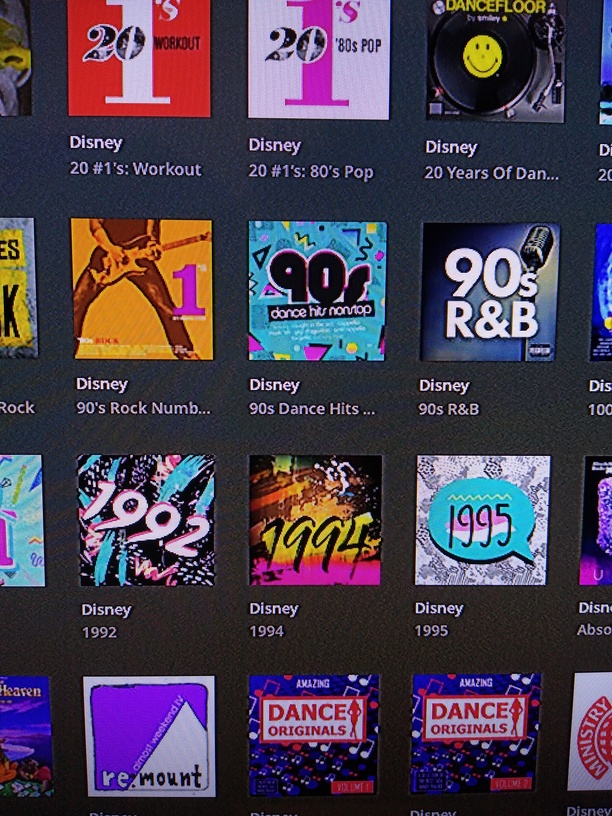
Edit the artist back to ‘Various Artists’ once it is really done with the scanning.
I think you have some Disney sound track album in there which is either missing an album artist metatag or is listed at musicbrainz with ‘Disney’ as the album artist.
(depending on whether you have activated ‘prefer local metadata’)
Test library 1 has prefer local metadata selected.
Test library 2 does not have prefer local metadata selected.
So using itunes, for all my compilation albums, add Various Artists back in on the metadata? Rescan, then see all them show up as Various Artists in Plex?
I meant editing inside Plex.
But yes, ‘Album Artist’ is crucial for all albums where you have differing artists on the tracks. Even if there is only one track out of 50 which has a different artist, then all tracks of that album need the ‘Album Artist’ metatag (set to an identical content, ofc).
If these files are used in other music management libraries, the Album Artist for compilations should be empty, never be tagged “Various Artists” because this screws up localization. The library manager (Plex, iTunes, etc) should identify those compilations, and display “Various Artists” string in the appropriate display language. It’s really bad form to be forced to tag files the wrong way (which causes problems in other music managers), in order for Plex to pick it up correctly - it’s a Plex bug, and should be fixed by Plex.
Maybe I’m sounding a bit overly annoyed/vocal in these topics but I’m a long time Plex user for music, and the streaming/sync side of it is excellent, and nicely improving over time. The metadata side however is a hot mess, and it’s actively going the wrong way (with new major bugs like this).
1 Like
HI, sorry if this is repetitive , but I’m a newbie. Like others in this thread, my local meta data is being ignored , for reasons that aren’t clear to me. At least this is where my question started. However, i seem to have two issues
Question 1:
I have added a folder to my music library. And it mostly works. And has worked for months. However, it often “disappears” from the library menu screen. The music is still there and it plays, but the library appears to have no source / be empty

The music is stored on a Synology NAS drive if that helps. Like i said, things are working fine. I only noticed this when trying to trouble shoot a meta data issue
Question 2
Based off of the above thread, and others, it seems like these are the appropriate settings to use when i want to trust local meta data (like some else mentioned…i have no clue what the difference between “scanner” and “agent” is - would appreciate help here as well)
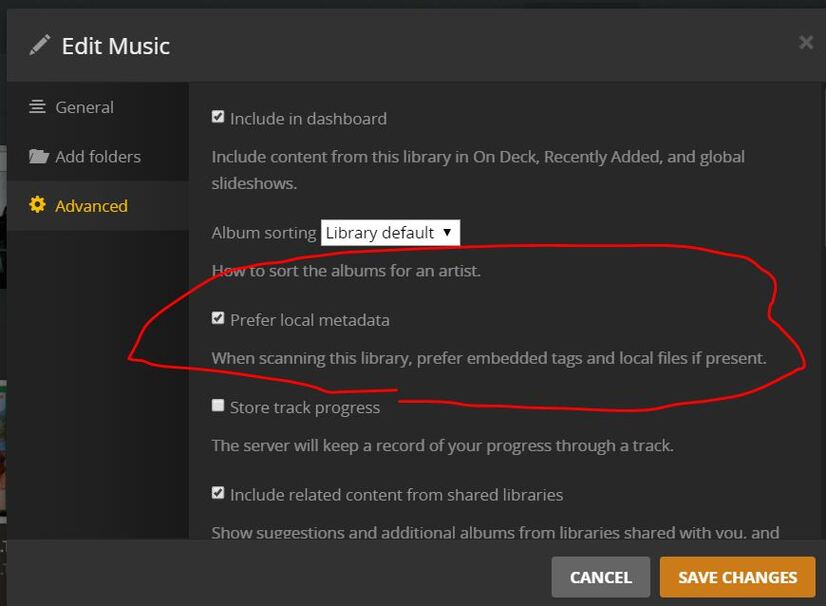
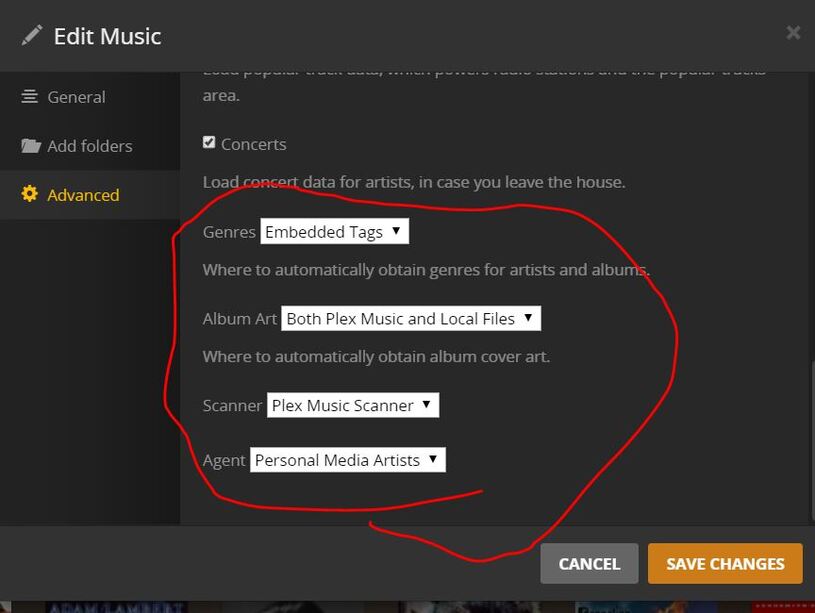
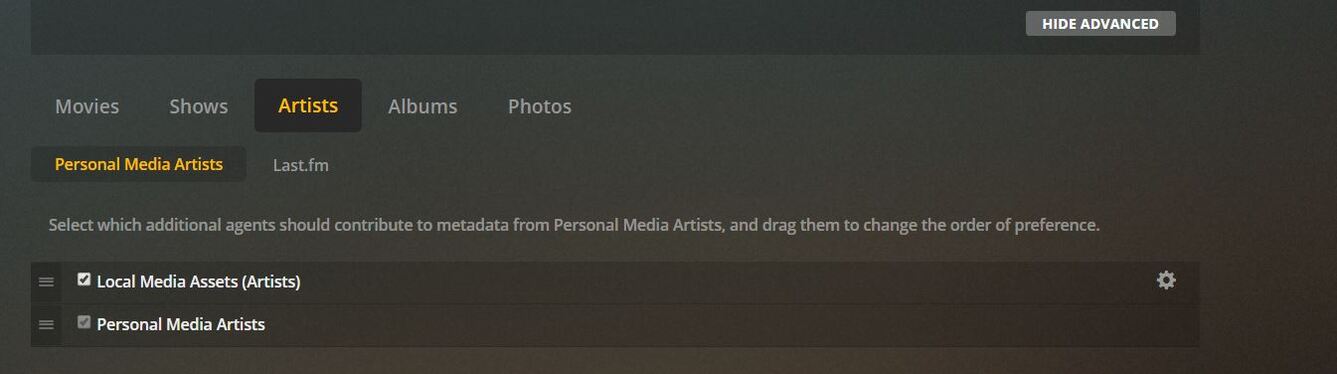
Despite these settings, is some cases plex is overwriting the artist name. the screen shot below shows a bunch of albums/songs being falsely attributed to “twenty one pilots”

these files have perfectly good meta data (at least i think so)
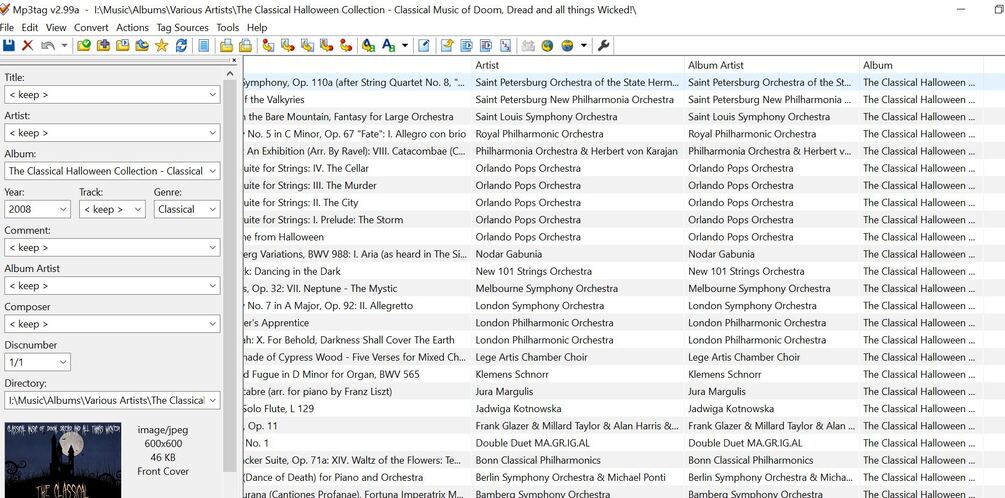
(despite the Halloween example I’m showing above, not all the mislabled songs are in the various artists folder)
Reading the above thread…it’s not clear to me, am i doing something wrong or is the new Plex Meta data system messed up and I should just wait for a fix?
Your Album Artist tag is wrong. The tag has to be identical for the entire album, or else most music programs will think they are separate albums. Change it to “Various Artists” and it should show up correctly.
Also change the scanner to “Plex Music” as that is the new and improved scanner.
