Changeboth Scanner and Agent to ‘Plex Music’.
Thanks to you both. Appreciate the help
Have updated accordingly and still no luck (have re-scanned and refreshed meta data multiple times)

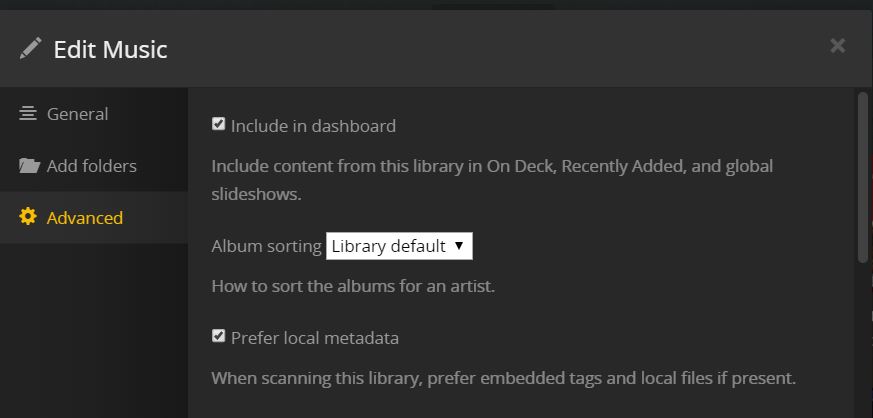
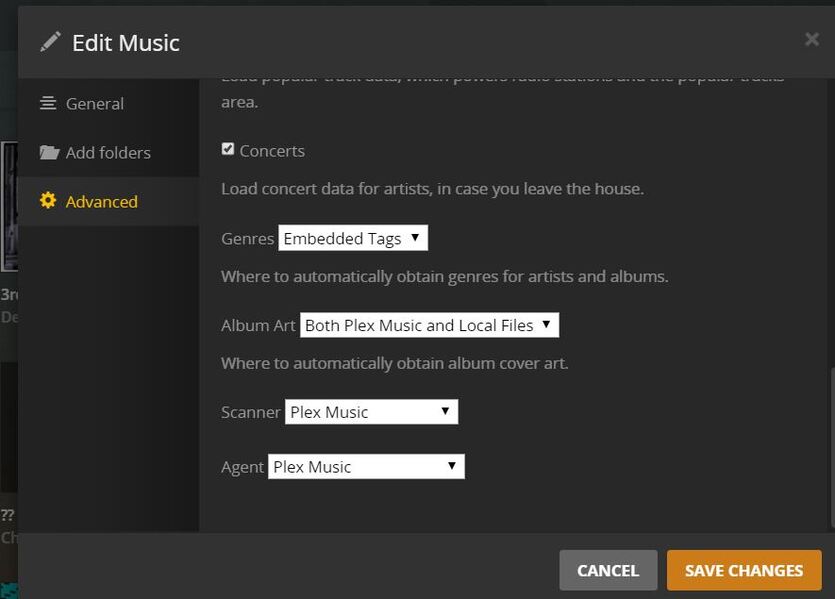
any other suggestions?
Try performing the Plex Dance “light” (meaning you can omit step 4) with one of these albums.
awesome. thank you so much. looks like i’m all set.
Not at this point in time, but I’ve been submitting to AcousticBrainz too.
Much like everyone else having issues, after upgrading from a perfectly working music library with correct tagging, artists and biographies to the new Plex Music library, my music library has been completely mangled.
Here are some issues:
-
Duplicate artists
-
Refreshing metadata still pulls wrong artist.
I did a refresh on the 2nd “Sean Tyas & Giuseppe Ottaviani” result in the first image, and then it changed to the following:
(note that the Artist now says Logistic, which is wrong, the bio is for Sean Tyas, and the albums do not belong to either artist (not “Logistic” nor “Sean Tyas”.. should be “Sean Tyas & Julie Thompson”) -
Plex ignoring “Prefer local metadata”.
I have my music library set to explicitly use local metadata, which, up until I upgraded the library to Plex Music, was correct, but ever since the upgrade local metadata isn’t used.. otherwise the above 2 wouldn’t happen. Case in point:
foobar2000 and mp3tag correctly show the right tags, and the tags are mapped to the appropriate ID3v2 frame and vorbis comment in both MP3s and FLACs, respectively:
XML for the first track in the above example;


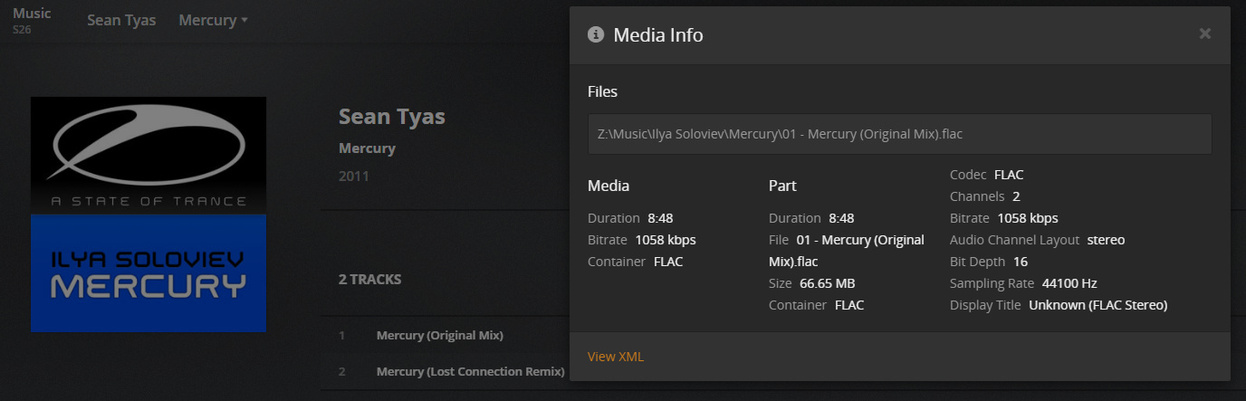

<MediaContainer size="1" allowSync="1" identifier="com.plexapp.plugins.library" librarySectionID="4" librarySectionTitle="Music" librarySectionUUID="b65a065d-ce43-4bc7-8963-73f55357198f" mediaTagPrefix="/system/bundle/media/flags/" mediaTagVersion="1573475542">
<Track ratingKey="122913" key="/library/metadata/122913" parentRatingKey="122912" grandparentRatingKey="134899" guid="mbid://219bbc36-a02d-4631-9e04-78026c1dbbd5" parentGuid="mbid://82b2873f-1429-4dc8-99e3-3074ad278817" grandparentGuid="local://134899" type="track" title="Mercury (Original Mix)" grandparentKey="/library/metadata/134899" parentKey="/library/metadata/122912" librarySectionTitle="Music" librarySectionID="4" librarySectionKey="/library/sections/4" grandparentTitle="Sean Tyas" parentTitle="Mercury" summary="" index="1" parentIndex="1" thumb="/library/metadata/122912/thumb/1573571582" parentThumb="/library/metadata/122912/thumb/1573571582" grandparentThumb="/library/metadata/134899/thumb/1573571573" duration="528696" addedAt="1573542681" updatedAt="1573571582">
<Media id="112733" duration="528696" bitrate="1058" audioChannels="2" audioCodec="flac" container="flac">
<Part accessible="1" exists="1" id="113187" key="/library/parts/113187/1297363858/file.flac" duration="528696" file="Z:\Music\Ilya Soloviev\Mercury\01 - Mercury (Original Mix).flac" size="69890603" container="flac">
<Stream id="177000" streamType="2" selected="1" codec="flac" index="0" channels="2" bitrate="1058" audioChannelLayout="stereo" bitDepth="16" samplingRate="44100" displayTitle="Unknown (FLAC Stereo)"/>
</Part>
</Media>
<Extras size="0"> </Extras>
</Track>
</MediaContainer>
I shouldn’t have to make any manual manipulations to the music data that Plex shows as it was 100% correct before the library upgrade.
From my experience here, the Scanner may assign Various Artists to an album in these circumstances, but what happens at the track level differs (and I wonder if this is a bug):
“if you have albums with differing ‘album artists’ within one album.”
“Or you have tracks tagged with different ‘album artists’ within the same folder.”
This should cause some odd behaviour, nothing unusual here
“Or albums without ‘Album Artist’ tagged, but differing ‘track artists’.”
In this case, I’ve noticed my library currently adding them to a single album under “Various Artists”, but refusing to load track-level artists.
In the past, this seemed to work properly - multiple track artists in the same album, would load properly as a Various Artists album with track-level artists. This no longer works, and the only way for me to get track level artists working is to edit tags to set “Album Artist” to “Various Artists”, then the scanner will load Track artists. Is this correct behaviour??
Does Plex care about folder structure at all once “Prefer Embedded Metadata” is selected? I personally think relying on structure is silly, but I don’t use the Plex suggested structure (and won’t) and I don’t see any issues of note…
While it doesn’t currently deduct any metadata from the folder structure or file names,
it still expects all tracks of one album to be in the same folder. And no tracks from other albums mixed into the same folder…
Music > Artist > Album > Tracks
Everything else will produce unpredictable behaviour.
Wow, some terrible ideas being proposed here. Trouble is that many people have very ‘individual’ ways they want their data represented and demand that Plex adhere to that, even though it is non standard and possibly completely unique.
As OttoKerner has repeatedly explained, the folder structure needs to be …
Music > AlbumArtist > Album > Tracks
and indeed, even the track tagging needs to follow the same principle. I have been importing into a small test library using the new Plex Music combo and it is clear that if using ‘Prefer local metadata’, the AlbumArtist MUST be correctly set.
This is no real hardship and no matter what any individual may think, that’s the way it must be done. It is impossible for Plex to cater for every odd style that some individuals have adopted. They HAVE to stick to some standard methodology and in this case, they are using the correct approach.
That’s not to say it’s all perfect, which brings me to the AlbumArtist tag. It would be completely WRONG to use an empty AlbumArtist tag to represent ‘Various Artists’ which is after all just a term to indicate a lot of artists in this album and NO AlbumArtist doesn’t even suggest that. If you want a non localised string, how about using ‘*’ as that is so often used to represent ‘many’. I’ve no idea if that would work, or ‘file globbing’ would get in the way. It shouldn’t though.
An empty tag should really indicate that the value to use exists elsewhere. So an empty AlbumArtist tag should indicate to any software that the Artist tag should be used instead, otherwise, when it exists use the actual AlbumArtist tag value.
Likewise the Sort tags. If when sorting any list, use the Sort version of the tag if it exists but use the regular tag if not. So if the artist ‘Eric Clapton’ has no SortArtist tag, then the artist will be sorted under ‘E’, but if the SortArtist is e.g. Clapton, Eric’, it would sort under ‘C’.
This can be considered standard practice and is good practice as it allows the user to arrange their own sorting criteria without having to rely on what the devs thought at the time they wrote the code. Anyone not interested in having any particular sort order can simply ignore it all and leave the SortArtist tag empty so an artists list will simply sort on the the basic Artist tag. It’s there for those who want it but doesn’t interfere with those who don’t. Ideal.
It is also good data practice to never duplicate. Having multiple tags with the same actual data is just asking for later problems as they get out of sync. One gets changed somehow (maybe by mistake) and that throws everything out of kilter. There should only be one copy of the data. So an artist such as Santana should only have the Artist tag set to ‘Santana’. That text should then be also used as the AlbumArtist, and the Sort versions of each of those tags. Only existing once makes it easier to update and harder to corrupt. Also helps to minimise file size which although not a huge difference compared to the file’s actual content, when combined with the other advantages, it all makes this the better design. Sadly, Plex doesn’t fully adopt this, so best practice is to ensure all 4 (*)Artist tags are fully populated, even with the same data.
The Compilation tag is hard to utilise well. It was introduced when there was no such thing as AlbumArtist and is no longer needed to represent such albums with multiple artists. However I do agree that when viewing as Artist’s recordings, it can be nice to see other tracks that exist on ‘Various Artist’ albums. But, I would prefer that these be available in a distinct section of the Artist’s page and not simply mixed up with their own albums. This for me is because they are often simply duplicates of tracks that exist on their albums and I prefer to see a clear list of their own albums, unsullied by any other individual tracks from other albums. So I think the solution would be a new section on an artist’s page that listed these additional tracks, with a link that takes you directly to that album in the Various Artists (or whatever it is called) section of the library.
Why do some get so worked up about the folder structure? Isn’t the whole point of a music system like Plex that you don’t have to keep futzing with the files? It is of little importance what that folder structure is. As long as Plex can read it, that’s all you need. Once imported, all your interaction with the music will be through Plex.
The only crucial point is that Plex can deal with the structure. I have been using iTunes since before it was called iTunes. In fact, before it was even originally bought by Apple. It has always provided an excellent way to deal with media content. You get a good overview of everything (with many different view options), you can drill down to albums and individual tracks and set the metadata on single tracks, whole albums, everything for that artist or indeed your entire collection. All the while it can keep everything in an easily understood directory structure that PLEX CAN READ.
I cannot understand anyone who complains that iTunes is slow. I find it manipulates over 25,000 tracks almost instantly. Performance in general use has NEVER been an issue. But then I use a Mac and maybe the Windows experience is not so good. Well, easy answer to that one… 
I also read (in this thread I think) that some music was being imported with no Artist set for the tracks. I noticed this and realised it was specific to MP3 tracks. MP4 (AAC) are imported fine. I can only assume this is actually a bug where Plex is not associating the correct MP3 tag to its Artist field, which therefore gets left blank. I need to report this, but so far I’ve not been able to work out how to report a problem like this that has to be a bug in the code.
Overall, having been initially so underwhelmed at how Plex dealt with music I didn’t really use it. But my recent testing shows that it is now very close to perfect. Just get your tags correct and with a minor bugfix and it will be great. If it really is misbehaving on import, it is now my considered opinion that your data must be wrong.
I realise how tricky it can be working with such large numbers, but a good tagging program would make this easier and yes, I recommend iTunes. I still use other apps for some specific uses, but for overall music data management, I’ve found nothing better. But it’s no server. That’s where Plex comes in. 
Yeah, i’m really gonna spend a ton of time retagging and resorting almost 20 years of MP3s because Plex doesn’t want to properly read the data already embedded in the file?
GTFOHWTBS.
1 Like
I’ve read through this thread and am struggling as well!
I observe a difference when I use .flac over .mp3
Using MediaInfo I can see that the track artist is populated as well as album artist, but I’m not sure why Plex omits the track artist?
I’ve been bulk encoding, but I’ll have to stop for now if the media needs to be ripped again…
Please help!
I would argue that an empty AA for compilations is correct. Apart from the fact that most other library managers including iTunes/Music.app do it that way, it follows a solid algorithm to infer this from other fields:
- same album name, multiple track artists, no album artist → flag as V/A compilation
- same album name, multiple track artists, album artist → flag as album by 1 artist
- same album name, one track artist, no album artist → flag as album by 1 artist
- same album name, one track artist, album artist → flag as album by 1 artist
There are some practical problems with using a Various Artists string as AA:
- in order to correctly identify multi-artist compilations, you need to catch the words “various artists” in >100 languages
- since most other software handles compilations with empty AA just fine, you’ll need to retag almost everything that comes into your library, specially to make it work in Plex
- using
*as AA solves the localization issue, but again you’re out of step with everyone else and you have to retag everything
It’s no coincidence that most other software does it that way, this same discussion has been held in so many dev teams, and nearly all of them (except Plex) have settled on supporting empty AA. I have no fundamental problems with either way, there are many ways to skin a cat - but as long as everyone uses the same convention.
For example, as soon as you retag your compilations to have AA “Various Artists” the way Plex wants it, these albums no longer appear in the separate Compilations category in iTunes (or on the iPhone, etc), but under a regular artist somewhere in the big list under “V”. And this is not just Apple, this also happens on other platforms/software. So following the Plex guidelines (however well argued they are) breaks stuff elsewhere. We’ve had good discussions on this over the years (with @OttoKerner & others) and I understand there’s a clear preference within the Plex dev team to stick to its own tagging requirements and not follow the rest.
The Compilation tag is hard to utilise well. It was introduced when there was no such thing as AlbumArtist
This is not quite true, iTunes/Apple and the id3v2 specification already had Album Artist (the TPE2 id3v2 frame) before they introduced the TCMP “Part Of Compilation” frame (and its MP4 equivalent, cpil). It’s very useful in the sense that it does away completely with algorithmic guesswork what is a compilation or not, and it’s a shame it wasn’t quickly implemented everywhere else (or was in the id3 specs from the beginning). If Plex supported it we would have none of these discussions at all.
With “Part Of Compilation” tag support you’d get:
- same album name, compilation, no album artist → V/A compilation
- same album name, compilation, album artist → compilation album to be sorted under 1 artist (e.g. a Genesis “Best Of” including a Phil Collins solo song)
- same album name, no compilation, album artist → album by 1 artist
- same album name, no compilation, no album artist → album by 1 artist
In retrospect though, I would’ve preferred Apple had gone the whole hog and didn’t just make it a Compilation True/False field, but a proper Release Type field with Album/EP/Single/Compilation/Live/Archival options like most online DB’s (RYM, Discogs, Allmusic, MusicBrainz) do have. But that’s water under the bridge, there’s no id3v2 field defined for that unfortunately so we’ll probably always have to scrape that from somewhere online. Or the big players (Apple, Microsoft, Google) would have to agree to create a new (TYPE? TRTP?) frame and collectively support it on all their platforms/applications, but the chances of that are zero. Nobody cares about local music servers and tagging anymore. In practice, we have to work with the fields and id3v2 tag frames we’ve got now.
yes, I recommend iTunes. I still use other apps for some specific uses, but for overall music data management, I’ve found nothing better.
Completely agree, iTunes/Music.app indeed is underrated, it’s a very powerful library manager/tagger, especially combined with AppleScripts. And: it handles compilations very well. It can also handle albums with tracks from different years and genres, something that Plex cannot do since it stores Year and Genre on the album level in its database. I have it with >200,000 tracks and especially on macOS there’s not really a viable alternative.
It does get slow once you have a lot of large smart playlists with dynamic updating. It doesn’t support multivariate fields (i.e., multiple artist, composer or genre tags for one track, delimited with either / , ;), which is a pain for tagging collaborations. What’s also hugely annoying when using iTunes as a Home Sharing music server for an AppleTV, is that search is absurdly slow, even though Apple’s own iTunes Remote app (iPhone/iPad) searches the exact same library super fast.
I’d happily move away from Apple software if the alternatives were better.
2 Likes
Interesting stuff, but I have to disagree with you about introduction of Album Artist. It is quite clear in my memory that the ‘Compilation’ flag was in use well before Album Artist was introduced. But I no longer have software that old in order to check.
Also, using ‘VARIOUS ARTISTS’ as the AA in no way compromises viewing compilations, which as long as they are specified as such, will always be listed under the Compilations section in iTunes.
Part of the problem is that the term ‘Compilation’ does not just mean VARIOUS ARTISTS. When an artist releases an album comprised of e.g. their greatest hits, that is known in the music industry as a Compilation. The use of both the Compilation tag and also AA means both can be accommodated.
I do take your point that an empty AA could mean multiple artists or as I put it, use the Artist tag instead. But there are still problems. If I want to use Compilations to include e.g. Greatest Hits compilations, that means they get lumped with all the VARIOUS ARTISTS albums, under the Compilation section, which I wouldn’t really want. But I would have to use that section in order to view those VARIOUS ARTISTS albums - albeit mixed up with single artist compilations. However, by using VARIOUS ARTISTS as the AA tag, I can simply view those in their own section.
I know you don’t like having such a section displayed in the main Artists list, but it is actually the logical place and anyway, that’s where Compilations are, so I don’t see the problem.
I would rather NOT have any actual ‘Compilations’ section although use the Compilations tag for all such albums, whether single or multiple artists. So VARIOUS ARTISTS albums would use any ‘text’ that you want to indicate that (e.g.  ) in the main artists list, but within an individual artist, any compilations could be displayed differently to indicate what they were, as opposed to a real album.
Either way, Plex is lacking here. As I already suggested, it should allow us to specify any text string to be used to mean the equivalent of VARIOUS ARTISTS, each being displayed in the main Artists list. I still have the problem of singles. They need to be identifiable, just like VARIOUS ARTISTS. I do NOT want singles artists appearing in the main Artists list, just as I don’t want all artists listed from a VARIOUS ARTISTS album - unless the artist already exists with other items to their name. But I also don’t want singles mixed in with VARIOUS ARTISTS albums. They’re different. In iTunes, I use ‘SINGLES’ as the AA tag and so they are grouped together under that entry in the Artists list. Again, any text could be used, but Plex doesn’t allow this at all. Anything tagged with SINGLES as the AA gets associated with any of a number of real artists whose name incorporates the word ‘singles’. None of which is appropriate as I have nothing by any of them.
So, while an empty AA could be used to mean VARIOUS ARTISTS, that is all it could possibly mean. There is NO possibility whatsoever to incorporate a method of identifying singles, or anything else a user might want to identify in this way. AA can only be empty in ONE way. There’s no variations of empty.
However, my suggestion of Plex being configured with multiple strings it should use in this way allows everyone to use the text (in whatever language) they want to identify any groups to be displayed in the Artists list. Let’s be honest, how long would it take to create these special AA tags. In iTunes, that’s only a few minutes and it would then work just as I described. But it will only work in Plex if they add this capability. It needs to be told to NOT match on these strings when importing, just use them as a virtual artist and list them without any fancy metadata. Even better, in Plex settings, specify the string to use AND a description which gets displayed for that virtual artist. So other users of that Library can easily see exactly what it means.
I wish there was a way that did not involve changes to Plex, but there is not and I still object to the use of empty AA to mean VARIOUS ARTISTS as that is a very limited solution and SINGLES are still a problem. Hence my suggestion, as that allows EVERYONE to obtain what they need, even if it doesn’t immediately seem to fit with their current thinking.
Or, suggest how to be able to handle ‘Compilations’ (both types), VARIOUS ARTISTS and SINGLES and any other groups a user might want to use - in any language. I’m all ears.
Nobody stated that all compilations must use ‘Various Artists’ as their album artist.
If you have a Best OF album by a certain artist, by all means use this artist’s name as the Album Artist.
The ‘Compilation’ flag was introduced by iTunes.
Before, there was only ‘Album Artist’ and ‘Artist’.
I agree there is a desire to have a way to distinguish proper albums, EPs, Singles from each other.
MusicBrainz does have that info in their database. If you take the time to add new items to their database, it’s one of the fields you are expected to include. Maybe it can be included in improvements at some point in time.
On another note, any progress on the second issue on this thread - collaboration albums?
The scanner/agent still is determined to use only the first artist listed on those type of albums, even though the Album Artist and Track Artist tags are properly identified as both (ie - Elton John and Leon Russell as shown in the first post in this thread)
That’s not quite true, I just tried this in iTunes - with Compilations ticked, changing the AA to “Various Artists” moves the album under the artist “Various Artists”, and out of the compilations section. If it’s different on your side, I’ll investigate if something else triggers this.
Also, you end up with releases mixed up with with this guy  :
:
Part of the problem is that the term ‘Compilation’ does not just mean VARIOUS ARTISTS. When an artist releases an album comprised of e.g. their greatest hits, that is known in the music industry as a Compilation. The use of both the Compilation tag and also AA means both can be accommodated.
Unfortunately, not in Plex, since it does not support tracks from different years. The Year attribute is not stored on the track level in its database but on the album level, which means no Plex client can ever filter tracks by year. The workaround is that either you have to tag a greatest hits album with the year the compilation was released (which introduces things like Elvis getting included in a “90s Rock” playlist, or some 70’s Funk track tagged as being from the 2010s because it happened to be on some recent movie soundtrack), or you have to just have to settle on one generic year for all tracks on the album, i.e. tagging a 70s Disco compilation with “1977” which is wrong but at least less messy than “2018”.
I would rather NOT have any actual ‘Compilations’ section although use the Compilations tag for all such albums, whether single or multiple artists. So VARIOUS ARTISTS albums would use any ‘text’ that you want to indicate that (e.g.
) in the main artists list, but within an individual artist, any compilations could be displayed differently to indicate what they were, as opposed to a real album.
I know the distinction between one-artist compilations and multi-artist compilations: one-artist compilations should probably get sorted under the artist, multi-artist compilations get sorted in their own Compilations section. Walk into any record store and that’s how it has been organised since forever So does iTunes, and most other library managers that support compilations.
Either way, Plex is lacking here. As I already suggested, it should allow us to specify any text string to be used to mean the equivalent of VARIOUS ARTISTS, each being displayed in the main Artists list.
I think this is a great idea in isolation, problem is that other library managers don’t use this method. I don’t really prefer a solution that only works in Plex and breaks stuff elsewhere.
Don’t get me wrong - I’m not disagreeing with anything you say in principle (there is more than one way to skin this cat), just in the consistency it’s applied in Plex vs other software
I do NOT want singles artists appearing in the main Artists list, just as I don’t want all artists listed from a VARIOUS ARTISTS album - unless the artist already exists with other items to their name.
This is pretty arbitrary - I have many artists with dozens of compilation appearances but no albums of their own. Loads of artists have only released singles/EP’s, and never albums. I mean, for most of the history of recorded music, albums didn’t even exist. I do want them listed in the Artists list - why pretend they don’t exist? Track artists are already excluded from search (in Plex clients at least, Prism can do it), how can I ever find a compilation track I know the artist name of?
Ideally you’d index all Artists and have a client-side smart playlist/view of Album Artists with the artists you don’t want to see stripped out.
I did not state that to be the case. I think you have misread something. My point is that using an empty AA tag to mean VARIOUS ARTISTS is very limiting. We need more flexibility and more control from Plex to support all we need to do and my suggestion provides exactly that.
The problem is that Plex is doing nothing about this and I have no way to import music while keeping Singles separate from ‘Compilations’ and/or VARIOUS ARTISTS and without listing every individual artist of those singles. Again, my suggestion can deal with that and I’ve not seen or heard of any other solutions apart from partial ones that only solve a particular user’s quirks in how they want to list their music. I have tried to offer a solution that would suit all users.
All we need to do is be able to identify some music that should NOT be matched on import and currently, marking those as VARIOUS ARTISTS in the AA tag is the only way supported by Plex and it’s hopelessly inadequate. If that is simply changed so empty AA means the same thing, it just moves the problem elsewhere rather than actually solving it for all.
Meanwhile, I am still not able to use Plex for music as it fails to offer a solution for singles, other than just making a mess of the import.
My memory of that differs. I was using the Compilation flag before I ever saw any Artist Album flag. But then I was using it before Apple ever bought it and re-named it iTunes. however it doesn’t really matter which came first. Egg or chicken, who cares. 
I have never seen that. If you have an album with all tracks set as ‘Part of Compilation’ and an empty AA tag, they will appear in iTunes under Compilations only. If you then add VARIOUS ARTISTS (or any text) as the AA tag instead of blank, they will then ALSO appear under that text in the Artists list. They do NOT move out of Compilations. I have always used Macs however and I guess it’s possible iTunes Windows works differently although I doubt it. Anything with the ‘Compilation’ tag set will be listed under Compilations whatever data other tags contain.
How does it break in other apps? ANYTHING you use as the AA in iTunes gets listed under that text string in the Artists list AND in the Compilation section (if you have set that in each track and choose to show Compilations). So no matter what you use in iTunes, it doesn’t break anything. How does that differ with other music library apps? Of course there are some apps that don’t respect the AA tag anyway, so it’s all irrelevant for them and they’re not worth bothering with if they’re that bad.
Apps that do use the AA tag have to use whatever text you put in it as the name of the artist. So you can use any text you like and lots of different strings in fact, as I use VARIOUS ARTISTS and SINGLES to keep those separate and identifiable.
Where that does NOT work is Plex because on import it tries to match the AA tag data (except those tagged as VARIOUS ARTISTS). So ANYTHING else you try to use as the AA gets matched to the best Plex can find, which in the case of SINGLES (or anything else you want to use that is not a real artist) is always nonsense as this text is not supposed to match anything. That’s the whole point. But Plex only uses the text string “VARIOUS ARTISTS” for this. Anything else gets screwed up with inappropriate matches. All I’m suggesting is that we (the users) get to specify the text strings to use to prevent this stupid and unwanted matching. It also solves the language problem and I cannot see how it would break any other software as they already allow any text to be used as they don’t try and match anything. Well, unless you’re referring to other apps that are trying to match with Internet data. But why would you be doing that if you’re using Plex. iTunes or any other tagger will work with any AA text. It’s just Plex that needs this flexibility.
Probably the whole point of using the AA or Compilation tags is so that you do not get every individual artist displayed in the main Artists list. If you have 200K tracks, that would make a HUGE Artists list. It only really makes sense to group all the tracks of a VARIOUS ARTISTS album under a single artist (or Compilations if you want). Likewise, there’s no way I want all the artists of odd singles I have to be mixed up with all the artists whose albums I have. But simple use of the AA tag allows for either preference. Leave AA blank (and ‘Compilation’ unchecked) and that track will be listed under that Artist in the main Artists list. Use any other text string for AA and they will all then just be grouped together under that one single ‘virtual’ artist. In any case, if you have other albums by that artist, those SINGLES or VARIOUS ARTISTS tracks will also get listed there, so you’re not losing anything.
An EP is an Album, just with fewer tracks. In a database, the Album is just a container for multiple tracks, whether that is 2, 10, 20 or any number. From a database point of view, they are the same thing. Even a single is technically the same, just with 2 tracks. However in my case I am referring to actual single tracks as opposed to the physical entity with an A and a B side and hence I want them listed and grouped separately as they don’t fit with the other music data.
It can get more complicated when you get into ‘Box sets’ and other packaging issues, but mostly we can handle that in the simplistic user databases such as iTunes and/or Plex.
Whatever, a database cannot read your mind. You have to store specific pieces of data in order for it to be able to provide what everyone needs and leaving the AA tag empty is too vague. There needs to be greater control to cater for all requirements. So the use of multiple possible strings to designate a track as a SINGLE or part of a VARIOUS ARTISTS album (or any grouping you want) does provide for this, while also allowing the use of any desired language as in our case, Plex wouldn’t need to understand the string. Just to know that the specified strings all meant the same thing: DO NOT MATCH ON IMPORT. In fact, Plex could easily be adapted in this way and allow the use of an empty string. So you could have exactly what you want. An empty AA tag should be treated as VARIOUS ARTISTS and hence not matched. My suggestion to allow the user to enter multiple strings (and descriptions) to be used as VARIOUS ARTISTS equivalents would not only completely solve that issue for me, but also for you as you could continue to leave AA blank and indeed, solve it for everyone…
Yes, making use of the Compilation tag could also be nice to have, but since it can mean 2 rather different things, its use is somewhat ambiguous so it’s actually not as useful as you seem to think and hence not as important as having Plex recognise and respect ALL tracks that should not be matched and simply listed under that AA string in the Artists list.
I do also agree that Plex needs to better deal with multiple artists on the same track. But it also needs to understand multiple genres and other tags that are not necessarily singular in the data they need to store. The trouble with that is that NO music tagging system was ever fully developed. They should have used database designers to define what was required and how, instead of kids just thinking in flat file terms, but that’s too late now. Plex tries to convert the metadata in some sort of relational way, but as we know, not perfectly and in any case, there is no such thing as multiple entry tags and so any attempt to fudge it is just that, a fudge and no standardisation. So someone uses ‘/’ as a separator, someone else uses ‘:’ and why stop there. With no standard, it is virtually impossible for Plex to be able to correctly handle multiple type tags. Unless they implement their own non standard way of doing that, but that means it would break any other software that does not use the same standard and I know you wouldn’t want that. 
Long before the mp3 format was even defined, I was working with the Mechanical Copyright Protection Society, whose function here in the UK was to cut cheques to all the copyright owners when recordings were made. So they HAD to get it right. And they did. I wish these johnny come latelys like Gracenote and Musicbrainz etc had consulted the MCPS before hatching up their own largely deficient data schemes. But they didn’t, more’s the pity.
Once the data structure is correct, the use and display of that data can then accommodate all requirements but the basic track based tagging we’re stuck with is so far from being correct it’s not funny.
Just to be clear about the Plex database, they are absolutely correct to attach some tag data to the album and some to the track. That accurately represents reality. However, they don’t seem to have all the right metadata at each level and some tags/fields need to be at both levels, usually not with the same data. So there’s still work to be done there.
However that would be all rather complex to implement, whereas my suggestion of allowing multiples strings (and descriptions) to be used as an equivalent to VARIOUS ARTISTS would be very easy to implement and massively improve importing and use of Plex. Once we get that sorted, then maybe we can push for improved database structure.
1 Like
I would argue the primary purpose is to be able to list compilations separately from one-artist albums and avoid them being broken up by the database into 20 one-artist albums with 1 track, not to hide its artists.
So someone uses ‘/’ as a separator, someone else uses ‘:’ and why stop there.
Especially dangerous with artists like AC/DC . By the way, there is a standard defined in id3v2.4:
All text information frames supports multiple strings,
stored as a null separated list, where null is reperesented by the termination
code for the charater encoding.
Likewise, there’s no way I want all the artists of odd singles I have to be mixed up with all the artists whose albums I have.
But this personal viewing/filtering preference of which artists you want to see or not is something you should normally do on the GUI/client/query level, not upstream in the scanner/DB level.
I think for a music DB, the preferred setup is to have all group/person entities (be they album artist, artist, composer, producer, lyricist, arranger, remixer of coffee boy) in one Artist table, and have artist pages where you have filter/subsections by role. This is how Discogs, RYM and even libraries like Emby do it, and has been suggested for Plex a while ago by @beckfield in this post Tag support for ROBUST music library organization - #44 by beckfield
making use of the Compilation tag could also be nice to have, but since it can mean 2 rather different things, its use is somewhat ambiguous so it’s actually not as useful as you seem to think
On its own, no. In combination with Album Artist (empty for V/A comps, filled in for one-artist compilations), it’s completely unambiguous.
They should have used database designers to define what was required and how, instead of kids just thinking in flat file terms, but that’s too late now.
I don’t think the problem is that they are db designers, but not record collectors - and they fail to realise that their limited assumption of what an album is (“it has a year, an artist, a genre”), isn’t so strict. So it goes: Build support for albums in your library, testing with your ten-album collection, yes it works, release! But oh wait - here’s an album with tracks from different years! And the album might have tracks with different genres! Artist can be a multivariant field! Never thought that could happen. But changing it on the db level means rebuilding all queries and UIs on the client side. Way too much work, let’s just not do it. I’ve seen this happen with a lot of music db’s, these considerations pop up too late in the development process, when the db engineers have already done their design, and their assumptions clash with the real world.
An EP is an Album, just with fewer tracks.
That’s a tricky assumption - there are EP’s with 20 tracks or 70 minutes, and albums with just one track or less than 20 minutes. Even some remarkably long singles…
From a database point of view, they are the same thing. Even a single is technically the same, just with 2 tracks.
Digital singles are usually one track these days, so that’s another tricky generalisation. With a release with track numbering 1/1 you can have either a single on your hands, an EP or an album. Or even a V/A compilation, if you have DJ mixes mastered as 1 track.
This is why an explicit Release Type field is so sorely missed, since you cannot infer it from any other field: not length, not numbers of tracks.
You can (ab?)use the Grouping (TGRP) tag for it, which works well in eg iTunes or foobar2k, but Plex doesn’t support it. I’ve seen the Grouping being used for lots of things in the wild: record label, country, release type, etc, and I guess that was the idea, to have a freeform tag that people can use for whatever info. I think it’s messy, but it’s better than nothing. Plex actually has something like this in its internal database, “Collections”.
My suggestion to allow the user to enter multiple strings (and descriptions) to be used as VARIOUS ARTISTS equivalents would not only completely solve that issue for me, but also for you as you could continue to leave AA blank and indeed, solve it for everyone…
I would be perfectly happy with that. However, this requires changes in the code of the new Plex Music scanner, and the Plex devs might be hesitant to throw more options into the already pretty crowded UI.
Just to be clear about the Plex database, they are absolutely correct to attach some tag data to the album and some to the track. That accurately represents reality. However, they don’t seem to have all the right metadata at each level and some tags/fields need to be at both levels, usually not with the same data. So there’s still work to be done there.
I fully agree - there’s a bit of a fundamental issue that local metadata is stored on track level, and need to be rolled up to Album and Artist level, which then has to be reconciled with with the matching process against Allmusic, MusicBrainz, who mainly have their metadata on the Album and Artist level.
Once we get that sorted, then maybe we can push for improved database structure.
It would help a lot, that’s for sure. The DB structure isn’t that bad at all, it’s just not populated fully.
For example:
- Genre and Year can already be stored on the track level in the current Plex database design - the “Plex Music” scanner just doesn’t populate these fields, and even if you populate them manually, Plex only uses album-level data towards the clients/API.
- There is a flag for Compilation in the internal Plex DB. The scanner doesn’t simply read it from the tags, it tries to figure this out based on a fuzzy combination of filename/folders and Artist, Album Artist and Album Title tags
- Artists are scanned and stored on the track level, but only Album Artists get included in search, and compilation tracks are not visible on the Artist page. So here, the scanner puts the data there, but the client-side queries don’t include it.
- Multivariate fields on the track level: Artist, Genre
The things I expect can be added easily, since they are in the MusicBrainz DB and integrating more with that is where Plex is heading:
- Release Type (album level)
- Language (track level)
- Country (album level)
Fields that are in id3v2 and iTunes, but Plex has never felt it needed to include:
- Work/Movement (for classical music)
TIT2andTIT3 - Composer
TCOM
