A post was split to a new topic: Commercial use
The naming doesn’t matter as long as the extension is .nfo - we only support this if you have a separate folder for each movie.
1 Like
Thanks. Yep always separate folders.
Just wanted to check before I run through my libraries creating them.
Why would you want to uninstall the server to use a feature that’ll be part of a regular update at some point?! For argument’s sake… let’s assume you don’t have to do that and there’ll be a smooth transition.
1 Like
I like your polite, non agressive attitude.
10 Likes
The new scanner seems indeed a lot faster than previous ones, although I’d like to report an issue I have with the new scanner and agent.
I’m located in Belgium and I prefer my libraries are set in English (so English movie posters and English summary), unless for Belgian or originally Dutch spoken movies, which I rather have in Dutch.
For example, for the movie ‘Bullhead’, the original name of the movie is ‘Rundskop’ but the agent automatically picks the English name, so when I try to change it to Rundskop (Fix Match… > Search options, fill in “Rundskop” and pick the language “Nederlands” - Dutch in Dutch),
Rundskop is shown in the results, but when I pick it the metadata wheel spins but nothing happens.
Title remains the same (but this is a known issue, so I assume you guys are already working on this), but the summary and posters also remain the same.
It sometimes takes a few tries but the new agent just doesn’t pick up on the dutch metadata.
With the old scanner/agent Plex replaced the Title (when ‘Localized titles’ is checked), Poster, Summary, … (and I’ve also seen differences in Tags, Posters, Backgrounds and general info).
I could reproduce with 3 other Dutch-spoken Belgian movies (De Indringer/The Intruder, Ben X and The Broken Circle Breakdown).
has there ever in the history of plex required an uninstall/reinstall to enable a new feature?
I’ve never seen one.
I can’t think of any app that would require that, anywhere.
And even if it came to that, one would expect fair warning to be given, when it was time to do so.
Just to clarify; these are preview builds and not official release builds. You are not expected to continue using these once the new agent/scanner feature releases and you shouldn’t use the new movie libraries you created for anything other than testing (as noted in the OP).
You can however still use these builds normally as it’s still based of the normal PMS release branch but it’s always better to keep testing separate from your main server if you can. This release is based on version 1.19.5 but once this version goes live publicly you just update like normal to the newer version.
The new scanner is however limited to these specific builds (until it’s publicly released), once you move back to the release build you obviously cannot create new libraries using the new scanner.
2 Likes
Just so I understand correctly, do you want your titles and posters in Dutch? If so checking these two options will do that (assuming localized version exists):
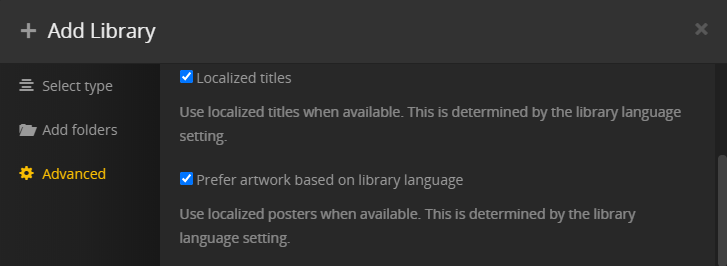
Summaries and other things are not yet localized, that is something still being worked on.
Thank you for the quick reply,
So I’d like all my content in English (so my library language is set to ‘English’) unless it’s a Dutch spoken movie/tv show (Yes I’m a pain in the ass  but I don’t mind to change them after uploading).
This is my beta library settings (don’t mind the amazingly creative name)

So since summaries, titles, etc. are not yet localized for the new library I’ll just have to wait a little more.
Normally I use the ‘Plex Movie Agent’ to find the Dutch metadata.
Since you guys rebuilding the Scanner and Agent I assume the databases will also have the same functionality as the previous agents when the localized versions are available.
I wouldn’t mind testing it when localization is done 
Ah okay, thanks for clarifying. Just asked about this now, we don’t yet have the logic for handling original titles correctly but is something that is being worked on currently. I’ll let you know when this is ready - thanks for testing out this scenario, it’s definitely something that should work.
2 Likes
That’s why it’s still in the beta version, I thought I’d mention it since the initial post only mentions the localized titles 
ok yes, you are right there are windows apps that uninstall/reinstall as a matter of course any time that app is updated.
then of course there is stuff like office, we won’t get into.
but any case, plex has never required that, all updates have been in place, and library changes have been migrated automatically or with a manual user trigger (ie refresh metadata).
2 Likes
Right now the localization is limited to getting the title in the library language and using English titles when you chose to not localize but once we have the correct original titles we’ll use those.
I’m impressed with how fast the preview scanner and agent are. Two thumbs up.
I think it chose better poster art by default - am I crazy? Kudos to whoever/however that was done.
Matching accuracy was perfect for files with the expected naming structure.
My handful of exceptions were for things like mismatched production vs. release dates. [ Removed my other comment. ]
The old scanner successfully matched some files with mostly garbage naming, but they did have the imdb id ‘tt123456’ in the filename. I fixed the naming and structure and it worked immediately in the preview.
I was excited and surprised that media analysis / video preview thumbnails / index-sd.bif files carried over.
I notice that the bundled Plex Web client is a bit behind. I knew that an intro detection task was running because I could see it in Activity from other clients, but it wasn’t visible connecting to the web app directly on the server. I’m happy the intro detection itself was working.
I also noticed that when trying to Edit a library, especially from the Home screen, sometimes the Add Folders and Advanced tabs aren’t available. But sometimes they are - I can’t reproduce this consistently. It has been reliable from Settings -> Manage -> Libraries.
1 Like
I have been told that I am running a version of this new agent code (PMS Version 1.19.5.2847), but I have never been to this thread before. I am however, on the Beta update channel with updates scheduled automatically during maintenance, so did I get this new version without realizing it?
I’m curious because movies in existing libraries no longer automatically match. PERIOD. I can manually match them perfectly (I know, I had to do that over a hundred times after relocating some of the folders in a library to a new drive.) TV Shows still auto-match just fine, but movies seem to be completely ignored or skipped or something.
And, FWIW, I’m not going to create any test libraries to try out the new stuff. If I am running one of the new (and apparently broken) versions of the movie agents, is it possible to roll back to a working version and if so, how? (I have just disabled the beta updates, too.)
I understand the version you are running got out inadvertently.
Rolling back on Windows works as follows:
- Stop Plex Server using its tray icon.
- uninstall Plex Server with the regular ‘Apps’ control panel of Windows. Do not use 3rd party ‘uninstaller’ software like Revo etc. Do not use Registry cleaners/optimizers.
- download the current public or beta server installer from plex.tv
or
go to your Plex data folder.
There is a subfolder in there, namedUpdateswhich will contain previous versions of the installer .exe - execute the installer
- reboot Windows (just a safety measure, it may work without rebooting as well)
@OttoKerner Thanks, Otto! I was able to get it working correctly after rolling back. (For me, the reboot was required in order to the install to succeed.) The only oddity is my updates folder has only three entries from 2017:
 Directory of E:\PlexData\Plex Media Server\Updates

05/23/2020  10:08 PM    <DIR>          .
05/23/2020  10:08 PM    <DIR>          ..
11/01/2017  11:00 AM    <DIR>          1.9.6.4401-53fa66811
11/09/2017  06:29 PM    <DIR>          1.9.7.4441-e5eb5d5a1
11/14/2017  12:29 PM    <DIR>          1.9.7.4460-a39b25852
Are updates saved there any time that Plex updates itself, or only when the automatic update triggers? I tend to look at my server almost every day and usually click on the update buttons when they appear. Just curious.  Thanks again for your help!
So I haven’t played with this yet. But I do have some thoughts about the state of metadata fetching on Plex and how I think the feature could improve.
I noticed recently that Plex added-- or re-added-- CineMaterial as its first choice for fetching movie posters. Apparently it is a higher quality source, so I don’t mind.
However, I have noticed that the majority of posters from CineMaterial are not “clean” as the old ones in the sense that they have a lot of texts about cast, slogans, and release/legal information. In short, the posters from CineMaterial resemble posters from real life more than the previous source, which generally presents a pruned image with nothing more than an image and the title.
I hope we can have more granular control on what kinds of posters we get so we can have a more consistent looking library. Right now my library is a mix of both styles of posters and it doesn’t look so pretty.
Admittedly this is a low priority for me-- I’d much rather the team focuses their effort on core user experience like actual playback. But since this is a thread for concentrated feedback on metadata fetching, I thought it wouldn’t hurt to share my thoughts.
To take the idea one step further, I hope one day we will see poster collections with consistent styling and it’d be as easy to apply as changing icon packs on Android phones. Just my 2 cents.
1 Like
I had this same issue and so you might want to look at LAMBDA
It sits after the regular agents and after it finds all of the data, then it copies everything to your local folders so that if you set it to prefer local data, this is always there. It has been very helpful for me. If you ran this once and had all of the data, then when you use the new agent, it should use your local data first.
1 Like
