Server Version#: 1.20.0.3125 (Linux Docker)
Player Version#: N/A
Trying out the new metadata agent, rescanned library and all release dates are now (correct year)-01-01. This was reported on the pre-release thread but it went unnoticed.
Server Version#: 1.20.0.3125 (Linux Docker)
Player Version#: N/A
Trying out the new metadata agent, rescanned library and all release dates are now (correct year)-01-01. This was reported on the pre-release thread but it went unnoticed.
I don’t immediately see it, but on another thread about 1.20.0.3125 a Plex representative confirmed that it’s a data issue, that they were addressing it, and that (when resolved) a Refresh will resolve it.
Thanks, so it sounds like it was a back-end data issue then?
Dunno whose data had the problem, but Plex took ownership of resolving it. 
The Jan-01 issue is a backend problem and yes it’s being worked on now.
When it’s resolved, a local refresh will put all the dates to their correct values.
How are you all liking the new agent so far?
How are you all liking the new agent so far?
Pretty good (and FAST!). I did notice a few things probably worth feeding back:
Movies that previously had manually added artwork under the legacy agent end up with ‘blank’ artwork after the scan, and the user must manually go in and edit / select the first poster for those entries. It would be handy if there was some way to ‘mass reset’ the selected posters so that the defaults / first entries could be re-selected on the next full metadata scan.
I did notice a couple of titles that had cover art appear in the match listing but no posters available from the new agent. Is there some mechanism to report / fix these in the backend?
‘Fix match’ / ‘match’ dialogue doesn’t give enough length for the file name in many cases, which makes it difficult to tell exactly which file/title it is that you’re trying to confirm is the correct match. This existed before but I figured the new match window might have addressed that - no joy there :(. What’s odd is that there is usually plenty of space to the right of the truncated file name, so cropping it down was unnecessary yet it still happens. Further, the truncation could be more intelligent by truncating the end of longer filenames instead of just randomly cropping out the middle section of the full path+filename.
‘Fix match’ no longer shows the match confidence/score.
You’re spot on. those are all things which are currently being tweaked on the backend and server side.
From what I can tell, there will be an updated PMS 1.20.0 BETA with the new server-side code for the few issues found.
Is there any way to increase movie cast list?
My overall impression is good but there are some quirks.
Cast members list is wrong in some movies. This is probably due to fetching the data from IMDB instead of from TMDB as I had set up the legacy agent.
Director field is also wrong probably for the same reason.
I’d like to be able to choose TMDB as source for cast list.
Other than that I think it’s pretty good. And fast.
Will Plex also make a new Plex Agent for tv shows ?
Here’s some of the “inside scoop” stuff which is about to show up in the documentation
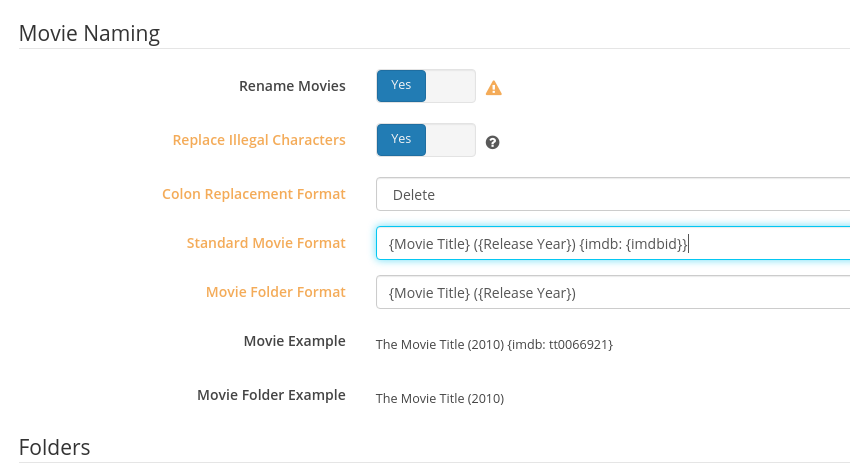
A. The new augmented naming syntax for movies, where the new additions are optional
`Name (Year) {attribute: value} [Optional invisible info]
( ) - Parenthesis for the year – per existing
[ ] - Brackets for all optional (and invisible) data – per existing
{ } - Braces to delineate the new optional attributes: imdb, tmdb, thetvdb, etc
B. - Granularity of movie settings be set on the individual items instead of being global only.
C. Will there be a new TV scanner – YES!
The theme of the new movie scanner & agent extends into the TV scanner & agent.
D. .plexignore works and no longer descends the tree .
1, It chops off the ignored path immediately when the regex matches
2. It won’t waste time / bandwith to rclone libraries
====================================
Some other things we’ve tested / played with (mostly played with to learn - which work and are official)
{tmdb: {TmdbId}}.find -exec script where ‘script’ does a echo | sed with a regex to remove \{.*\}
Currently my naming is:
B:\Movies\Bill & Ted’s Bogus Journey (1991) [TMDB-1649]\Bill & Ted’s Bogus Journey (1991) [BLURAY-1080P] [DTS 5.1].mkv
Will the new scanner search on the TMDB id that is there? Or will I need to change them all to use braces for the new scanner to pick them up?
Edit:
Based on other employee posts, it looks like we can use either, but it is “recommended” we use braces. So I will kick off that change now. 
You’re correct.
OFFICIALLY
{ } are the delimiters
[ ] will work but is most likely not going to be supported long term because it conflicts with the [ Stuff to ignore ] rule - plus - we have the { } syntax now which does support it properly.
I will ask engineering but suspect they’ll allow it for some time as folks transition into the new naming.
I’ve been chating with DrZ this morning and just a bit ago. He’s also been updating me on work he’s finishing now.
hello @ChuckPa, just to get the naming down, would the below work? Does it make sense to include in the folder name, or would it work on the actual movie file name as well? Since it takes time for Plex to reindex everything when you mass rename, I just wanted to get the new format down first so as to not have to do it again.
movie (year) {IMDb: tt00imdbid}
No need to overly complicate it: We’re using lower case in our testing.
movie (year) { imdb: value }
If using FileBot: https://www.filebot.net/naming.html
If using Radarr, it formats it properly for you when done this way .
Either way, both of them are smart enough to put all the info for you.
Regarding the time to reindex everything -----
I reindexed all 768 movies in my library in 3 minutes. (“Refresh All Metadata”)
I did a full rebuild from scratch, in a parallel library, in 7 minutes.
(Yes, I have a very slow 40 Mbps internet)
Hi @ChuckPa
The New Plex Agent is working very nice for Brazilian Portuguese. I wanna say thanks to plex team for this goal! Does plex have plans to add this brazilian protuguese to TV Shows? it would be fantastic! Also how can i set/show the release dates in library?
Thank you!
Braz.
BrazMan,
The dates are part of the metadata.
There are some small “bumps” with the new agent which they’re working on fixing now.
The “First Available” is a known problem ( which is the “Release Date” ).
When it’s fixed, just refresh the metadata and it will all correct itself.
Thank you for the info @ChuckPa
@ChuckPa, thanks for the tips. I renamed all my movies and rescanned them with the new agent. I couldn’t use : since I am on Windows, so I used - instead. It was nowhere near as fast as yours, not sure why. Even with Empty Trash turned off, I guess it was deleting the old movie and creating a new item. It would migrate over the collection tags or locked titles/sort titles, but not posters (even locked/custom ones).
It also seemed to be much worse at matching, and did not seem to be using IMDB IDs at all.
Here is an example name of a movie
G:\Movies\Queen (2013)\Queen (2013) {imdb-tt3322420} [HI].mkv
It somehow matched this instead https://www.imdb.com/title/tt3400550/
Another case
G:\Movies\The Photograph (2020)\The Photograph (2020) {imdb-tt7798646} [EN].mkv
matched this instead https://www.imdb.com/title/tt11783796/?ref_=fn_tt_tt_2
These movies matched perfectly fine with the old agent or when I upgraded and refreshed metadata. No clue why, but seems like adding IMDb IDs in the name has actually created a lot more issues. I have to go through my entire library manually to figure out how many cases are mismatched, but the loss of all the custom artwork is very unfortunate. In some cases, the artwork that I uploaded is still available as an option in the poster selection. In others, it is completely gone.
I guess I need to revert back to the old naming and a backup of my old DB until the kinks are worked out.
You need a space in there {imdb - tt.....}
Try it on a few. Get to understand it.
When you have it right, it will go as fast as your internet & CPU can.
My upload is 230 KB/sec … and it was maxed out.