Like so many other people, I am new to Plex. I have Plex server on a Synology DS1817 NAS drive. I have myself set up obviously to be admin. Now I would like to give my daughter remote access to certain folders on the drive. I set up a new Managed User in the Plex Server and marked those folders that she can access. But, I lack the rest of the information. I am currently at her home for Thanksgiving and hoping that someone can help me so I can complete this before I leave.
How do I set up her device to access the Plex under her user name and not mine.
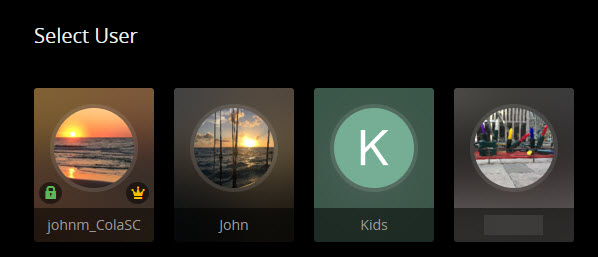
Managed or Home Users will always pick the account they want to access. Even if they have their own Plex account.
Existing Home User picker, son account as Friend:
Added my son’s account as a Home User instead of as a Friend. He still has his own Plex account that he logs in with but can pick any of the Home User accounts to access once on my Plex server in this case:
So the Plex Account is free, but how do they know about your’s then? Or what do they have to put in on their device to connect? And as a Friend, do you invite them using their email to join you?
As a managed user, do you have to log them into your Plex Account first?
My son logins with his Plex account but if he stayed as a Home User he would then see all other Home Users and could choose the account with John, Kids, my wifes account, or my Admin account if he knows the Pin assigned to that user account. He is added as a Friend normally, I added as a Home User so you could see the difference with him not as a Home User and then after adding the account as a Home User.