Sorry stuck at “Click the here link in the “You can view the debug logs here.” text. This will take you to a page showing the logging information”

“Once you’ve reproduced the issue, go back into Settings > General > Show Advanced > Debug”
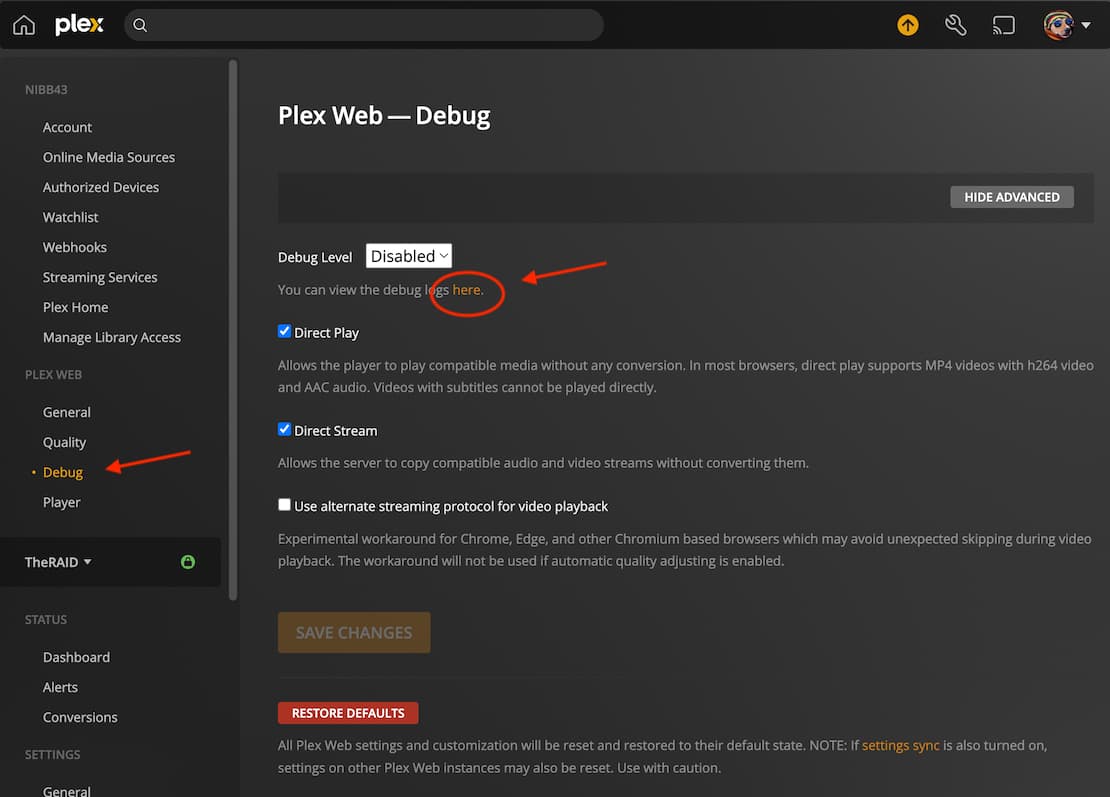
Attached
debug.zip (5.2 KB)
I can’t find you playing anything in that log, sorry.
I am closing Plex Server and reopening it, then enable debug mode and playing the file for 30 seconds, then I would go back to the debug page and copy the log information into notepad then zip it and post, is that correct?, I’ll do it again later tonight
something like this I guess:
- enable server debug logging
- enable client debug logging in Edge.
- restart plex server & wait a few minutes
- in edge version of Plex, play the Simpsons episode for 30sec.
- in edge grab log with that “here” link.
- in edge in the Troubleshooting link > Download Logs to get server ones.
- disable debug logging
- zip and upload logs
That make sense? 
Ok, see how you go with these logs
debug.zip (7.6 KB)
Plex Media Server Logs_2022-06-30_15-32-54.zip (2.2 MB)
1 Like
Great logs. They show a lot.
Your Plex Media Server.log has a lot of error messages.
Here’s an example of them.
Jun 30, 2022 15:31:17.954 [20292] ERROR - [Req#43e] [Transcoder] [mp4 @ 02ab0cc0] Application provided duration: -16 / timestamp: 44044280 is out of range for mov/mp4 format
Jun 30, 2022 15:31:18.000 [20292] ERROR - [Req#442] [Transcoder] [mp4 @ 02ab0cc0] Application provided duration: -16 / timestamp: 45045752 is out of range for mov/mp4 format
Jun 30, 2022 15:31:18.061 [23168] ERROR - [Req#448] [Transcoder] [mp4 @ 02ab0cc0] Application provided duration: -16 / timestamp: 46047224 is out of range for mov/mp4 format
Jun 30, 2022 15:31:18.091 [23168] ERROR - [Req#44b] [Transcoder] [mp4 @ 02ab0cc0] Application provided duration: -16 / timestamp: 46546936 is out of range for mov/mp4 format
Because those messages are sound related, we’re probably onto something.
Let’s hope we’ve provided enough for Plex to determine the cause and stop bye.
Thanks for your time
Are you post processing the file? Plex is reporting corrupt file.
Side Note1: You have Hardware transcoding turned on but no GPU is found.
Sinde Note2: Browser is the worst for playback on TV shows, have you tried Plex for Windows.
Yes Plex for Windows plays the file fine, just not through Edge, I read somewhere that Browser’s have a hard time transcoding H264
Plex does the transcoding because h264 will not play in any browser, but Plex is getting into an error condition processing the .ts files from the over the air tuner.
Try playing your Simpsons video in Opera, Firefox, or Chrome.
The log from your server was complicated by a remote access user.
The last line makes me think your playback issue could be the tuner hardware,
Jun 30, 2022 15:31:07.428 [19624] ERROR - [Req#1d4] [Transcoder] [h264 @ 02d15cc0] number of reference frames (0+5) exceeds max (4; probably corrupt input), discarding one
Jun 30, 2022 15:31:07.443 [19624] ERROR - [Req#1d5] [Transcoder] [h264 @ 02d15cc0] mmco: unref short failure
Jun 30, 2022 15:31:07.444 [19624] ERROR - [Req#1d8] [Transcoder] [h264 @ 02d15cc0] mmco: unref short failure
Jun 30, 2022 15:31:07.444 [19624] ERROR - [Req#1d9] [Transcoder] [h264 @ 02d15cc0] number of reference frames (0+5) exceeds max (4; probably corrupt input), discarding one
Jun 30, 2022 15:31:07.573 [15552] ERROR - [Req#1da] [Transcoder] [dvbsub @ 02cf9200] Junk in packet
If the transcoder is getting a corrupt file, the hardware could be causing that corruption.
Those messages I pasted have log level ERROR. It’s bad to see any of those in a log from the server. The GPU not found message is a DEBUG level. This issue happens every day. It just falls back gracefully to software.
Jun 30, 2022 15:31:07.234 [19652] DEBUG - [Req#1a5/Transcode] TPU: hardware transcoding: enabled, but no hardware decode accelerator found
Jun 30, 2022 15:31:07.235 [19652] DEBUG - [Req#1a5/Transcode] TPU: hardware transcoding: final decoder: , final encoder:
Ok interesting, Playing ok in Firefox but not Edge and Chrome
1 Like
This topic was automatically closed 90 days after the last reply. New replies are no longer allowed.
