I’m facing an issue where my local ABC station, in the St. Louis market, will (usually) not record audio when recording with Plex. I have HDHomeRun Dual’s (3 of them), and when I tune to the ABC Channel using the HDHomeRun app, audio works just fine, always.
If I do the same using Plex, either Live, or as part of a recording, I (usually) get no audio. Sometimes, Plex will record audio, but it’s inconsistent. Most of the time it does not, and recording show now audio track. I have no idea what causes this to happen, as literally nothing changes day to day on my Plex configuration side. I do not know how to solve this, but using Plex for ABC in my market is non-functional. All other broadcast stations work flawlessly.
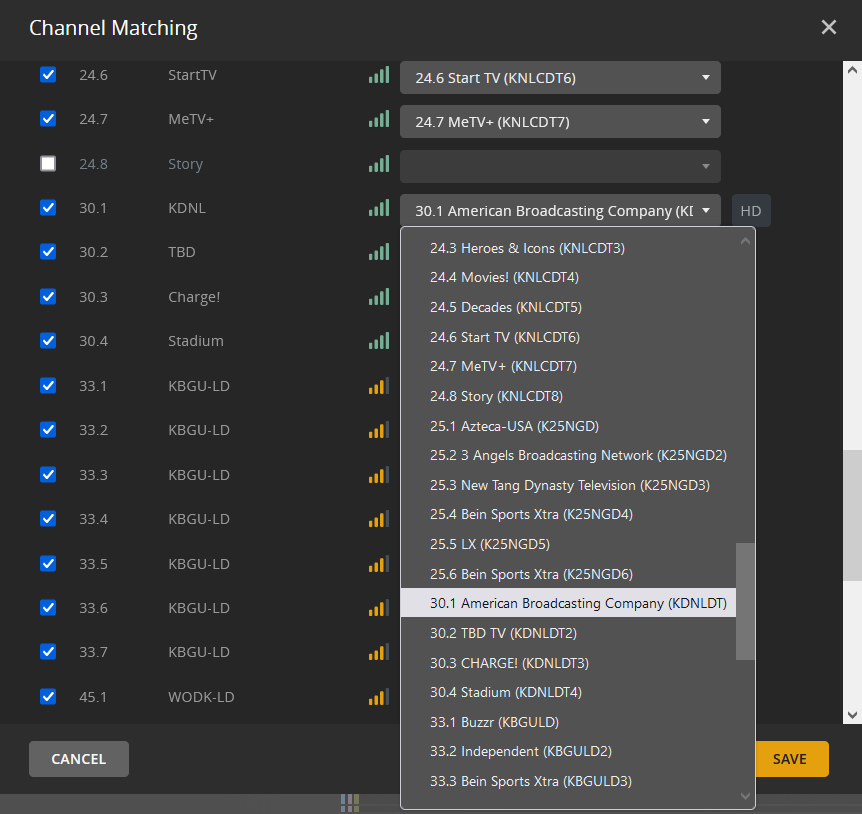
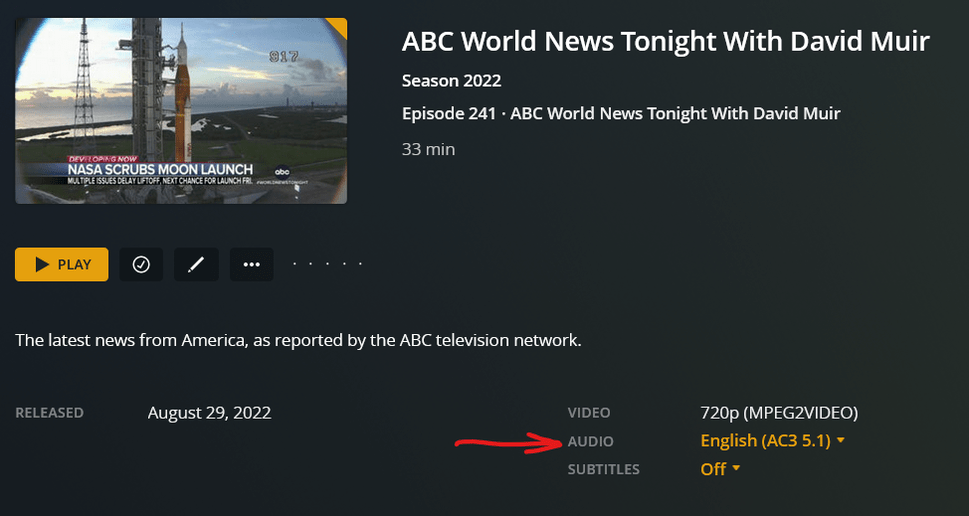
I’m attaching screen shots of the HDHomeRun channel configuration, Plex channels, and snippets of a non-audio recording and a recording where audio is captured. I’d love to make sure that the right audio channel is always chosen, but I can’t seem to sort how to do that in the Plex interface, or if there’s some other change I need to make. It’s ridiculous that I can record anything but ABC content with full audio, but yet somehow Plex refuses to record audio, while the HDHomerun app can sort it just fine. Any troubleshooting or steps to take would be very appreciated.
By default, all Plex does is concatenate the broadcast stream into a MPEG2 file. Without too much effort you should be able to play that file with media player to see if the audio is present.
If you have a file that truly is missing the audio you can produce a sample to upload: Generating Sample Files from Media | Plex Support . This is still no guarantee that the broadcaster isn’t introducing the error either from marking the wrong audio channel as default etc.
Other than asking about your Language settings, scheduled tasks and was this library created before the new “Plex TV Series” agent & scanner were introduced? Most of this is answered if you upload the Debug logs from when a show recorded with no audio.
Thanks for your reply @pl_5309. Based on your comments, I’ll add more to this thread.
I have attempted playback of the recorded files using VLC. It will play audio, when it happens to be recorded. It will obviously not play audio that’s not been recorded.
I disabled all but one of my three tuners from being able to record the offending channel, just to simplify things. I tried several short recordings and live TV this morning. I’m uploading the TV Tuner log. I’m not sure the best way to get the recorded videos uploaded, as the two recordings are about 50M each. One of the recordings did record audio, while the did not. They were the same show, mere minutes apart, on the same channel, using the same tuner. LiveTV play resulted in equally unpredictable results where audio may or may not show up. An earlier recording recorded audio, but displayed that it was the Spanish language (which it wasn’t).
I’m glad to do any additional debugging needed, as this is very high on my frustration list, as I can’t rely on Plex to record or play anything from my only ABC affiliate.
Plex does not alter the stream except if you have “CONVERT VIDEO WHILE RECORDING” enabled.
Either
You have a failing tuner
The broadcaster is not sending audio or tagging the wrong stream.
How to tell if the header is wrong, look at the file xml by choosing one of the ones without audio and doing a “Get Info” then View XML. Put that into a txt file and upload here.
Best way to provide all the debug logs is to use Plex Web/for Windows Server Settings > Troubleshooting > download logs drop the zip file in this thread. When the Server starts recording it looks at the header, if the framing is off that will be in the ‘Plex Media Server.log’
Hi @pl_5309. Thank you for the continued engagement on this.
To address a few things, I do not have any of the “Convert Video while Recording” enabled on my HDHomeRun devices. As for the “failing tuner,” while I thought about that, I have three separate HDHomeRun Dual devices, and the problem is not confined to a single tuner; all of them exhibit the same problem. The odds of all three of my dual’s failing at the same time, while not zero, is pretty remote. I’d tried to eliminate any tuner-specific items on my own.
The really, really odd thing is that the issue isn’t static. And by that I mean that I’d think if it were a broadcast tagging issue, it’d likely always be the same. I’d not end up with some recordings having video, and others not. I suppose it could be a transient issue on the part of the broadcaster, but since the same thing has happened only minutes apart during some of my test recordings, during the same show, I’m just left baffled. I’ve also never seen this issue when using the HDHomerun apps to tune/view the exact same station.
I’m attaching full debug logs, as requested, and an XML copy/paste of a recording I just did (don’t judge the show I record, it’s just whatever’s current on that station )
Again, thank you for the continued help. I’ve tried everything I could think of, and certainly need the help of some gurus that may be able to explain what the heck is happening. Plex Media Server Logs_2022-08-31_15-38-08.zip (3.8 MB) JudgeMathis_XML.txt (3.0 KB)
I also grabbed the XML from two other recordings, of the ABC World News, which took place on different days. Same channel, same time. One has audio, one does not. I don’t know if it’ll help, but at this point, I’m hoping more data can help narrow down what the issue is. ABCNews_withAudio_XML.txt (4.8 KB) ABCNews_withoutAudio_XML.txt (3.8 KB)
How long has this been occurring and for the Plex/Not Plex, do you recall Plex Version it started with?
The XML files confirms that there is no audio.
Which version of the software/firmware are you using for these tuners?
20200225, 20210422 or higher?
Due to the age of these tuners they do have to rely on a Windows driver, you could try an uninstall/reinstall. This makes it more complicated to bypass Plex and grab a sample but we should be able to plug directly into them with VLC.
This has been going on far too long for me to even remember how long ago it stopped. Very easily 6+ months. I’d posted a couple times about it, and even did so on Reddit and a few Plex forums on Facebook as well, but never made any headway. I accepted it was something weird with only my tuner, location, station combo and sort of gave up for a while.
All of the HDHomeRun tuners are running 20210422. I don’t believe there’s anything higher available for those, from my last search. I thought about breaking down and buying a new tuner, but wasn’t sure the problem would go away even if I did that.
As for your comment on the Windows drivers for the HDHomerun, I wasn’t aware of the need for any specific drivers on my Plex server for the tuners. Plex detected them natively, and I configured them. I do have another system that I do have the HDHomeRun apps installed on, just for firmware management, etc. The output in the original post with the HDHomeRun Setup was captured from that system. I can tune to the ABC station using HDHomeRun’s App (20220208 App/ 20220729 UI) and I always get audio and video, but that doesn’t solve my DVR or LiveTV issues from within Plex.
When I tune to the ABC affiliate using HDHomeRun Setup, it opens up Windows Media Player by default. I’ve not found a way to change it to try and open VLC. WMP doesn’t show the video, oddly, but it does provide the audio stream; my ABC station always has audio in WMP. I’ve tried to figure out how to get VLC to connect to my tuners in the past, going around HDHomeRun’s apps and Plex, but I never managed to get it right.
Appreciate your continued responses. I hope somehow it can get sorted and working!
@pl_5309 The oddities continue. I was out of town for the weekend, but the ABC News still ended up being recording. The three snips show the oddities of the audio. One with Spanish Descriptive, one with no audio, and one with English. Literally nothing with the environment changed, and I still have only a single tuner recording ABC channel.
If you get a new tuner and use it with Plex, get one without the hard drive. Pros: Only one cable connection, better tuner, and easier to make sample files.
This is a fringe case where Plex cannot determine the audio tracks for one station. Not sure what you would have more success with, calling the station and speaking to the engineer or producing some sample files so that Plex can analyze for why it can’t lock on to the audio.
@sa2000 I know you’ve been looking at a problem similar to this in another thread, but wanted to see if I could pull you into this one too. There seem to be quite a few people affected, as there’s a Reddit thread on other ABC stations across the US experiencing the same issues, across multiple tuner types.
I pick up Denver ABC and have the same issue for a long while. It is definitely not the tuner, as I always have audio on ABC when I use the SiliconDust app.
Stopping and restarting playback a number of times tends to work, just not helpful for recordings on that station. Happy to provide additional info for troubleshooting if helpful.
I have seen the same. I need to find the time to actually generate the debug logs. I deleted my DVR, and completely started over. That seemed to work for a few days, and all my recordings had audio, but since then, they’ve stopped again, and finding time when I am able to fully set up the logs for debug, run a recording, etc. has been challenging, but I’m determined to do so, as soon as my schedule allows. There is another thread that others are working on debug as well, so we’re not alone, and I’ll post my debug info there as promptly as I can.
I’ve had similar issues with the audio on DVR recordings.
It only affects channels that are broadcasting two audio tracks and one of the tracks typically has “Descriptive” in the ID tag. Some tracks have a “Spanish Descriptive” ID. Some are “English Descriptive”.
Here is what I’ve been doing to bring the audio recording back.
From your Plex Media Server in a browser:
Settings
Languages
Prefer Audio Tracks in “None”
Prefer Subtitles in “None”
Deselect (Unchecked box) - Automatically select audio and subtitle tracks
These are to try and force Plex to record all audio tracks available
Save Changes
Manage
Live TV & DVR
- Delete DVR
On the Plex Media Server
Complete any available updates
Reboot Plex Media Server
From your Plex Media Server in a browser:
Manage
Live TV & DVR
Add DVR(s)
Rescan Channels
Go to the Live TV and check all of the channels that have more than one audio track. If any channel is missing some audio track, repeat the check of all of the channels until no audio tracks are missing.
Try the DVR.
Hopefully, Plex will record all available audio streams and you may have to select the English stream if more than one is available and Plex doesn’t choose the one you want.
Playback Settings
Audio Stream
If more than one audio stream is available, choose the one you want
The best results that I have found is when I make any changes - updates, add files, delete files, etc., I complete them all at once and then go thru this process completely.
12-28-2022 Update
With the Plex update for Ubuntu (Version 1.30.0.6486) the audio issues are worse. As an additional workaround, I’m deleting any programs that have audio issues and are on the DVR schedule to record all episodes. I’m then adding individual episodes back in to the DVR schedule to record single episode recordings. So far, this appears to correct the issue and bring in all the available audio tracks to the recording.
I have run into the same problem with NBC in Vegas. Sporadically, a local news recording wouldn’t have any audio streams in the recorded file. I ran into the problem “live” as well. I have a second tuner card in another PC, so I as able to tune the channel with VLC and the audio stream was there. But plex didn’t “see/detect” it. The workaround I settled on was just to have a cron job restart plexmediaserver daily in the early morning. I have not yet run into the problem since i began restarting the server process daily.
I tried this yesterday and I recorded 5 back-to-back episodes on the same channel.
The first four had both correct audio streams and the fifth didn’t have audio.
Will continue restarting Plex daily.
Thanks for the suggestion.
First is the FCC mandate for local broadcasters to provide descriptive audio on the secondary audio channel which is/was usually the Spanish audio track. When they switch over and back isn’t being handled cleanly by the broadcaster.
Second, if you are running on Windows the Plex Tuner Service is becoming unresponsive. For those cases you need to indicate which version of Plex Server you are running otherwise it will be lumped in with the first symptom.
Day two attempt. 4 recordings performed on the same channel after having restarted Plex, recording 1,2, and 4 there’s no audio, audio only on the third, two tracks.


 )
)


