I have recorded a few shows from the TV Guide and the video plays fine in Plex with no audio but closes there after, trying to play them with several Windows media players but no audio, even in VLC which I always thought was robust.
What codec/s do I need to install?
Good question. Plex automatically loads any codec you need.
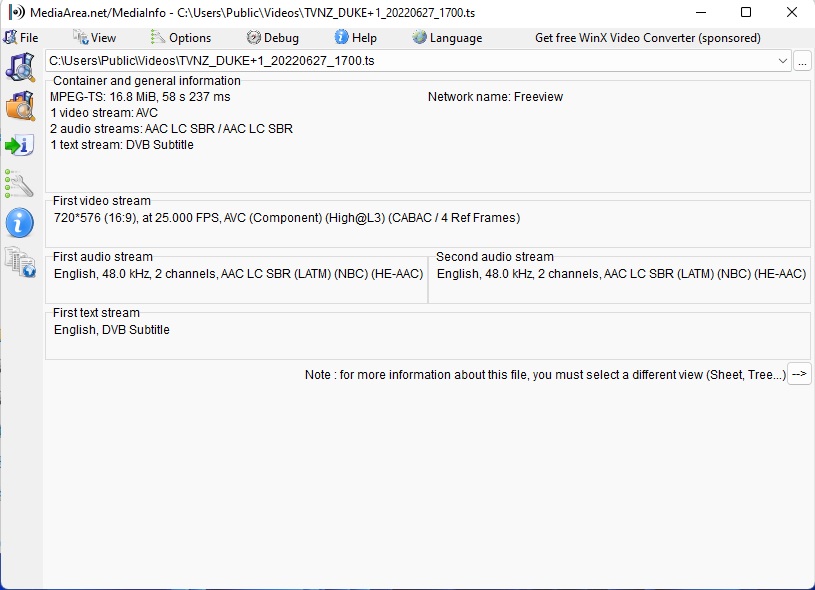
We could use some media information.
Attach a screenshot of it by dropping the image into your reply.
Some people are familiar with Mediainfo. That would just as good.

Extra information
-
Scan Type interlaced
-
Separate Fields true
-
Stream Identifier 256
-
Width 1920
-
Display Title 1080i (H.264)
-
Extended Display Title 1080i (H.264)
-
Codec DVB_SUBTITLE
-
Bitrate 9 kbps
-
Language English
-
Language Tag en
-
Stream Identifier 257
-
Display Title English (DVB_SUBTITLE)
-
Extended Display Title English (DVB_SUBTITLE)
Definitely no sound track being recorded into that file.
I’m not familiar with DVR Tuners and what could cause that. If nobody chimes in, we could investigate your server log, if you restart PMS in debug mode and record a show for a minute, then grab the logs. Would you verify for us that sound is coming out of the tuner but just not being recorded?
Thanks
Awesome thanks. Looking forward to a server log. I sanitize mine, removing my username and whatnot.
Logs Attached
Plex Media Server Logs_2022-06-27_17-23-24.zip (3.6 MB)
Thanks I can see it start the recording process and making decisions, finding an audio track and a subtitle track. Later I see a lot of h264 errors.
Grabber entries
Jun 27, 2022 17:19:32.687 [51092] DEBUG - [Grabber/6fc3855d4fe842c00038d4eec01c39e2cf7556fd] We're going to try to auto-select an audio stream for account 1.
Jun 27, 2022 17:19:32.687 [51092] DEBUG - [Grabber/6fc3855d4fe842c00038d4eec01c39e2cf7556fd] Selecting best audio stream for part ID -1 (autoselect: 1 language: en)
Jun 27, 2022 17:19:32.687 [51092] DEBUG - [Grabber/6fc3855d4fe842c00038d4eec01c39e2cf7556fd] We're going to try to auto-select a subtitle.
Jun 27, 2022 17:19:32.687 [51092] DEBUG - [Grabber/6fc3855d4fe842c00038d4eec01c39e2cf7556fd] Audio Stream: -1, Subtitle Stream: -1
Jun 27, 2022 17:19:32.687 [51092] DEBUG - [Grabber/6fc3855d4fe842c00038d4eec01c39e2cf7556fd] MDE: Selected protocol hls; container: mpegts
Jun 27, 2022 17:19:32.687 [51092] ERROR - [Grabber/6fc3855d4fe842c00038d4eec01c39e2cf7556fd] Unable to find title for item of type 5
Jun 27, 2022 17:19:32.687 [51092] DEBUG - [Grabber/6fc3855d4fe842c00038d4eec01c39e2cf7556fd] MDE: analyzing media item -1
Jun 27, 2022 17:19:32.688 [51092] DEBUG - [Grabber/6fc3855d4fe842c00038d4eec01c39e2cf7556fd] MDE: : no direct play video profile exists for http/mpegts/
Jun 27, 2022 17:19:32.688 [51092] DEBUG - [Grabber/6fc3855d4fe842c00038d4eec01c39e2cf7556fd] MDE: : no direct play video profile exists for http/mpegts//
Jun 27, 2022 17:19:32.688 [51092] DEBUG - [Grabber/6fc3855d4fe842c00038d4eec01c39e2cf7556fd] MDE: : codec is unavailable for analysis
Jun 27, 2022 17:19:32.688 [51092] DEBUG - [Grabber/6fc3855d4fe842c00038d4eec01c39e2cf7556fd] MDE: : codec is unavailable for analysis
Jun 27, 2022 17:19:32.688 [51092] ERROR - [Grabber/6fc3855d4fe842c00038d4eec01c39e2cf7556fd] Unable to find title for item of type 5
Jun 27, 2022 17:19:32.688 [51092] DEBUG - [Grabber/6fc3855d4fe842c00038d4eec01c39e2cf7556fd] MDE: : selected media 0 / -1
Jun 27, 2022 17:19:32.688 [51092] DEBUG - [Grabber/6fc3855d4fe842c00038d4eec01c39e2cf7556fd] Cleaning directory for session 27b1b541-cfd8-4590-9cae-22b7520fa90f ()
Jun 27, 2022 17:19:32.688 [51092] DEBUG - [Grabber/6fc3855d4fe842c00038d4eec01c39e2cf7556fd] Starting a transcode session 27b1b541-cfd8-4590-9cae-22b7520fa90f at offset -1.0 (state=3)
h264 errors
Jun 27, 2022 17:19:38.384 [34056] ERROR - [Transcoder] [h264 @ 026ef100] non-existing PPS 0 referenced
Jun 27, 2022 17:19:38.385 [34056] ERROR - [Transcoder] [h264 @ 026ef100] non-existing PPS 0 referenced
Jun 27, 2022 17:19:38.386 [34056] ERROR - [Transcoder] [h264 @ 026ef100] decode_slice_header error
Jun 27, 2022 17:19:38.386 [34056] ERROR - [Transcoder] [h264 @ 026ef100] no frame!
I’m not sure why it’s doing these things. I hope a Plex employee can spot something.
It appears as though the audio stream is present in the recording, at least according to the media analysis which occurs immediately after it’s completed (audio channels=6):
Jun 27, 2022 17:22:06.847 [55468] DEBUG - [Grabber/6fc3855d4fe842c00038d4eec01c39e2cf7556fd] [MI] * [mpegts h264/ac3] Duration: 146760ms, 1920x1080 (1.777778) 25.000fps, bitrate=6261kbps, audio channels=6, optimizedForStreaming=0 ("F:\TV Recordings\.grab\6fc3855d4fe842c00038d4eec01c39e2cf7556fd-16df6eb6de8dca84c2094b7bf75e5d712344ad7c\The Simpsons - S29E02 - Springfield Splendor.ts")
Can you provide the XML information for the recording? See “XML Information/XML File” in this support article:
It will show all the streams present in the recording with details about each.
Attached
115622.zip (2.3 KB)
According to the XML information, there are three audio streams present in the file:
<Stream id="277268" streamType="2" selected="1" codec="aac_latm" index="1" channels="2" bitrate="95" language="English" languageTag="en" languageCode="eng" audioChannelLayout="stereo" profile="he-aac" requiredBandwidths="93,93,93,93,93,93,93,93" samplingRate="48000" streamIdentifier="257" displayTitle="English (AAC_LATM Stereo)" extendedDisplayTitle="English (AAC_LATM Stereo)"></Stream>
<Stream id="277269" streamType="2" codec="aac_latm" index="2" channels="2" bitrate="95" language="English" languageTag="en" languageCode="eng" audioChannelLayout="stereo" profile="he-aac" requiredBandwidths="93,93,93,93,93,93,93,93" samplingRate="48000" streamIdentifier="258" displayTitle="English (AAC_LATM Stereo)" extendedDisplayTitle="English (AAC_LATM Stereo)"></Stream>
<Stream id="277270" streamType="2" codec="ac3" index="3" channels="6" bitrate="379" language="English" languageTag="en" languageCode="eng" audioChannelLayout="5.1(side)" requiredBandwidths="371,371,371,371,371,371,371,371" samplingRate="48000" streamIdentifier="259" displayTitle="English (AC3 5.1)" extendedDisplayTitle="English (AC3 5.1)"></Stream>
Try playing it back again, but this time select the third stream (AC3 5.1) to see if you can hear it. If you still can’t, please upload fresh server logs.
Actually playing it on Plex through the AppleTV works fine, it when I try and play it on the PC is where I am have audio issues.
The Simpsons plays ok on the AppleTV which is the XML information I sent today with the 3 audio streams showing up in Plex more info Audio.
But a recording done a couple of days ago Family Guy has no steams in audio XML (Attached)
115613.zip (2.1 KB)
Please enable debug logging on your Plex for PC.
play your recent Simpsons S29E02 episode for 30sec on the PC, the one with 3 audio tracks, and you can attempt to choose all three audio tracks during this test.
quit the app and attach log files for the client and server.

Yes enable debug logging on the Plex for PC player,
then using Plex for PC, play that episode of Simpsons, on the PC monitor.
Let it play or buffer or whatever for 30sec. Try all three audio tracks.
Then quit the player and upload the client log and the server log for us.
We’ll tackle the missing audio in Family Guy later.
Let’s keep this thread focused on getting Plex for PC to play a valid recording on your computer, by logging what happens. Thanks bud.
I think I have done it right, can not access the 2 other audio tracks as it did not play correctly
Plex Media Server Logs_2022-06-28_13-58-22.zip (3.0 MB)
Thanks for the log. Did you use the Plex for Windows standalone application or did you use a web browser to watch that?
I used Plex Server in Microsoft Edge
Ok you have Plex Media Server running on Windows.
An Edge browser connects to it and shows a Plex client.
We have a name for that client.
We call the client that runs in a browser the Plex Web App.
You grabbed a log from the server that shows you trying to play Simpsons.
We could also use a log from the client, the Plex Web App, showing the same issue.
The directions for getting that client log are below:
Because the Plex Web App can’t direct play h264, the .ts file gets transcoded, and we are trying to discover the decisions that are made.
