i have recently had to upgrade my Plex media server and now have version 1.13.9.5456 . Unfortunately I can no longer find the Auto or timed library refresh setting ( is it in this new version at all ? ) and if having to pause playing a tv show or film the Resume category is now missing in my app library too . If this is the new way can I go back to the version I installed in 2017 ? Thanks for reading , John N
do you mean Continue Watching? That is on the home screen

Hi BigWheel , thanks for taking the trouble to supply an extremely detailed and comprehensive answer ; unfortunately the version I now have ( Beta ?) looks nothing like the illustrations you were kind enough to supply - though they do look like what I had originally . Now I no longer have a Mediabox icon/link and my Continue Watching as you say has also gone . If it helps this version has (in the home screen ) just a right hand side bar/menu containing 1. Manage - Status , Settings ; 2. Libraries and 3. Online Content - Plugins , News , Podcasts and Webshows . None of the settings in any of these or from the main Settings ‘button’ itself gives me anything like what you describe . Again I do appreciate all your efforts and hopefully I am just experiencing bugs that are being worked on . Thanks , John
Can you take a screen shot of what you see after clicking on “settings”?
Hi , sorry for the delay but I’m in the UK and 67 yrs old and at 11pm my my time when you replied I was in bed ! I knew you’d ask for a screen shot so ( I haven’t taken one in years - too used to taking smart phone pics of laptop screen then sending ) I’ll remind myself and hopefully send one later . Have a good day for now and thanks so much for trying to help an old’un 
Hi BigWheel , I’m back - screenshots attached ( it was embarrassingly easy ! ) . Hope this helps . Thank you , John
PS , oops ! apparently I can only send 1 attachment at a time so here’s the main one , John

…and 2…

Continue watching is on the home screen. Click the house on the top left of the page.
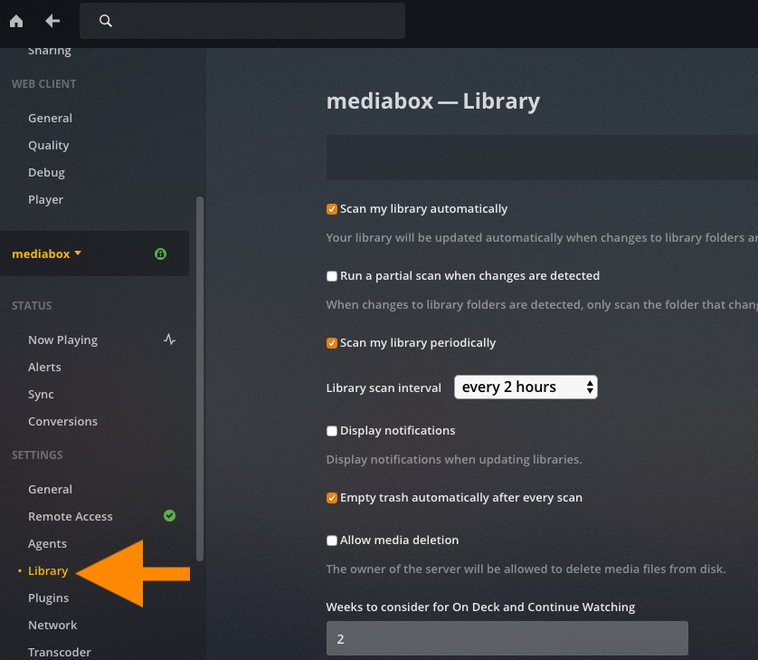
For LIbrary settings The part of the screen that i put an orange box around is scrollable. The arrow is pointing at the scroll bar. Your server name has the orange text. your servers settings are below that. scroll down that side and you will see the library settings and others.

Thanks very much , I will give it all a good look . In the meanwhile thanks to your suggestions I have discovered the setting for timed refreshing of Media folders so that’s one down . Forgive the assumption but I’m presuming you are in the US so don’t let me keep you from the football and turkey etc . Happy Thanksgiving and thanks - John
Hi Big Wheel ( is that Creedence Clearwater or the American toy ? Cool name either way …) and anyone else reading , it looks like the Continue Watching and out of date metadata problems I’ve been having are due to the new Plex app on my Amazon Fire Stick ; ain’t that always the way - something’s working fine so we’ll introduce an update that ■■■■■ it up ! At least thanks to you I have resolved the library auto update issue so that’s something . Thanks everyone , John
This topic was automatically closed 90 days after the last reply. New replies are no longer allowed.
