I still need to see the server’s DEBUG logs of activity before issuing corrective DB statements.
The DB statements I have are considerably more selective and refined from the one you show. I want to make certain nothing else was damaged.
I still need to see the server’s DEBUG logs of activity before issuing corrective DB statements.
The DB statements I have are considerably more selective and refined from the one you show. I want to make certain nothing else was damaged.
There are already 2 users with this problem. Are you going to ask everyone?
I will check in my database before running. Same way I did with the advice query. I checked what would be deleted and that it was a huge amount, on top of that it seemed sensible at the time.
You could add some prerequisites to have me check before running the fixes.
What logs specifically do you need and what part exactly. When I download the logs I get a variety of files. And some of them contain information I do not want to post and you should not want posted.
Or are you just looking that there are no errors regarding the mentioned table?
Will get you the DEBUG logs a little later… Gotta get dinner on…
I am asking for the information to ensure I don’t give the wrong or ineffective instructions.
Hi Chuck.
Just tried PM’ing you with my logs but the forum stated “An error occurred: Sorry, ChuckPa is not accepting messages at the moment.”
PM sent.
I still don’t know what logs you are exactly looking for, apart from “DEBUG”. There isn’t a specific “debug log file”.
I’ve found a support article that just states to attach the entire zip file, but that would contain way too much data I don’t want to post.
I’ve already enabled debug logging and restarted the server obviously.
I’m guessing it is (part of) one of the following you are looking for:
Both (but mainly the first) contain data I don’t want to post online.
In neither there is something about “statistics_bandwidth”.
Please advise.
I’m also having the same issue. I’m hoping there’s some fix, I don’t fancy reverting my database back two months.
Replied with logs…
@TwelveParsecs- As long as you have enabled debug logs in Plex, go to Settings > Manage > Troubleshooting and download the logs zip file, then ask Chuck to PM you and then send the logs to him by reply.
The problem with the zip is that there is a lot of information in there. A lot of that is not needed and a lot of it i simply dont want to send out
That is why I’m asking what exactly is needed, and I will send that.
There would be no security concerns sending all of the logs to a Plex employee… If they were to do anything nefarious using the data in your logs, they’d lose their job!
However you obviously shouldn’t post your logs directly onto the public forum topic as that would be visible to the world.
Still waiting for a reply.
Hi @ChuckPa- Had a quiet period this morning so decided to see what happened if I restored the DB back to before the 29th July…. In a word, it was a total S***show!
The 1st and most obvious thing that happened was the need to rescan the libraries in order to pick up the newer content, and of course the order in which they were added was all over the place, however I could kinda live with that.
Waited 10 minutes or so, and the watched history did not sync back, either for me or my test account… And yes, both of those accounts are set to sync…
I was not willing to wait any longer because it would be very likely I’d start getting complaints from my external users, who are all family and friends.
So this is not a solution, and I would like to hope that you can come up with something a little more viable, and far less destructive.
I’m also having this issue. At the same time this stopped, Plex DB borked a bunch of my “Recently added” shows and made them all show up again despite being added ages ago.
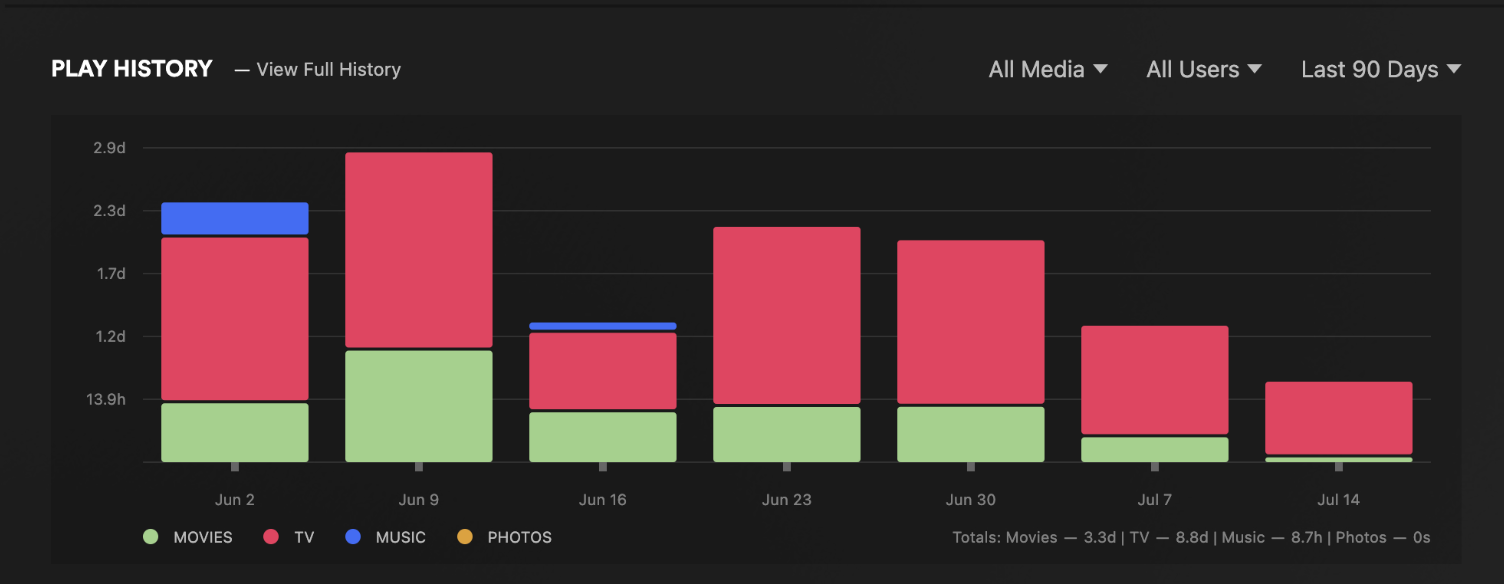
That update also seemed to break “Top users” and play stats. I can see the live view when a user is on, but now not recording any historic data. It’s now past the 30 day mark, only have it when viewing the “Last 90 days”.
What is interesting is that the “Top played” is showing data up to date:
But it looks like the actual data stopped some time in mid-July. I remember this was the same time as the PMS 1.41.9.9961 version.
I’d rather not have to re-do the database here. Happy to send logs as needed.
DB Repair says everything is dandy:
Checking the PMS databases
Check complete.  PMS main database is OK.
Check complete.  PMS blobs database is OK.
DBRepair only checks and repairs the .db container.
It cannot fix the tables & records. It is beyond the scope of a shell script to do so.
Given everything that happened with that table in 1.41.7,
the most likely best solution is to,
with viewstate sync having recorded everything,
Delete and let it recreate from scratch , pulling down cloud data and creating an error-free DB
Thanks for this. In terms of deleting and starting again, is that a case of turning it off and turning it back on? Or would this need some SQLlite stuff to clear the table?
No, Unfortunately this is a complete removal/erasure and restart from scratch.
The task is to:
I’m not a MacOS user or very conversant.
That said,
Your Plex server data should be in your home directory under Library/Application Support/ Plex Media Server
If that is true (Plex was developed on MacOS),
then
– Uninstall Plex
– In the terminal window, make certain Plex Media Server under Library/Application Support is gone.
– ( Delete Plex Media Server and all below it if it’s still there)
Go to https://app.plex.tv/desktop/#!/settings/devices/pms
– Delete the server instance from Plex.tv
Now install PMS again, fresh, as I’ve detailed above.
Did you also run a query to delete excessive records from the table statistics_bandwidth ?
I’ve been in IT since 1998 and I’m really struggling to understand your logic of “trash the entire thing and rebuild it all from scratch…” approach.
This literally makes no sense to me at all…
From my perspective, there are 2 possible problems here…
So I could have a combination of either one of the above scenarios, or maybe even both.
Either way, asking someone to entirely trash their system and rebuild it from scratch is not a solution.
Reading back through the posts in this topic, unless I am mistaken, you still haven’t actually identified what is causing this. Perhaps we should actually start with that?
I have described my scenario, however I will repeat it again…
Now some might say “Do you really care about not having statistical data since then?”
It’s certainly not stopping me or my users from normal day to day usage, but I sure would like it fixed because I know sooner or later, I will need it.