Server Version#: 1.41.6.9685
Player Version#: 10.26.0.2578
<If providing server logs please do NOT turn on verbose logging, only debug logging should be enabled>
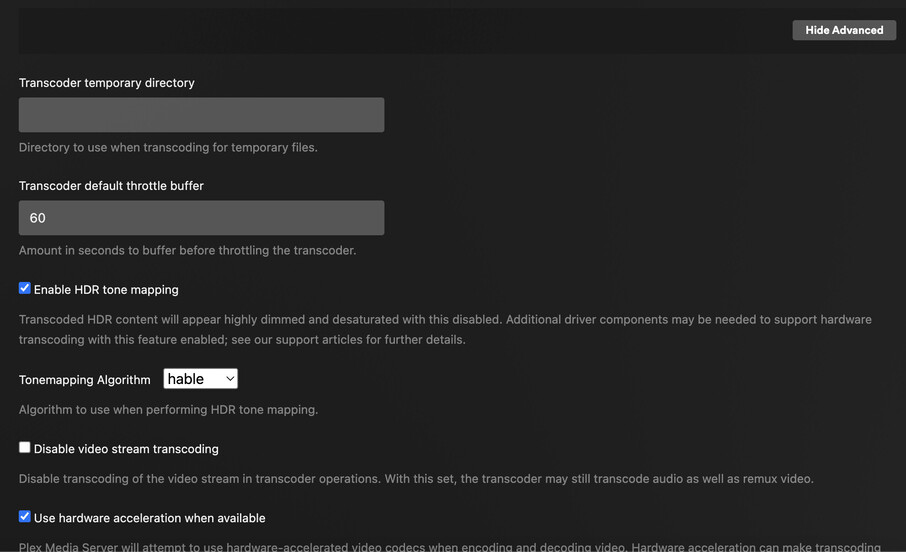
Hello. I am looking for help because I do not have the “Transcoder Quality” dropdown that is shown in several support articles. I’m trying to troubleshoot why my Sonos Beam always shows the output as PCM Stereo, and it would be helpful to know if Plex is the problem, or if it’s somewhere down the line in my setup. Regardless, it seems I should be able to see the Transcoder Quality option. I have Plex Pass.
Thank you in advance.
I had something similar with my setup. Sonos beam was always in Stereo, turned out to be the pass through settings on the tv that was causing my issue.
Plex Documentation → Server Settings → Transcoder
I do not know why the setting does not appear for PMS on the Shield Pro.
The setting applies to video, not audio, transcoding.
It does not apply when hardware accelerated transcoding is enabled.
Yeah, my TV is being a real pain. It keeps reverting to “Auto” in the Audio Output section. I have changed it to “Dolby Digital” several times a day, but it just reverts. I can tell because the audio sounds like crap, and I verify it in the Sonos app (it shows PCM).
If it helps any.
My shield advanced sound settings are set to:
Match content audio resolution: disabled
Match Dolby/PCM audio levels: enabled
Dolby audio processing: enabled
Select audio formats:
Stereo upmix: disabled.
On my TV (Sony) I have the Dolby Digital Plus Output set to Dolby Digital Plus (there is an option on my TV for just Dolby Digital).
That’s exactly what I have, except for matching PCM levels. When I did that, the volume on everything drastically reduced.