Server Version#: 1.41.8.9834
Player Version#: 8.45 (9684, Apple TV) and 2025.22.0 (1195, iOS)
Despite my best efforts, I can’t seem to get Plex to transcode to anything other than 720p or less. I am able to direct play/stream high bitrate content to all clients, but as soon as transcoding is enabled, it’s kneecapped at 720p…
PMS is running as a docker container (ie an “app”) on my TrueNAS server (installed on bare metal). I have an Intel 12700k CPU, and plex pass. Hardware transcoding is enabled and seemingly working. The container is using “host” networking, and my clients (iPhone and Apple TV) are on the local network and on the same subnet as PMS.
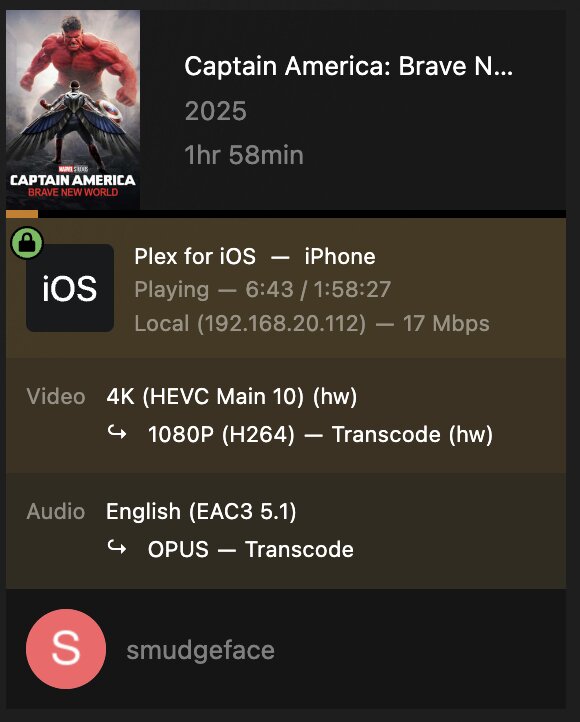
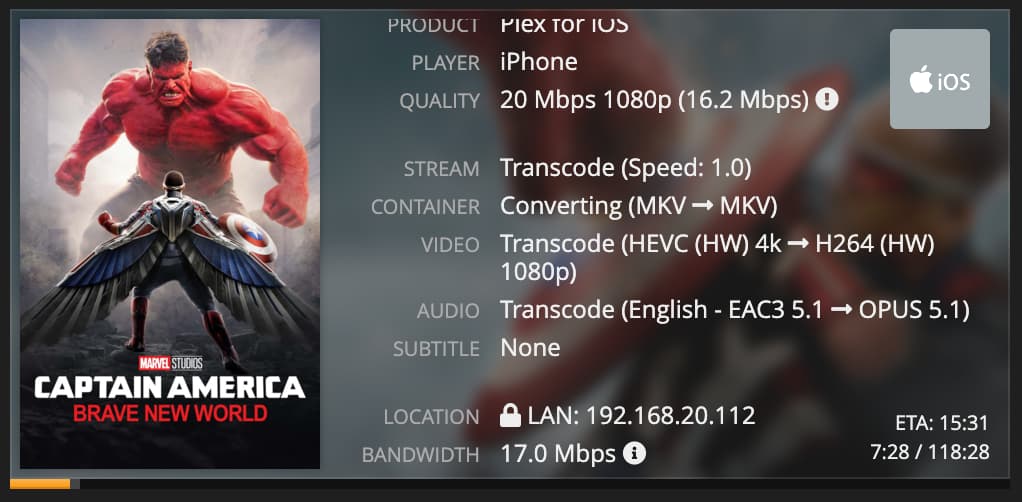
In the attachments are screenshots from PMS and Tautulli when I tried to transcode a 4K movie to “1080p HD (High)” on my iPhone, which estimates “20 Mbps (About 9 GB per hour)”. You’ll see that the transcode is using HW (correct) but the output is in “SD” and 3 Mbps 720p (incorrect).
I have tried toggling “Enable HEVC video Encoding”, but it has no effect other than to change the transcode output from H264 to HEVC (but still “SD”). Interestingly, Tautulli reports “Transcode (Speed: 17.2)” instead of “Transcode (Throttled)” when I disable HEVC video encoding. But, regardless, the output is always 720p.
The “Transcode (Throttled)” in my screenshot bothers me, but I have no idea why that would be the case… Perhaps that’s a clue?
I also uploaded the logs which were taken immediately after starting a stream to my iphone with 1080p requested. I’m happy to upload anything else that might help diagnosis.
Any ideas what might be going on here?
Plex Media Server Logs_2025-08-13_01-12-05.zip (5.3 MB)
“Transcode (Throttled)” indicates that the transcoder has already already reached the amount of time you’ve configured for the setting:
Settings -> [Select Server Name] -> Transcoder -> Transcoder default throttle buffer
As far as I know the default is 60 seconds; so it’s not surprising that would be reached pretty quickly in your configuration (for H.264). Transcoding to H.265 will take longer to reach a throttled state.
That in particular is nothing to be concerned about and likely has nothing to do with the problem you’re experiencing.
The screenshots suggest that there is a bitrate limit of 3 Mbps in effect for the transcoding. You cannot sensibly cram 1080p resolution into a 3mbps stream, particularly with hardware transcoding which is not optimized for efficiency.
You should investigate
- is there a bitrate limit defined in the settings of the client?
- is there a bitrate limit defined in the server settings for remote connections?
- is the client in a different IP network than the server? (particularly when your LAN is quite complex and uses VLANs, or if the server is hosted within a VM or container)
Thanks for your reply.
- is there a bitrate limit defined in the settings of the client?
Definitely not intentionally. I’ve searched for any client or server setting which might limit bandwidth to 3 Mbps, and there’s none
- is there a bitrate limit defined in the serversettings for remote connections?
I’ll double check if this is the case, but I don’t believe so. I allow all clients, Remote or Local, to have unlimited bandwidth. Also, all clients are local.
- is the client in a different IP network than the server? (particularly when your LAN is quite complex and uses VLANs, or if the server is hosted within a VM or container)
Definitely not. Both client and server are on the same subnet. My server is in a container, but the container uses “host” networking, putting it on the same network as the host OS. Port forwarding from my router works to the PMS IP, and PMS reports it had direct internet access. I do believe networking is not the issue.
Enable debug logging in your server.
(Do NOT enable “verbose” logging.)
stop and restart your server.
Start playing the same video again, using the same client. Wait ~2 minutes.
Then fetch the server logs and inspect the Plex Media Server.log
scroll down to the timestamp where playback was initiated.
Give particular attention on lines which are around the string MDE:.
You should find out why transcoding was initiated using the information contained in the logs.
Grabbed the logs, and here’s what I’ve found so far (timestamps removed for brevity):
MDE: Selected protocol hls; container: mkv
MDE: analyzing media item 62289
MDE: Captain America: Brave New World (2025): Direct Play is disabled
MDE: Captain America: Brave New World (2025): media must be transcoded in order to use the hls protocol
MDE: Captain America: Brave New World (2025): no direct play video profile exists for http/mkv/hevc
MDE: Captain America: Brave New World (2025): no direct play video profile exists for http/mkv/hevc/eac3
Captain America: Brave New World - video.width limitation applies: 3840 > 1920
MDE: Captain America: Brave New World (2025): Direct Streaming is disabled, so video stream will be transcoded
MDE: Captain America: Brave New World (2025): no remuxable profile found, so video stream will be transcoded
MDE: Cannot direct stream video stream due to profile or setting limitations
Codecs: testing hevc (decoder) with hwdevice vaapi
Codecs: hardware transcoding: testing API vaapi for device ‘/dev/dri/renderD128’ (Intel AlderLake-S GT1)
…
[Req#5218bd/Transcode] Streaming Resource: Reached Decision id=18194 codes=(General=1001,Direct play not available; Conversion OK. Direct Play=3000,App cannot direct play this item. Direct play is disabled. Transcode=1001,Direct play not available; Conversion OK.) media=(id=62289 part=(id=62365 decision=transcode container=mkv protocol=hls streams=(Video=(id=132254 decision=transcode bitrate=1527 encoder=hevc_vaapi width=704 height=294) Audio=(id=132255 decision=copy channels=6 rate=48000))))
Completed: [192.168.20.112:57145] 200 GET /video/:/transcode/universal/decision?directPlay=0&directStream=0&directStreamAudio=1&protocol=hls&fastSeek=1&path=%2Flibrary%2Fmetadata%2F18194&session=a923156c-a34c-492b-a453-3340091533af&mediaIndex=0&partIndex=0&mediaBufferSize=50000&hasMDE=1&subtitleSize=0&videoQuality=60&videoResolution=1920x1080&audioBoost=100&autoAdjustSubtitle=1&subtitles=none&maxVideoBitrate=8000&location=lan (7 live) #5218bd TLS GZIP 42ms 5789 bytes (pipelined: 3)
Those last two log entries seem to be contradictory. The first indicates that a decision was reached to play with width=704 and height=294. The second indicates that transcoding decision was videoResolution=1920x1080
With on ly these snippets it is not possible to say anything definitive.
But I tend to assume that the last snippet is in fact from a different plexback attempt, or by a different client.
If you still have “automatic quality” activated, disable it. It never worked as it was supposed to in all situation.
This is definitely from my most recent playback attempt on iPhone. I looked a bit further in the logs, and found this. It appears to be the actual call to the transcoder (FFMPEG).
Aug 14, 2025 01:45:50.025 [140670549343032] DEBUG - [Req#911d17/Transcode/3d2676a8-ee7f-4863-888d-3d27302eec92/JobRunner] Job running: FFMPEG_EXTERNAL_LIBS=‘/config/Library/Application\ Support/Plex\ Media\ Server/Codecs/46f74ab-560174306fe167a5978a79dd-linux-x86_64/’ LIBVA_DRIVERS_PATH=“/config/Library/Application Support/Plex Media Server/Cache/va-dri-linux-x86_64” X_PLEX_TOKEN=xxxxxxxxxxxxxxxxxxxxxxxxxxxxxxxxxxxxxxxxxx “/usr/lib/plexmediaserver/Plex Transcoder” -codec:0 hevc -hwaccel:0 vaapi -hwaccel_fallback_threshold:0 10 -hwaccel_output_format:0 vaapi -hwaccel_device:0 vaapi -extra_hw_frames 0 -analyzeduration 20000000 -probesize 20000000 -i “/media/4K Movies/Captain America Brave New World [2025]/Captain America Brave New World.mkv” -filter_complex “[0:0]hwupload[0];[0]scale_vaapi=w=704:h=294:format=p010[1];[1]hwupload[2]” -map “[2]” -metadata:s:0 language=eng -codec:0 hevc_vaapi -b:0 2012k -maxrate:0 2012k -bufsize:0 4024k -r:0 24 -force_key_frames:0 “expr:gte(t,n_forced*8)” -map 0:1 -metadata:s:1 language=eng -codec:1 copy -copypriorss:1 0 -segment_format matroska -f ssegment -individual_header_trailer 0 -flags +global_header -segment_header_filename header -segment_time 8 -segment_start_number 0 -segment_copyts 1 -segment_time_delta 0.0625 -segment_list “http://127.0.0.1:32400/video/:/transcode/session/3d2676a8-ee7f-4863-888d-3d27302eec92/f016aa53-8809-4d0c-a54a-907183e98eef/manifest?X-Plex-Http-Pipeline=infinite” -segment_list_type csv -segment_list_size 5 -segment_list_separate_stream_times 1 -segment_list_unfinished 1 -segment_format_options strip_dovi=1:output_ts_offset=10 -max_delay 5000000 -avoid_negative_ts disabled -map_metadata:g -1 -map_metadata:c -1 -map_chapters -1 “media-%05d.ts” -start_at_zero -copyts -vsync cfr -init_hw_device vaapi=vaapi:/dev/dri/renderD128,driver=iHD -filter_hw_device vaapi -y -nostats -loglevel quiet -loglevel_plex error -progressurl http://127.0.0.1:32400/video/:/transcode/session/3d2676a8-ee7f-4863-888d-3d27302eec92/f016aa53-8809-4d0c-a54a-907183e98eef/progress
Notice the line “scale_vaapi=w=704:h=294”. I wish I could figure that out
A bit earlier in the logs is this. You’ll see “videoResolution=1920x1080” and “maxVideoBitrate=20000” which supports the idea that the client is requesting 1080p at 20 mbps, but for some reason the transcoder is being called with 704x294
Aug 14, 2025 01:45:49.951 [140671491902264] DEBUG - Completed: [192.168.20.112:62680] 206 GET /video/:/transcode/universal/start.m3u8?directPlay=0&directStream=0&directStreamAudio=1&protocol=hls&fastSeek=1&path=%2Flibrary%2Fmetadata%2F18194&session=3d2676a8-ee7f-4863-888d-3d27302eec92&mediaIndex=0&partIndex=0&mediaBufferSize=50000&hasMDE=1&subtitleSize=0&videoQuality=100&videoResolution=1920x1080&audioBoost=100&autoAdjustSubtitle=1&subtitles=none&maxVideoBitrate=20000&location=lan (15 live) #911d12 TLS 9ms 391 bytes (range: bytes=0-)
I enabled verbose logging - no extra information there.
I’ve confirmed “automatic quality” is disabled.
my next step is going to be a firing up a fresh install of PMS in a new container and see if it works better/different. My current install has been migrated from a previous NAS - that shouldn’t matter, but who knows
Is there a “good” way to do that? Obviously I’ll eventually want to restore my old library to preserve watch history. Is this even worth the bother to try?
OK, so I installed a second container instance with fresh config, pointed it to the same library folders, and pointed my clients to the new server. I made no changes to my client configuration and ran the new server with no changes to default settings.
Again, in my iOS client, from the triple-dot menu at the bottom right (while viewing a video) I chose “Quality > 1080p HD (High)”. This is what I see in Plex dashboard and Tautulli
In other words, it works great. So, there’s hope.
I just can’t figure out what is wrong with my original server and I don’t want to run with this new server because I’ve lost all my view history, and I’ll have to adjust my library shares for all users. There has to be a better way…
Is there some way to reset all settings in an existing Plex Server instance? I don’t want to lose my shares or view history…
OK, I figured it out…
I diffed the Preferences.xml on my new instance with my old instance, and noticed the following important details
Problematic settings in my old file:
-
TranscoderVideoResolutionLimit="704x480": The main culprit, capping my resolution.
-
HardwareDevicePath="8086:4680:...": This appears to be a hardcoded path to the GPU from my old system. While it might work by coincidence, it’s brittle and unnecessary on the new system (let Plex auto-detect)
I stopped my server, saved my Preferences.xml as Preferences.xml.bak, and restarted the server. After the usual song and dance, I was back up and running. All libraries were restored, all history was maintained, and most importantly… transcoding is working as it should.
Hope this helps someone else in the future.
Oh, one more thing… there is almost no information about that “TranscoderVideoResolutionLimit” setting online. No idea why that was set. My old server was not very powerful, so possibly Plex distributions for that NAS were intentionally kneecapped for performance reasons.
I did find this:
It says:
transcoderVideoResolutionLimit (text)
Maximum video output resolution for the transcoder. (default: 0x0)
It also talks about hardwareDevicePath (text) as an Undocumented Setting.