For a very long time I’ve searched for a solution how to run specifically NordVPN and be able to access Plex Media Server remotely. No answers that I have found either worked or they were so complex that I either didn’t understand the solution or it was too much of a stretch to attempt - TILL NOW.
This solution specifically applies to a Windows-based Plex Media Server on a home network using an ASUS RT-AC68U router running AsusWRT-Merlin firmware.
The specifics in my situation are:
- A PC running Windows 10 PRO using a static local IP address running Plex Media Server .
- ASUS RT-AC68U running AsusWRT-Merlin firmware: https://www.asuswrt-merlin.net/
Download: https://sourceforge.net/projects/asuswrt-merlin/files/RT-AC86U/Release/ - Using the OpenVPN NordVPN option on the router: https://nordvpn.com/tutorials/asustwrt-merlin/
AsusWRT-Merlin installed over the default ASUS firmware is a wonderful firmware that provides many new options for router setup as well as rapidly updated security fixes to help you attempt to stay ahead of the challenges of the modern internet. I have the router setup as a standard AsusWRT-Merlin installation complimented by the NordVPN setup as instructed in the link above. With this setup all internet traffic on my home network goes through the NordVPN tunnel. Unfortunately, this does not allow remote access to Plex Media Server which routinely fails giving network unreachable error. What is needed is a way for NordVPN to allow Plex to function via NordVPN setup (not possible), or otherwise a way to have Plex Media Server not default to the NordVPN tunnel and rather use the standard WAN for it’s internet activity instead. It is this later option that I have found a solution for.
Now for the solution -
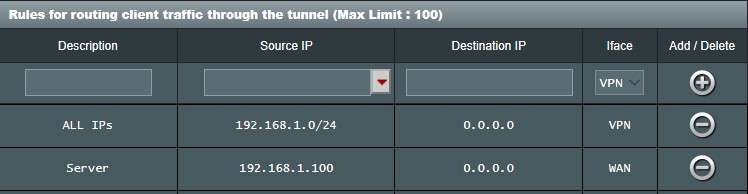
Today I found a well detailed website that explains simply how to selectively route using AsusWRT-Merlin without requiring special coding! https://www.vpnuniversity.com/routers/use-selectivepolicy-routing-kill-switch-asuswrt-merlin You will find this article very easy to apply so simply excluded the Windows 10 Pro PC running PMS from the VPN. (see image below)
This worked!
To boil this down to simple steps:
- On the “VPN Client” tab under OpenVPN Client Settings turn on the “Redirect Internet Traffic” switch and set to “Policy Rules (strict)”.
- Setup the first rule as instructed in the VPNUniversity link above. This will cause all of your network devices to use the VPN tunnel. This image shows the rule.
- Then, setup a second rule that takes the Plex Media Server PC and exclude it from the VPN tunnel, defaulting to the standard WAN internet settings.
This is as simple a method I have found and works! (or at least it has so far!) Please let me apologize to any and all who understand this topic more thoroughly than I. This method just works and should be stable. There is one caveat that follows which would elegantly refine this solution but until I can figure out how to make that refinement work, this is the solution I’m keeping.


PS. It would be better to have only Plex avoid the VPN rather than the whole computer, so I attempted to direct the router to exclude only the list of IP addresses for incoming connectivity that Plex specifies but this fails as the PC continues to be assigned the NordVPN IP address.
PSS. All standard caveats are implied here. I take no responsibillty for any problems you might have if you follow these suggestions. 
