So the 70 and the 60 UHD both played and forced transcoded just fine. Which is great! Plex Media Server Logs_2020-05-21_09-23-40.zip (4.0 MB)
However, Id prefer to not watch endless loops of jellyfish forever, so when I tried watching my media, It still buffered.
Same as before, Howo to train your dragon played fine and skipped forward fine, but when pause and scrolled forward to a later point in the file, I got endless buffering.
Spirdemand buffered on its own before I even asked anything of it.
Here are dem logs too…Plex Media Server Logs_2020-05-21_09-35-00.zip (4.2 MB)
I see the playback of “How To Train Your Dragon - The Hidden World”
There is something in that video which isn’t right. Some of those Web-downloaded files are not what they claim to be. This might be just one of those cases.
The transcoder is sleeping and waiting for the TV.
May 21, 2020 09:26:22.465 [0x7fb38cf01700] DEBUG - Auth: authenticated user 1 as Jshebroe75
May 21, 2020 09:26:22.465 [0x7fb34e2b3700] DEBUG - Request: [192.168.1.13:58631 (Subnet)] GET /player/proxy/poll?deviceClass=pc&protocolVersion=3&protocolCapabilities=timeline%2Cplayback%2Cnavigation%2Cmirror%2Cplayqueues&timeout=1 (9 live) GZIP Signed-in Token (Jshebroe75)
May 21, 2020 09:26:22.465 [0x7fb34e2b3700] DEBUG - Content-Length is -1 (of total: -1).
May 21, 2020 09:26:22.792 [0x7fb34f159700] DEBUG - Transcoder segment range: 0 - 30 (30)
May 21, 2020 09:26:22.961 [0x7fb3852dd700] DEBUG - Session pzi114tfhxltgcaor6t2r19k (4) is throttling
May 21, 2020 09:26:22.961 [0x7fb347fff700] DEBUG - [Transcoder] Throttle - Going into sloth mode.
May 21, 2020 09:26:23.951 [0x7fb38cf01700] DEBUG - Auth: authenticated user 1 as Jshebroe75
May 21, 2020 09:26:23.951 [0x7fb3852dd700] DEBUG - Request: [192.168.1.13:59061 (Subnet)] GET /:/timeline?ratingKey=7394&key=%2Flibrary%2Fmetadata%2F7394&playbackTime=69039&playQueueItemID=1322&state=playing&hasMDE=1&time=69000&duration=6246000 (9 live) GZIP Signed-in Token (Jshebroe75)
May 21, 2020 09:26:23.952 [0x7fb3852dd700] DEBUG - Client [imwfgjvqzo4ouu2xzkixdpld] reporting timeline state playing, progress of 69000/6246000ms for guid=, playbackTime=69039ms ratingKey=7394 url=, key=/library/metadata/7394, containerKey=, metadataId=7394, source=
May 21, 2020 09:26:24.033 [0x7fb3852dd700] DEBUG - Play progress on 7394 'How to Train Your Dragon: The Hidden World' - got played 69000 ms by account 1!
Can you play either in Plex/Web or on another device ?
Also, please play something else.
How to train your dragon on MacbokPro. Direct play = Super jumpy. Fast forwarded fine.Plex Media Server Logs_2020-05-21_10-11-44.zip (4.6 MB)
How to train your dragon On MacBook Pro Forced transcode = Played fine. Fastworded fine
Plex Media Server Logs_2020-05-21_10-15-28.zip (4.6 MB)
Toy story 70mbs on MacBook Pro Direct play = Super jumpy. Fast forwarded fine.Plex Media Server Logs_2020-05-21_10-17-51.zip (4.6 MB)
Toy story 70mbs on MacBook Pro Forced transcode = Played fine. Fastworded fine
Plex Media Server Logs_2020-05-21_10-20-08.zip (4.6 MB)
Toy story Direct ply on Samsung Played fine and fast forwarded fine. Plex Media Server Logs_2020-05-21_10-24-19.zip (4.7 MB)
Toy story Forced encode on samsung played fine and fast forwarded fine.
Plex Media Server Logs_2020-05-21_10-28-57.zip (4.7 MB)
SO this means that it’s my files? Not my TV or NAS?
Also, do I need to keep posting logs after every test play, or can you see what’s happening for the past few plays
If DirectPlay is jumpy, then it’s AllStop right there.
Even the smallest of supported Synology systems can DirectPlay without issues.
There is a network problem.
- Are you using Jumbo frames (MTU > 1500 standard)?
- WiFi for both devices?
I dont know what jumbo frames is, and everything is hardwired between Cat8 ethernet cable.
no wifi at all
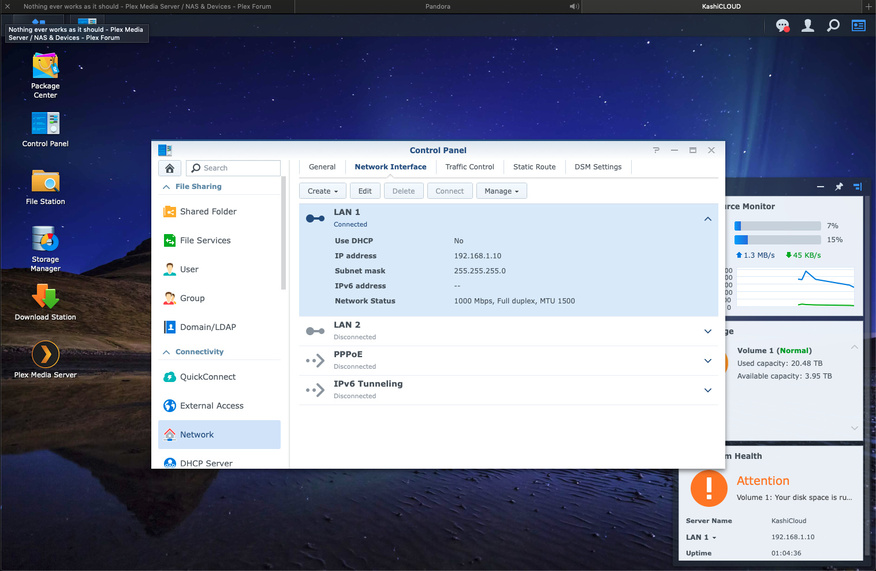
It should look like this.
Notice the MTU is set at 1500. That’s ethernet default and how all networking should be unless a very special long-haul connection application with extremely high latency between Send-Ack packet exhanges.
Let’s try an experiment.
Copy a file from the NAS to your Computer.
Tell me how fast it’s copying, what size and how long it took.
Mine doesn’t look like that. TheMTYU is the same but there’s some other stuff goin on I dont understand. It looks like this.
this is the file transfer experiment:
Deadpool MKV - 11.15gb = 1m50s
Brandon Sanderson Mistborn Trilogy AudioBook (Folder w/ ) - 2.35gb = 30s
Icons folder - 489mb = 29.5s
Avengers MKV - 34.2gb - 5m09s
Untitled [hotoshop file - 34mb - 1s or less
NOW I see it. Thank you
- You have created a Bonded interface but are using only ONE cable.
- DELETE the bonded adapter and let it return to be ETH0 and ETH1
This is why you’re having problems. it keeps trying to send data over the missing wire.
Ok that makes sense. I did that and it returned to Lan1 and everything looks like yours but I dont have an IPv6 address.
Also, will I benefit from a bond if I add a second cable? or will I not notice the differance?
Do you need an IPv6 LAN address?
If so, Control Panel - Network Interface - Select the appropriate adapter → EDIT → IPv6 tab.
Plex doesn’t use IPv6 so if you need it, it’s only for your equipment.
I’ll have to do more research to find out what an IPv6 actually does and if I need one or not.
So what should I test now to see if that was the issue for real this time?
Adding a second cable, which requires a Managed Switch (the other end of the bonded connection)
will allow you to distribute up to 2 Gbits/sec to multiple hosts.
It will not send 2 Gbps to a single host. Bonding only “gives the highway more lanes for traffic” - Everyone still travels at the speed limit (1 Gbps)
Undesrstood. So no. No I dont need that haha!
Unless you’re like me, you usually don’t need it.
I would just leave it as it is, ETH0 or ETH1 and let it go.
Plex should stabilize and work well for you now.
Please let me know?
Man I was SUPER EXCITED for a moment…
Toy Story played perfect. No buffers, not sturdders, skipped forward fine and played back quickly, paused then scrolled forward a few minutes, viola! played back great. Looked amazing.
Theeeeeen I want back to the original Ba^&ard of a file Doctor Strange…Same buffering problem. Skipped forward fine and recovered, but failed to recover after a scroll forward though timber.
Spiderman…Buffered.
SOOOOOO Close! I feel like it was a little better, because instead of stuttering buffering signals all the time, it would be playing back but the audio would stutter, but that was the only difference I noticed on the other two files.
Heres the logPlex Media Server Logs_2020-05-21_18-01-13.zip (3.3 MB)
And to make things fair…heres som jellyfish logs for you too
50, 70, and 110 all played fine direct, and forced.
200 and 120 still gave me the bot back to the menu screen, but 120 would play forced down to 20mbs, but would not eastward through it.Plex Media Server Logs_2020-05-21_18-13-52.zip (3.4 MB)
What now Doc?
Perfect.
I expect the J3455, with its known design flaw (yes it has one) to be fussy at any source material above 100 Mbps.
It’s a Celeron CPU with a KabyLake QSV chip glued on. There’s going to be bandwidth issues.
So me a favor please.
- restart plex (so I can see a clean log)
- Wait 60 seconds for it to stabilize after startup.
- Play only Dr Strange
- Let it play for 2 minutes
- stop
- Pull and attach the logs.
I wasn’t really sure how to restart Plex by itself, so I exited out ofmthe app on the tv, rebooted the whole nas, then opened Plex. Hopefully that gives you a clear log.
Here ya goPlex Media Server Logs_2020-05-21_19-04-39.zip (2.8 MB)
Thank you for the log.
To control the app is done by Package Center.
Package Center -> Installed -> Click the Plex box
You’ll see it “running”. Clicking the pull down will give you a choice of Stop or uninstall. Select stop
Once stopped , Select Run.
That’s it.
As for the movie, I need to see the XML. I’m still not getting what I expect.
Hover over the movie’s icon -> Expose the ellipsis -> Click it -> Get Info -> View XML
Copy and paste the top portion; from the beginning to end end of the Media section down to just before the Genre and Actor info starts.