Apologies for the delay.
Please see attached
I tried playing a normal collection, then a smart collection and smart playlist
All just spun
Plex Media Server Logs_2024-05-29_01-35-55.zip (4.9 MB)
A regular playlist did work after about 40 second but the one listed above will spin forever, even if I skip to next video
You are just having one hell of a time.
Let’s first hit the shield settings.
Key points:
- Let the Shield (internally) deal with refresh rate switching, etc.
- Let the Shield burn the subtitles (Automatic)

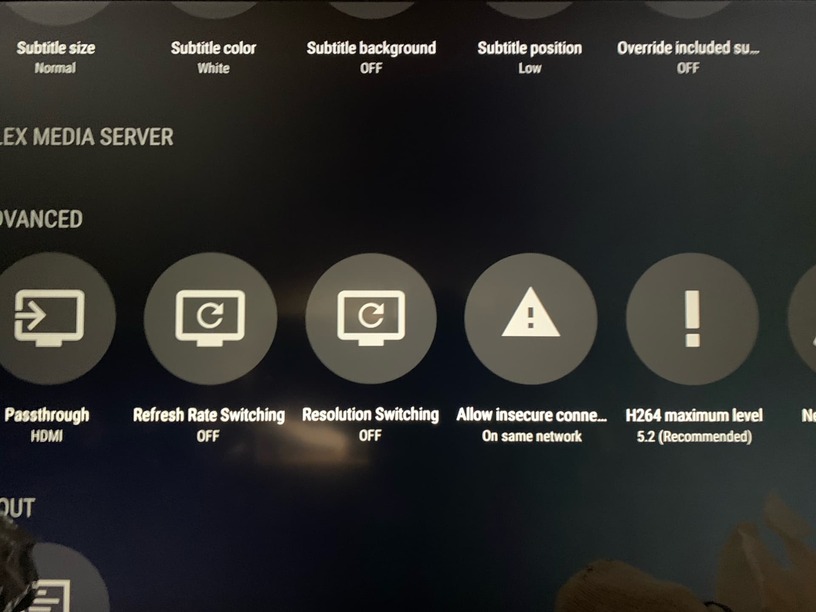

I just created a simple, 3-movie playlist.

I hit play and 4 seconds later, it’s streaming without issue.
We need to figure out where it’s going amuck for you.
For most folks, things get confusing around subtitles.
Here is where you are using the shield, with subtitles.
May 29, 2024 01:29:16.124 [11492] DEBUG - Request: [192.168.86.31:44570 (Subnet)] GET /hubs/continueWatching?contentDirectoryID=2%2C3%2C1%2Cplaylists&includeDetails=1&includeExternalMetadata=1&includeLibraryPlaylists=1&includeMeta=1&includeRecentChannels=1&includeStations=1&includeTypeFirst=1&libraryHubsOnly=1 (6 live) #19098b TLS GZIP Signed-in Token (InsipidCjs) (SHIELD Android TV)
May 29, 2024 01:29:16.124 [11492] DEBUG - [Req#19098b] HubCache: Adding '1/continueWatching/1/hubs/continueWatching/en-auexternal-media,indirect-media,hub-style-list/contentDirectoryID=2%2C3%2C1%2Cplaylists&includeDetails=1&includeExternalMetadata=1&includeLibraryPlaylists=1&includeMeta=1&includeRecentChannels=1&includeStations=1&includeTypeFirst=1&libraryHubsOnly=1' to the cache (1/continueWatching/1/hubs/continueWatching/en-auexternal-media,indirect-media,hub-style-list/contentDirectoryID=2%2C3%2C1%2Cplaylists&includeDetails=1&includeExternalMetadata=1&includeLibraryPlaylists=1&includeMeta=1&includeRecentChannels=1&includeStations=1&includeTypeFirst=1&libraryHubsOnly=1).
May 29, 2024 01:29:16.174 [11492] DEBUG - [Req#19098b] HubCache: Computed '1/continueWatching/1/hubs/continueWatching/en-auexternal-media,indirect-media,hub-style-list/contentDirectoryID=2%2C3%2C1%2Cplaylists&includeDetails=1&includeExternalMetadata=1&includeLibraryPlaylists=1&includeMeta=1&includeRecentChannels=1&includeStations=1&includeTypeFirst=1&libraryHubsOnly=1' in 49 ms.
May 29, 2024 01:29:16.174 [11492] DEBUG - [Req#19098b] HubCache: 58 hubs cached, 53.2% hit ratio.
May 29, 2024 01:29:16.175 [11492] DEBUG - We're going to try to auto-select an audio stream for account 1.
May 29, 2024 01:29:16.175 [11492] DEBUG - Selecting best audio stream for part ID 4640 (language: en)
May 29, 2024 01:29:16.175 [11492] DEBUG - We're going to try to auto-select a subtitle for account 1.
May 29, 2024 01:29:16.175 [11492] DEBUG - Subtitles: Found a candidate subtitle language [en] for a foreign film
May 29, 2024 01:29:16.175 [11492] DEBUG - Audio Stream: 15717, Subtitle Stream: 15718
May 29, 2024 01:29:16.177 [11492] DEBUG - We're going to try to auto-select an audio stream for account 1.
May 29, 2024 01:29:16.177 [11492] DEBUG - Selecting best audio stream for part ID 3350 (language: en)
May 29, 2024 01:29:16.177 [11492] DEBUG - We're going to try to auto-select a subtitle for account 1.
May 29, 2024 01:29:16.177 [11492] DEBUG - Audio Stream: 10923, Subtitle Stream: -1
May 29, 2024 01:29:16.178 [11492] DEBUG - We're going to try to auto-select an audio stream for account 1.
May 29, 2024 01:29:16.178 [11492] DEBUG - Selecting best audio stream for part ID 3246 (language: en)
May 29, 2024 01:29:16.178 [11492] DEBUG - We're going to try to auto-select a subtitle for account 1.
May 29, 2024 01:29:16.178 [11492] DEBUG - Subtitles: Found a candidate subtitle language [en] for a foreign film
May 29, 2024 01:29:16.178 [11492] DEBUG - Audio Stream: 10578, Subtitle Stream: 10580
May 29, 2024 01:29:16.180 [11260] DEBUG - Completed: [192.168.86.31:44570] 200 GET /hubs/continueWatching?contentDirectoryID=2%2C3%2C1%2Cplaylists&includeDetails=1&includeExternalMetadata=1&includeLibraryPlaylists=1&includeMeta=1&includeRecentChannels=1&includeStations=1&includeTypeFirst=1&libraryHubsOnly=1 (6 live) #19098b TLS GZIP 56ms 20571 bytes (pipelined: 2)
May 29, 2024 01:29:16.217 [11492] DEBUG - [Req#190984/Transcode/bif/f5b17819-a248-40f6-8c24-9d391dc00f72] Activity: updated activity f5b17819-a248-40f6-8c24-9d391dc00f72 - completed 77.5% - Generating video preview thumbnails
May 29, 2024 01:29:16.238 [11492] DEBUG - Request: [192.168.86.31:44582 (Subnet)] GET /hubs/promoted?contentDirectoryID=2&count=25&excludeContinueWatching=1&includeDetails=1&includeExternalMetadata=1&includeLibraryPlaylists=1&includeMeta=1&includeRecentChannels=1&includeStations=1&includeTypeFirst=1&libraryHubsOnly=1&pinnedContentDirectoryID=2%2C3%2C1%2Cplaylists (8 live) #190994 TLS GZIP Signed-in Token (InsipidCjs) (SHIELD Android TV)
Interesting
I will give that a go and the if the issue persists, should I debug again?
Would disabling subtitles help?
The Shield Pro will play subtitles without blinking.
The key, as I’ve found, is keep subtitles set for “Automatic” in the Shield app.
If you set it to burn anything, you have problems (it’s forcing the CPU to do the work – and drag its feet terribly)
If you lookup an ARMv8 (the TS128 I showed above) or an Intel C2538 CPU (DS1815+ Synology), you’ll be surprised to know both are DirectPlay (as shown in the activity button on Plex).
If you’re getting anything other than ‘DirectPlay’, YES, I do want to see those DEBUG log files.
I’ll be able to see what drove it to transcoding.
I just had a look and all my setting already match the above
What’s the status here please ?
The debug would be identical to the above since the settings are the same?
I am away from home for a few days so can’t get any more debugs till then
Do you still need new debugs even though I haven’t changed any settings?
Check your PM
This is similar to my issue I have been having this past week. Not sure this has to do with the latest update or not, for the past week Plex on my 2019 Nvidia Shield has been loading my personal movies/tv shows slowly. Some of the thumbnail art for movies and tv shows is blank, on top of that doesn’t matter if I’m watching on my main Nivida Shield that has the plex server on it, or my other shield I use as a plex client or just logging into plex from windows, it is all the same symptoms. I noticed under my TV shows episode names are now missing or will finally update on its own after waiting 2mins, same with the thumbnail covers for shows/ episodes, theme music, metadata in general. Noticed a few of my movies are doing the same thing. On top of that just streaming my personal library from Plex has been super slow the past week. Did something change or has anyone else noticed this. Not sure what to do to correct this.
You should probs start a separate post for that, completely different to what I’m experiencing
I can’t use playlists or collections
I was just notified there was a problem with the Shield app.
specifically: Playback of a TV collection never starts.
The reported failure which (now fixed) is TV collections.
The corrections were completed by the development team, tested by them, and sent to QA some 6 hours ago.
I’m still at a loss why I cannot reproduce it.
Are you familiar with ADB (the android debugger) enough to “side load” the Plex app if I give you the commands ?
I still can’t play collections and no, I don’t know anything about that
I’ve updated the app as well
If that’s all your dev told you, I’m afraid they weren’t specific enough. I narrowed it down for you. It works just fine with movies or episodes. It fails, trying to add an entire show/season to a collection.
Correct
Is there not support during weekends or au hours? You provide a service 24/7 and have Australian servers
Please advise
To summarize where we are at a week in:
-Shows can be shuffled (season or entire)
- A playlist with a single show can shuffled
-Collections and Playlists with more than one show fail to shuffle, just constantly load
-Collections and Playlists that are Smart do the same as the above
-According to the user reply, the bug was only fixed for single shows, the above errors or ongoing
-The app also doesn’t show the settings icon to indicate a collection or playlist is smart, which is why every other app instance does
Hopefully we can have this fixed asap, I bough Plex solely to smart shuffle playlists/collections
Awaiting update
Still awaiting solution
We have fix that we are trying to get into a build soon to test. Unfortunately i can’t provide an ETA when it will be available in a beta or the public build
