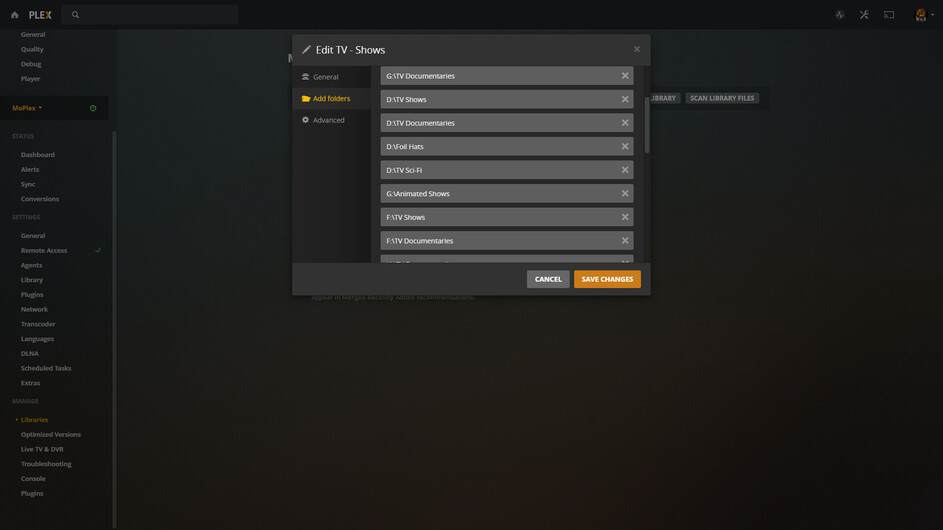
So, is this possible?
On the storage drive being used for the plex server:
Root folder called star trek
Series 1 folder = Picard, season 1 folder
Series 2 folder = Discovery, season 1 folder, season 2 folder, season 3 folder
Root folder gets metadata for STO, and when opening it lists actors of original series and subsequently shows only seasons 1-3 recognised as original series, renames all the media to original series, but end up playing discovery episodes. Does not see Picard season folder at all.
Can different Star Trek series reside in the same root folder? I have the same issue with Marvel.
Clear as mud I’m sure. Please ask for any clarifications. Thanks in advance. -B
No good.
Libraries go in Library Folders off the Root.
D:\TV Sci-Fi
is added to the Library:
Hidden files/System Files/Files that aren’t media are making your life miserable.
You can add as many Library Folders as you want and scatter them around on HDDs, but put all the media in a folder and add that to the Library.
Also - the Library MUST be a TV Show Library.
Movies go in a Movie Library in a Movie Library Folder.
Yeah, you must break out your Star Treks out into the root. When you select a particular folder to scan for TV shows, it assumes EVERY subfolder within it has files belonging to one show only. So it will try its best to match to the name of the folder, which in this case is Star Trek, and it must have decided it was Star Trek TOS. Then, it looks into every sub folder within that folder (and any sub folder, and and sub-sub folders) looking for SxxExx files. It then takes on faith that ANY file with - for example - S01E01 in it is the first season first episode, no matter what else is in the name. You may notice that each episode seems to have duplicate video files, right?
Happened for me with my Scooby Doo and Batman folders. I ended up breaking those out of there to the root of my TV show folder, and to keep them all together I changed the names of the folders to be like:
“Batman 1991 - Batman - The Animated Series (1991)”
“Batman 1997 - The New Batman Adventures (1997)”
etc. This kept them in the proper order in my folder view when I look for files. This does screw up the show matching, but you then just fix the match and Plex will then not care what the folder name is any more.
What do you mean by the same issue with Marvel? Are you doing a folder with all the recent and/or older marvel TV series, like Daredevil, Loki, Wandavision, etc? Has to be done the same way. But organize them by “Marvel - Loki (2021)” if you like.
I’m not a fan of the way Plex wants this, but it’s what I ended up having to do. Thinking about it, I think if you move Star Trek outside of the TV show folder to another folder that is not used by any library, you can then add this “Star Trek” folder as another source for this TV show library, and it’d integrate nicely while still containing only your show.
(Side note, I noticed Plex doesn’t seem to know/care if you include the show name in the files. It seems to get the context of what show an episode belongs to by the folder it is in. This avoids having annoyingly long file names if the show itself is super long as well. I’m looking at YOU, “Suppose a Kid from the Last Dungeon Boonies Moved to a Starter Town” and your long episode titles such as "Suppose someone told you they’d do anything for you, which you appreciate but you know you should push back?"