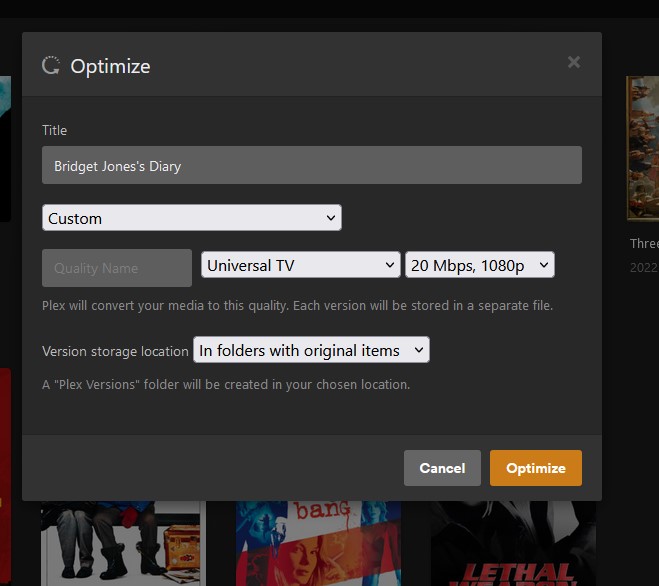
Sometimes, I have to optimize movie files. If you haven’t tried this feature for corrupt or really slow streaming files, I highly suggest you give it a go. For this instance, I run my Plex Server off a Synology NAS. It’s wonderful for plex, however when it comes to optimizing a movie - it’s rather slow.
I have other more powerful computers on my network and at my disposal that could make this task a lot quicker. I don’t know why the plex “optimize” feature does under the hood when you engage this activity. I don’t know how to replicate it’s parameters in HandBrake or other video software.
Why not make an Optimize Plex app to run on other more powerful computers? To reinforce this idea, after you optimize a video file - the original and converted optimized version is linked. Which means if you delete the original you lose the optimized version. Sure there are ways around this of copying the optimized version, deleting, and re-injecting into Plex. BUT WHY DO THAT?
Why not take your quickly made optimized version and completely delete the file that does NOT work well in Plex and inject it with the optimized version that was quickly made by a more Powerful computer that is not your Plex Server?
Plex’s “Custom” optimizing option is lacking in every way possible. There are two settings that are very basic. You can choose between device profiles and a few different video formats. My statement is compared to HandBrake.
Then what are the quality settings, filters, etc does Plex Optimizer use so we can replicate it? If you don’t know or would like to stream line the concept; why not develop a standalone Optimizer with Plex’s simple presets - which was the original purpose of my thread; to be used on more optimal hardware.
In HandBrake you can choose video encoder, frame rate, filters, audio settings, etc. No one knows what Plex does in the way of configuration when it comes to encoding under profiles. when you select “optimize for T.V.” or even custom - Universal TV, 20 Mbps. There is nothing beyond that.
And I’m not even referring to going into Plex’s config files. I’m talking about settings for every average user.
I’ll further expand on the "Optimized " version slightly off topic of this thread. Why can we not have a setting to use and play the Optimized version for every user and streaming device by default. Why must we select optimized version under version streaming?
I think there should be a way to enforce optimized versions for default streaming, and the ability to delete the older version to conserve space without Plex going bonkers and automatically deleting the optimized version.
The values that Plex uses are logged, and you can see the exact values used. Create an Optimize... job, check the log.
The most interesting settings (IMO) are the buffer shaping, to create files with constrained bandwidth profiles for easy streaming. It’s rare to see those used for “home” encoding. There are a few discussions about this here on the forum.
There are also projects like Tdarr for media mangling and transcoding in bulk.
For many users the best option is to just use a PC that’s already competent at transcoding. Quick Sync is remarkable. NAS for storage, SFF PC for Plex Transcoding.
There are a few feature requests and LONG discussions about “default quality”. This won’t give you any satisfaction today, but there has been the occasional “we’re working on it” from Plex.