Pesky bug with auto content scanning

Server Version#: 1.21.0.3711 (Replicated in PSM for NAS and also MAC)
Player Version#: 1.24.0.1483-714cba36

Want to report this bug hoping someone from PLEX will fix in future releases…

Issue:
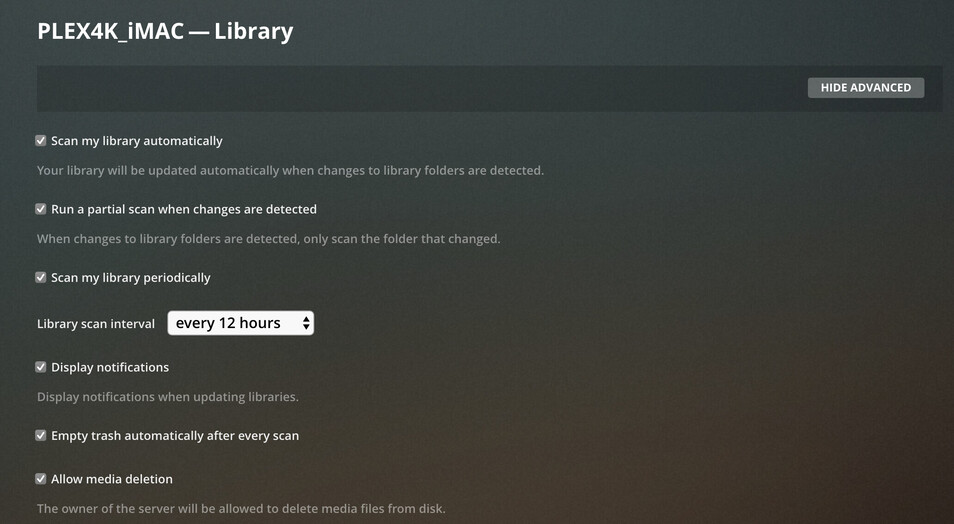
When Movies library got multiple folders added, the auto scanning not working when content added to the folders. Once the content is copied, I always need to scan the content manually.

Note that I have already enabled auto content scanning via PMS settings.

My Settings as below and hope you guys will fix this soon…

I don’t understand, @trumpy81. What’s the problem with adding multiple folders to the library?

I would suggest that it’s more correct to add each of the “Movies YYYY” folders, rather than adding a higher-level folder.

@AliveKiller, how is Movie_Belly mounted? Is it a USB drive, or a mounted NAS share?

That matches my understanding and experience, and I think it’s what the OP described.

@AliveKiller, I am curious if automatic scanning works correctly for you on the Mac, when some media files are in local directories. If your media is on a network share, I’m wondering if that’s contributing to the problem.

For instance, I have one Library with multiple folders. Changes are detected in local folders immediately. Change in network folders are not detected.

Thanks all for your feedback. Much appreciated.

@Volts: To test the issue, below is the setup.

  1. All Movies are in NAS

  2. PMS Running in NAS mounts are as below. They are directly mounted to local folders.

  3. PSM Running in imac mounts as below. They are also mapped as local volumes as per MAC functionality

Notes:

  1. I like to keep my folder structure as I got over 4000+ movies and I don’t want to scan them again.
  2. My TV-Shows lib only got 1 folder and Auto Scanning working. This is why I assumed this as a bug with when you have multiple entries.

Happy to provide any logs.

1 Like

If I add the parent folder, will all movies will scan again? Coz I don’t want to scan them again due to the size of the movies lib. Metadata folder is 85GB.

I am wondering if you have two related-but-not-identical issues -

On the Mac, I’m not sure if automatic scanning of network shares works. If it does, it also relies on support from the NAS. (I’m not optimistic. I suspect it would require a different mechanism + polling. Maybe somebody can speak up.)

And on the NAS - what is the NAS, by the way? Synology? - you might be running into a limitation with the maximum number of directories that can be monitored automatically.

Generic Linux, plus some background information:
https://forums.plex.tv/t/increase-the-number-of-directories-linux-can-monitor-notify/209156

If Synology:

Either way, it’s worth following those instructions to identify how many directories are in use, and if applying this fix would be worthwhile.

Thanks. Yes I do have a Synology NAS. I did try the steps to increase the table size as per the steps but no Luck.

Any other things I should try? or am I stuck with manual scan…

Thanks. If other options didn’t work I will add the parent folder. My lib is clean and don’t have any unmatch items.

This topic was automatically closed 90 days after the last reply. New replies are no longer allowed.
