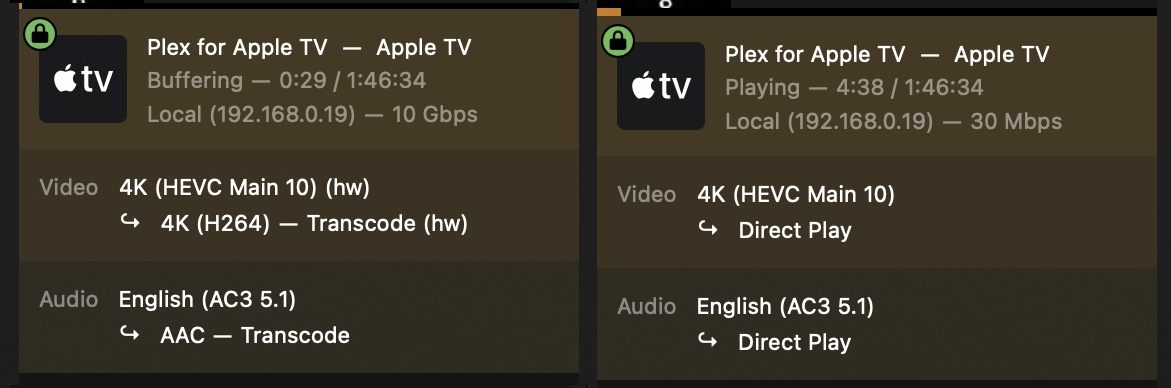
Playback freezes only on AppleTV4K / Plex app

Server Version#: 1.41.0.8992-70008992
Player Version#: 8.39

My PMS is on Synology DS920+ with playback on ATV4K (A2843) tvOS 18.

Plex has become unuseable for playback. I need to watch all my media on Infuse. Files I have never had problems playing are now freezing within 1-3 minute range.
Error message: Your connection to the server is not fast enough to stream this video. Check your network or try a lower quality.

I tried the same media file on all my devices. In addition to Infuse on ATV, my iPad and MacBook play without freezing.

<If providing server logs please do NOT turn on verbose logging, only debug logging should be enabled>

Investigating something because I just saw your post.

Check your file for subtitles.
Turn them off and test please.

I almost never use subtitles. However, I did visit several recent files that froze and subtitles are off.

I’m testing here and can’t make it freeze but will keep trying.

This is where I’m at in my testing.

The UHD605 GPU is limited so the max input bandwidth reflects the limits on transcoded output tasks

As for running, giving my limit resources..

DS920 - PMS 1.41.0.8992

My AppleTV4K (2017 model) works just fine

I’ve never had any success getting a 4K to play thru Plex, which is why I need to have Infuse on my system. Everything 1080p has been without problems until recently. Now nothing HEVC will play beyond a couple minutes.

Maybe my Plex app settings are not appropriate.

  • Allow Direct Play: ON
  • Use Old Video Player: OFF
    Is yours different?

Video Settings:

  • Auto Adjust - OFF
  • Home Streaming - Maximum
  • Internet Streaming - Maximum

Advanced Settings:

  • Allow DirectPlay - On
  • Multi-Channel Audio Boost - None
  • Display Type - HDR - ( I use a 48" LG C1 OLED )
  • Use Old Video Player - OFF
  • Use Old Audio Engine - OFF

Subtitles:

  • Burn Subtitles - Automatic

App version installed 8.39 (9244)

So there were two differences between our settings:

  1. Auto Adjust - I changed from ON to OFF
  2. Multi-Channel Audio Boost - changed from HUGE to None

One of these settings has fixed the transcoding!!!
1080P has gone from transcoding to direct play with freezing.
I even went for the big guns and tried 4K. This is also direct playing without freezing up.

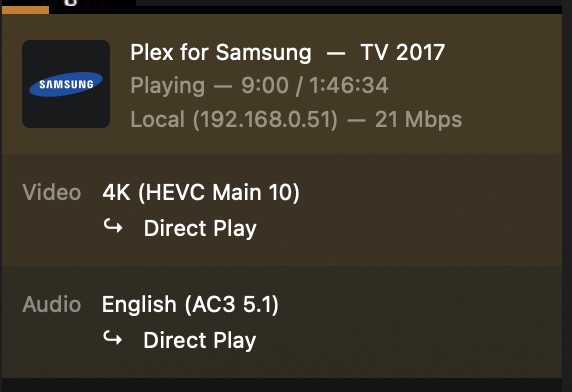
I did do a test last night. I installed Plex on my Samsung TV.
Plex on Samsung

The 4K was direct playing there. This is telling me the settings I’ve had, for some time, don’t agree specifically with Plex app on the ATV4K. 4K would play fine to all my other devices and Infuse(ATV).

Chuck, thank you so much. Do you have any insight which of these settings were forcing transcoding, and not direct play, to the ATV?

I don’t know without “just try it” investigating.

When you say “Audio Boost” – This will force a transcode of audio (at minimum)

Most of my playback is done with Nvidia Shield Pro 2019

PMS → Shield → Onkyo TXRZ → C1 OLED

Everything for me is always DirectPlay (even my 59.94 FPS content)

This topic was automatically closed 90 days after the last reply. New replies are no longer allowed.