Server Version#:1.42.0.9975
Player Version#: 4.148.0 / 5.93.2 (webos)
Note :- The Plex Windows app does NOT have the issue - 1.109.0.329-ea562b95
I am having issues where some files that were previously fine now won’t start - endless spinning circle on my LG C1 & in Chrome. They do however play fine under normal Windows (i.e. browse to file and double-click) or through DLNA. Making me assume that PMS is perhaps the issue.
I have a set of logs created after restarting the entire NAS and then attempting to play one of the affected files in Chrome - the main errors appear to be like this - just repeating on & on (and I do not know what this means) :-
Jul 17, 2025 18:09:27.992 [139856126094136] ERROR - [Req#10b/Transcode/wmgm5tpsohtuy5dyeasui95h/577b77fe-ab64-4209-a5d3-9893882f6cee] [hevc @ 0x7fc79a1e5100] Invalid NAL unit size (0 > 974).
Jul 17, 2025 18:09:27.992 [139856126094136] ERROR - [Req#10c/Transcode/wmgm5tpsohtuy5dyeasui95h/577b77fe-ab64-4209-a5d3-9893882f6cee] [hevc @ 0x7fc79a1e5100] Invalid NAL unit size (0 > 974).
Jul 17, 2025 18:09:27.993 [139856126094136] ERROR - [Req#10d/Transcode/wmgm5tpsohtuy5dyeasui95h/577b77fe-ab64-4209-a5d3-9893882f6cee] [hevc @ 0x7fc79a1e5100] Error splitting the input into NAL units.
Jul 17, 2025 18:09:27.995 [139856126094136] ERROR - [Req#10e/Transcode/wmgm5tpsohtuy5dyeasui95h/577b77fe-ab64-4209-a5d3-9893882f6cee] [hevc @ 0x7fc79a1e5100] Invalid NAL unit size (0 > 161).
Jul 17, 2025 18:09:27.995 [139856126094136] ERROR - [Req#10f/Transcode/wmgm5tpsohtuy5dyeasui95h/577b77fe-ab64-4209-a5d3-9893882f6cee] [hevc @ 0x7fc79a1e5100] Invalid NAL unit size (0 > 161).
Jul 17, 2025 18:09:27.995 [139856126094136] ERROR - [Req#110/Transcode/wmgm5tpsohtuy5dyeasui95h/577b77fe-ab64-4209-a5d3-9893882f6cee] [hevc @ 0x7fc79a1e5100] Error splitting the input into NAL units.
Jul 17, 2025 18:09:27.995 [139856126094136] ERROR - [Req#111/Transcode/wmgm5tpsohtuy5dyeasui95h/577b77fe-ab64-4209-a5d3-9893882f6cee] [hevc @ 0x7fc79a1e5100] Invalid NAL unit size (0 > 162).
Jul 17, 2025 18:09:27.996 [139856126094136] ERROR - [Req#112/Transcode/wmgm5tpsohtuy5dyeasui95h/577b77fe-ab64-4209-a5d3-9893882f6cee] [hevc @ 0x7fc79a1e5100] Invalid NAL unit size (0 > 162).
Jul 17, 2025 18:09:27.996 [139856126094136] ERROR - [Req#113/Transcode/wmgm5tpsohtuy5dyeasui95h/577b77fe-ab64-4209-a5d3-9893882f6cee] [hevc @ 0x7fc79a1e5100] Error splitting the input into NAL units.
Hopefully somebody knows exactly what this means ?
Thanks,
Ian
@ianfretwell719
I have both Chrome and a LG C1.
May I see the server DEBUG logs ZIP file which captures this ?
Impossible to diagnose without more info
No problem - are debug logs different from those obtained on the troubleshooting page ? If so how do I get them please ?
Christian - just for info:
Yes the Plex for Windows shows as direct playing.
The other two never get far enough to cause the dashboard to see there’s anything even happening.
OK - enabled Debug logging.
Then attempted to play from Chrome and then an LG C3 (C1 in use…)
Then downloaded logs as attached - hopefully that’s what you needed?
Plex Media Server Logs_2025-07-17_23-15-08.zip (4.0 MB)
@ianfretwell719
Your logs give every indication of bad transcoding or incompatible media.
Jul 17, 2025 23:06:26.998 [139856203651896] INFO - Plex Media Server v1.42.0.9975-6b2b441e1 - QNAP TS-473A x86_64 - build: linux-x86_64 qnap - GMT 01:00
Jul 17, 2025 23:06:26.999 [139856203651896] INFO - Linux version: QTS 5.2.5.3161, language: en-US
Jul 17, 2025 23:06:27.011 [139856203651896] INFO - Processor: 8-core AMD Ryzen Embedded V1500B Quad-core CPU @ 2.20GHz
Jul 17, 2025 23:06:27.011 [139856203651896] INFO - Compiler is - Clang 11.0.1 (https://plex.tv 9b997da8e5b47bdb4a9425b3a3b290be393b4b1f)
Jul 17, 2025 23:06:27.011 [139856203651896] INFO - /share/ZFS530_DATA/.qpkg/PlexMediaServer/Plex Media Server
Jul 17, 2025 23:06:26.998 [139856095828792] ERROR - [Req#2d607/Transcode/03v1cedlg9kb0kkz3xet1knd/ac1f5ffe-b5f0-4e2d-9ab4-bea16d9e889f] [NULL @ 0x7f2889929100] Invalid NAL unit size (0 > 97969).
Jul 17, 2025 23:06:26.998 [139855873231672] ERROR - [Req#2d608/Transcode/03v1cedlg9kb0kkz3xet1knd/ac1f5ffe-b5f0-4e2d-9ab4-bea16d9e889f] [NULL @ 0x7f2889929100] Invalid NAL unit size (0 > 65818).
Jul 17, 2025 23:06:27.027 [139855876438840] ERROR - [Req#2d609/Transcode/03v1cedlg9kb0kkz3xet1knd/ac1f5ffe-b5f0-4e2d-9ab4-bea16d9e889f] [NULL @ 0x7f2889929100] Invalid NAL unit size (0 > 105478).
Jul 17, 2025 23:06:27.027 [139855986936632] ERROR - [Req#2d60a/Transcode/03v1cedlg9kb0kkz3xet1knd/ac1f5ffe-b5f0-4e2d-9ab4-bea16d9e889f] [NULL @ 0x7f2889929100] Invalid NAL unit size (0 > 54467).
Jul 17, 2025 23:06:27.028 [139855878548280] ERROR - [Req#2d60b/Transcode/03v1cedlg9kb0kkz3xet1knd/ac1f5ffe-b5f0-4e2d-9ab4-bea16d9e889f] [NULL @ 0x7f2889929100] Invalid NAL unit size (0 > 41030).
Jul 17, 2025 23:06:27.029 [139855965080376] ERROR - [Req#2d60c/Transcode/03v1cedlg9kb0kkz3xet1knd/ac1f5ffe-b5f0-4e2d-9ab4-bea16d9e889f] [NULL @ 0x7f2889929100] Invalid NAL unit size (0 > 109380).
Jul 17, 2025 23:06:27.030 [139855891155768] ERROR - [Req#2d60d/Transcode/03v1cedlg9kb0kkz3xet1knd/ac1f5ffe-b5f0-4e2d-9ab4-bea16d9e889f] [NULL @ 0x7f2889929100] Invalid NAL unit size (0 > 91634).
Jul 17, 2025 23:06:27.030 [139856024390456] ERROR - [Req#2d60e/Transcode/03v1cedlg9kb0kkz3xet1knd/ac1f5ffe-b5f0-4e2d-9ab4-bea16d9e889f] [NULL @ 0x7f2889929100] Invalid NAL unit size (0 > 67026).
Jul 17, 2025 23:06:27.031 [139855880657720] ERROR - [Req#2d60f/Transcode/03v1cedlg9kb0kkz3xet1knd/ac1f5ffe-b5f0-4e2d-9ab4-bea16d9e889f] [NULL @ 0x7f2889929100] Invalid NAL unit size (0 > 257594).
Jul 17, 2025 23:06:27.032 [139856095828792] ERROR - [Req#2d610/Transcode/03v1cedlg9kb0kkz3xet1knd/ac1f5ffe-b5f0-4e2d-9ab4-bea16d9e889f] [NULL @ 0x7f2889929100] Invalid NAL unit size (0 > 51981).
Jul 17, 2025 23:06:27.032 [139855873231672] ERROR - [Req#2d611/Transcode/03v1cedlg9kb0kkz3xet1knd/ac1f5ffe-b5f0-4e2d-9ab4-bea16d9e889f] [NULL @ 0x7f2889929100] Invalid NAL unit size (0 > 30842).
Jul 17, 2025 23:06:27.033 [139855876438840] ERROR - [Req#2d612/Transcode/03v1cedlg9kb0kkz3xet1knd/ac1f5ffe-b5f0-4e2d-9ab4-bea16d9e889f] [NULL @ 0x7f2889929100] Invalid NAL unit size (0 > 126975).
Jul 17, 2025 23:06:27.034 [139855986936632] ERROR - [Req#2d613/Transcode/03v1cedlg9kb0kkz3xet1knd/ac1f5ffe-b5f0-4e2d-9ab4-bea16d9e889f] [NULL @ 0x7f2889929100] Invalid NAL unit size (0 > 94662).
Jul 17, 2025 23:06:27.034 [139855878548280] ERROR - [Req#2d614/Transcode/03v1cedlg9kb0kkz3xet1knd/ac1f5ffe-b5f0-4e2d-9ab4-bea16d9e889f] [NULL @ 0x7f2889929100] Invalid NAL unit size (0 > 92884).
Jul 17, 2025 23:06:27.035 [139855965080376] ERROR - [Req#2d615/Transcode/03v1cedlg9kb0kkz3xet1knd/ac1f5ffe-b5f0-4e2d-9ab4-bea16d9e889f] [NULL @ 0x7f2889929100] Invalid NAL unit size (0 > 35434).
Jul 17, 2025 23:06:27.050 [139855891155768] ERROR - [Req#2d616/Transcode/03v1cedlg9kb0kkz3xet1knd/ac1f5ffe-b5f0-4e2d-9ab4-bea16d9e889f] [NULL @ 0x7f2889929100] Invalid NAL unit size (0 > 105673).
Jul 17, 2025 23:06:27.051 [139856024390456] ERROR - [Req#2d617/Transcode/03v1cedlg9kb0kkz3xet1knd/ac1f5ffe-b5f0-4e2d-9ab4-bea16d9e889f] [NULL @ 0x7f2889929100] Invalid NAL unit size (0 > 43239).
Jul 17, 2025 23:06:27.052 [139855880657720] ERROR - [Req#2d618/Transcode/03v1cedlg9kb0kkz3xet1knd/ac1f5ffe-b5f0-4e2d-9ab4-bea16d9e889f] [NULL @ 0x7f2889929100] Invalid NAL unit size (0 > 101795).
Jul 17, 2025 23:06:27.052 [139856095828792] ERROR - [Req#2d619/Transcode/03v1cedlg9kb0kkz3xet1knd/ac1f5ffe-b5f0-4e2d-9ab4-bea16d9e889f] [NULL @ 0x7f2889929100] Invalid NAL unit size (0 > 86959).
Jul 17, 2025 23:06:27.053 [139855873231672] ERROR - [Req#2d61a/Transcode/03v1cedlg9kb0kkz3xet1knd/ac1f5ffe-b5f0-4e2d-9ab4-bea16d9e889f] [NULL @ 0x7f2889929100] Invalid NAL unit size (0 > 77926).
Jul 17, 2025 23:06:27.054 [139855876438840] ERROR - [Req#2d61b/Transcode/03v1cedlg9kb0kkz3xet1knd/ac1f5ffe-b5f0-4e2d-9ab4-bea16d9e889f] [NULL @ 0x7f2889929100] Invalid NAL unit size (0 > 108532).
Jul 17, 2025 23:06:27.054 [139855986936632] ERROR - [Req#2d61c/Transcode/03v1cedlg9kb0kkz3xet1knd/ac1f5ffe-b5f0-4e2d-9ab4-bea16d9e889f] [NULL @ 0x7f2889929100] Invalid NAL unit size (0 > 43998).
Jul 17, 2025 23:06:27.055 [139855878548280] ERROR - [Req#2d61d/Transcode/03v1cedlg9kb0kkz3xet1knd/ac1f5ffe-b5f0-4e2d-9ab4-bea16d9e889f] [NULL @ 0x7f2889929100] Invalid NAL unit size (0 > 25669).
Jul 17, 2025 23:06:27.056 [139855965080376] ERROR - [Req#2d61e/Transcode/03v1cedlg9kb0kkz3xet1knd/ac1f5ffe-b5f0-4e2d-9ab4-bea16d9e889f] [NULL @ 0x7f2889929100] Invalid NAL unit size (0 > 117296).
Jul 17, 2025 23:06:27.056 [139855891155768] ERROR - [Req#2d61f/Transcode/03v1cedlg9kb0kkz3xet1knd/ac1f5ffe-b5f0-4e2d-9ab4-bea16d9e889f] [NULL @ 0x7f2889929100] Invalid NAL unit size (0 > 114971).
I can’t tell what’s happening because DEBUG logging as been disabled.
Can you please repeat the test with:
- Enable DEBUG logging (SAVE)
- Restart PMS
- Start playaback
- STOP playback after 20 seconds
- Download Logs ZIP file from PMS
- Attach ZIP file here please
Thanks Chuck…
I didn’t restart PMS so that’s probably why it didn’t work that time. Is there some easy way of restarting PMS on a QNap? - I was under the impression that stopping and starting from the App Center doesn’t actually work properly ?
Late here though - so I’ll do this tomorrow and should have logs waiting for you by the time you get online yourself.
The affected files did work fine previously, hence my confusion.
They were created by MakeMKV direct from source media.
On QNAP, installing/upgrading will restart in the same manner it does with STOP/START in App Center.
You can use the PlexData shared folder (Plex Media Server → Codecs) and delete everything EXCEPT the .device_id file (your license) then restart PMS to get a fresh install of codecs.
I don’t think codecs are the issue here. It will be interesting to see what we find with DEBUG logging enabled.
Plex Media Server Logs_2025-07-18_09-50-37.zip (3.5 MB)
Hi Chuck - hopefully I’ve got everything right this time - new logs attached…
Thanks
Thanks for the logs.
- Found the GPU
Jul 18, 2025 09:47:26.256 [139972218485560] DEBUG - [GPU] Got device: NVIDIA GP104GL [Tesla P4], nvidia@unknown, default true, best true, ID 10de:1bb3:10de:11d8@0000:01:00.0, DevID [10de:1bb3:10de:11d8], flags 0xe8
- Hardware transcoding doesn’t see HW transcoding libraries (NVIDIA_GPU_DRV package is not running)
Jul 18, 2025 09:50:06.862 [139971948591928] DEBUG - [Req#df/Transcode] TPU: hardware transcoding: enabled, but no hardware decode accelerator found
Jul 18, 2025 09:50:06.864 [139971948591928] DEBUG - [Req#df/Transcode] [Universal] Using local file path instead of URL: /share/ZFS22_DATA/Media/Video/Music (HDx265)/Bryan Adams - Live at the Royal Albert Hall (2022)/Bryan Adams - Into The Fire - Live At The Royal Albert Hall 2022.mkv
Jul 18, 2025 09:50:06.864 [139971948591928] DEBUG - [Req#df/Transcode] TPU: hardware transcoding: final decoder: , final encoder:
Jul 18, 2025 09:50:06.864 [139971948591928] DEBUG - [Req#df/Transcode/JobRunner] Job running: EAE_ROOT=/share/ZFS530_DATA/.qpkg/PlexMediaServer/Library/tmp/pms-5d3f1f7a-9ad8-42a5-874a-ffd6bd364ade/EasyAudioEncoder FFMPEG_EXTERNAL_LIBS=‘/share/ZFS530_DATA/.qpkg/PlexMediaServer/Library/Plex\ Media\ Server/Codecs/46f74ab-560174306fe167a5978a79dd-linux-x86_64/’ X_PLEX_TOKEN=xxxxxxxxxxxxxxxxxxxxxxxxxxxxxxxxxxxxxxxxxx “/share/ZFS530_DATA/.qpkg/PlexMediaServer/Plex Transcoder” -codec:0 hevc -codec:1 truehd_eae -eae_prefix:1 mto4t8xfrel3a13mzvfjfhjy_ -ss 0 -noaccurate_seek -analyzeduration 20000000 -probesize 20000000 -i “/share/ZFS22_DATA/Media/Video/Music (HDx265)/Bryan Adams - Live at the Royal Albert Hall (2022)/Bryan Adams - Into The Fire - Live At The Royal Albert Hall 2022.mkv” -map 0:0 -codec:0 copy -filter_complex "[0:1]
- The video data in the file
“/share/ZFS22_DATA/Media/Video/Music (HDx265)/Bryan Adams - Live at the Royal Albert Hall (2022)/Bryan Adams - Into The Fire - Live At The Royal Albert Hall 2022.mkv”
- The video data in the file will not transcode to the MP4 (streaming) format.
Jul 18, 2025 09:50:06.892 [139972210629432] DEBUG - Completed: [127.0.0.1:45848] 200 PUT /video/:/transcode/session/mto4t8xfrel3a13mzvfjfhjy/a3a86037-f93a-403e-900a-8ebe6549f3e5/progress/stream?index=2&id=0&codec=ac3&type=audio (14 live) #e8 0ms 195 bytes (pipelined: 7) (range: bytes=0-)
Jul 18, 2025 09:50:06.896 [139972180290360] ERROR - [Req#e9/Transcode/mto4t8xfrel3a13mzvfjfhjy/a3a86037-f93a-403e-900a-8ebe6549f3e5] [hevc @ 0x7f078cf9f100] Invalid NAL unit size (0 > 974).
Jul 18, 2025 09:50:06.896 [139972180290360] ERROR - [Req#ea/Transcode/mto4t8xfrel3a13mzvfjfhjy/a3a86037-f93a-403e-900a-8ebe6549f3e5] [hevc @ 0x7f078cf9f100] Invalid NAL unit size (0 > 974).
Jul 18, 2025 09:50:06.897 [139972180290360] ERROR - [Req#eb/Transcode/mto4t8xfrel3a13mzvfjfhjy/a3a86037-f93a-403e-900a-8ebe6549f3e5] [hevc @ 0x7f078cf9f100] Error splitting the input into NAL units.
Jul 18, 2025 09:50:06.899 [139972180290360] ERROR - [Req#ec/Transcode/mto4t8xfrel3a13mzvfjfhjy/a3a86037-f93a-403e-900a-8ebe6549f3e5] [hevc @ 0x7f078cf9f100] Invalid NAL unit size (0 > 161).
Jul 18, 2025 09:50:06.899 [139972180290360] ERROR - [Req#ed/Transcode/mto4t8xfrel3a13mzvfjfhjy/a3a86037-f93a-403e-900a-8ebe6549f3e5] [hevc @ 0x7f078cf9f100] Invalid NAL unit size (0 > 161).
Jul 18, 2025 09:50:06.900 [139972180290360] ERROR - [Req#ee/Transcode/mto4t8xfrel3a13mzvfjfhjy/a3a86037-f93a-403e-900a-8ebe6549f3e5] [hevc @ 0x7f078cf9f100] Error splitting the input into NAL units.
Jul 18, 2025 09:50:06.900 [139972180290360] ERROR - [Req#ef/Transcode/mto4t8xfrel3a13mzvfjfhjy/a3a86037-f93a-403e-900a-8ebe6549f3e5] [hevc @ 0x7f078cf9f100] Invalid NAL unit size (0 > 162).
Jul 18, 2025 09:50:06.900 [139972180290360] ERROR - [Req#f0/Transcode/mto4t8xfrel3a13mzvfjfhjy/a3a86037-f93a-403e-900a-8ebe6549f3e5] [hevc @ 0x7f078cf9f100] Invalid NAL unit size (0 > 162).
Jul 18, 2025 09:50:06.901 [139972180290360] ERROR - [Req#f1/Transcode/mto4t8xfrel3a13mzvfjfhjy/a3a86037-f93a-403e-900a-8ebe6549f3e5] [hevc @ 0x7f078cf9f100] Error splitting the input into NAL units.
Jul 18, 2025 09:50:06.901 [139972180290360] ERROR - [Req#f2/Transcode/mto4t8xfrel3a13mzvfjfhjy/a3a86037-f93a-403e-900a-8ebe6549f3e5] [hevc @ 0x7f078cf9f100] Invalid NAL unit size (0 > 161).
Jul 18, 2025 09:50:06.901 [139972180290360] ERROR - [Req#f3/Transcode/mto4t8xfrel3a13mzvfjfhjy/a3a86037-f93a-403e-900a-8ebe6549f3e5] [hevc @ 0x7f078cf9f100] Invalid NAL unit size (0 > 161).
Jul 18, 2025 09:50:06.902 [139972180290360] ERROR - [Req#f4/Transcode/mto4t8xfrel3a13mzvfjfhjy/a3a86037-f93a-403e-900a-8ebe6549f3e5] [hevc @ 0x7f078cf9f100] Error splitting the input into NAL units.
Jul 18, 2025 09:50:06.902 [139972180290360] ERROR - [Req#f5/Transcode/mto4t8xfrel3a13mzvfjfhjy/a3a86037-f93a-403e-900a-8ebe6549f3e5] [hevc @ 0x7f078cf9f100] Invalid NAL unit size (0 > 162).
Jul 18, 2025 09:50:06.903 [139972180290360] ERROR - [Req#f6/Transcode/mto4t8xfrel3a13mzvfjfhjy/a3a86037-f93a-403e-900a-8ebe6549f3e5] [hevc @ 0x7f078cf9f100] Invalid NAL unit size (0 > 162).
What is this file? Some type of HEVC hybrid profile?
- What does “Get Info” show for the file ?
- How many do you have which fail like this? (it looks like bad re-encoding)
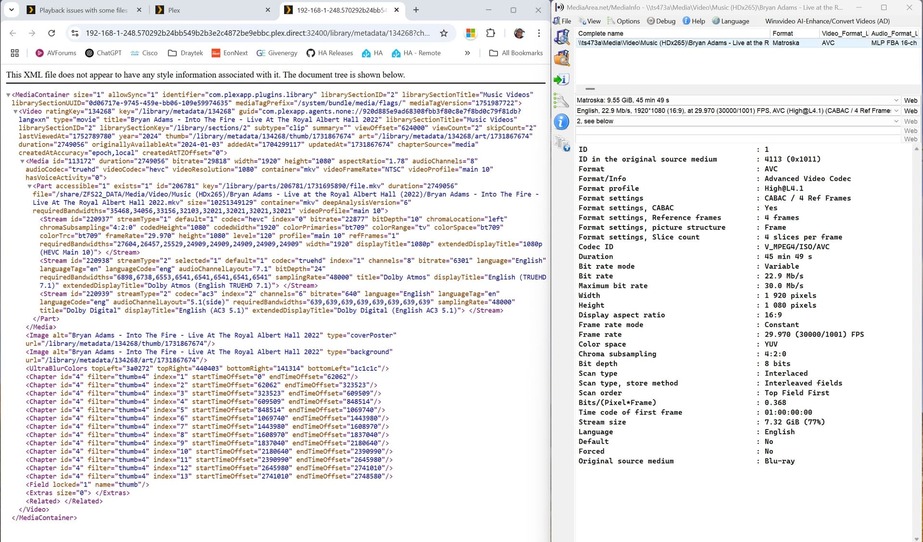
No idea where it’s getting HEVC from - source is bluray, ripped with MakeMKV (which doesn’t ‘do’ HEVC anyway).
The attached .jpg shows GetInfo alongside MediaInfo - GetInfo definitely thinks it’s HEVC whereas MediaInfo does not..
I’m going to re-rip and see if the output is still the same (version above was done with MakeMKV 1.17.8 - the new one will be 1.18.1).
I’m very interested in what you find out about this.
Everything in that mediainfo and what PMS saw screams “NO!”
It’s interesting in that you also thought it was H265 (HDx265).
My experience with MakeMKV is it rips the stream from the disk AS-IS.
It simply reads the header fields from the disc, constructs a MKV header, and then remuxes the selected stream(s) into output file(s).
I never thought it was h265 - Plex was the only thing that did that. I knew that both the source and the makemkv output could ‘only’ be h264.
However the re-rip, despite showing as being identical to the first in mediainfo (other than version) is now shown as h264 in Plex’s Get info - and plays just fine.
So presumably the older Makemkv was embedding something, somewhere that Plex was mis-interpreting.
Do we leave it at that or is it worth investigating further?
I’d leave it be.
I’m using MakeMKV 1.17.9 and will shortly update to 1.18.1.
I’ve never had a problem with bad info from ripping discs.
I have had problems using third party ISO files (errors in the ISO creation flags)