When transcoding there is no issue. The issue seems (at least to me) with direct play.
Yes I have tried new Plex docker installs from the same provider and others and the issue still persists.
When transcoding there is no issue. The issue seems (at least to me) with direct play.
Yes I have tried new Plex docker installs from the same provider and others and the issue still persists.
Again, agree with @stridemat - when I select “convert automatically” so the direct play is not in use then I have no problems.
Also - my TV is an LG and it does have a Plex client - albeit an older TV, the client works flawlessly. As does the Plex client on my iPhone and MacBook Pro. The issue seems specifically to do with Apple TV and direct play and does not exist outside of that ecosystem.
Can you share a sample that exhibits the problem?
Literally any files when played on the Apple TV but the same files are fine on other players, such as iOS.
I have linked below a video I previously shared on this thread with the debug overlay.
See the dropped frames jump towards the end of the video and the resulting affect.
ok. so that nails it down to transcoding/video at least. I’m also transcoding with the RTX2080Ti and have issues. However, that might be due to the higher quality that I’m enforcing.
When you do transcoding, could you share the Video and Audio details with us? Maybe the internal transcoding does change the video and audio to a more “compatible” format with the ATV videotoolbox.
That’s awful and distracting glitching.
Can you share a problem video file itself?
Is everyone here are using PLEX DVR?
Using Plex DVR here. Think I have managed to resolve issue, as I’ve switch from Apple TV to Firestick 4K and it’s been faultless since. Undecided if I should sell my AppleTV while it’s worth some money or keep it in case Plex fix the issue.
this is also true for me. That’s why I kept on stressing its a client issue. I should have mentioned that before. FireTV walks flawless for me and even starts the video faster.
Shame about all the ads though 
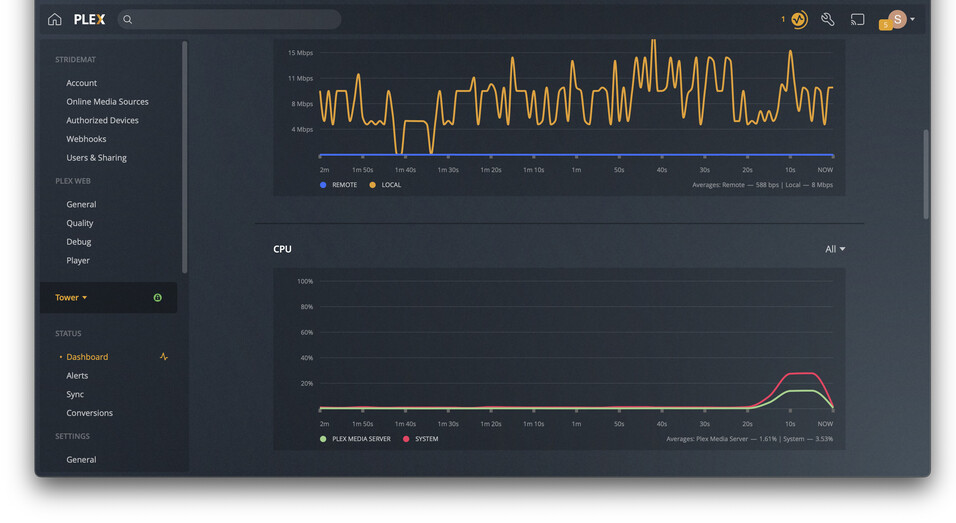
So the stutter seems to happen / correspond with a bump in CPU usage.
Running ‘htop’ on Unraid shows the following processes spike at the time of the stutter:
Devs, any ideas?
On a reset and reinstalled tvOS Apple TV with Plex as the only third party app installed the same thing happens as my post above.
if you force quit the Plex app with double tap ´home’ + swipe up, then restart it, does it help or dropped frames still occur? Have you set up your DVR?
Force quitting seemingly fixed the issue this evening. I suspect it will come back over night.
Yes I have the DVR in use.
Force quitting, deleting and reinstalling the app, resetting ATV and installing everything fresh does not resolve this issue. I’ve tried all currently released and beta version over the last two years with no success.
Just chiming in I have this on my Apple TV 4K also, though same files play fine on iPad and I ‘think’ on the non 4k version of Apple TV, but I’d need to check.
I’m going to try a workaround mentioned previously to disable the enhanced player. At least I’ll get my sanity back - I thought it was poor encoding of files for ages!
PS - If this is Apple TV specific, we should probably add that to the title?
Hello. Just updated my Apple TV to version tvOS 15.1.1 and using Plex version 7.24 (1), server version 1.24.5.5173 on Qnap. Ever since the tvOS update I am now also getting the frame stutters/drops every few seconds. Very unpleasant, unfortunately.
Tried changing the setting “use old player” found in the Plex app on Apple TV and the stutters/frame drops are gone. Crazy.
I am baffled that this is still an issue. It seems to only happen with me on some HEVC content when direct playing. Why has this not been fixed? This is a core part of the app function. And while I know I can go into settings and convert forcefully, yet I shouldn’t, not everyone does and people think the video is bad.
Tell me about it. My issue goes away after a reboot of the Apple TV. But comes back slowly getting worse after a few days.
Come on Plex team - help!!