Seems this has been mentioned in the old 2020 thread but I’m getting stuttering of x265 content on my Apple TV HD since the last 2 updates. Infuse plays the file fine & plays fine on Plex iOS. Direct play is on and match frame on. Working perfectly for the last year on my Apple TV HD & suddenly having this issue for files that previously played fine.
Choosing Convert automatically in Playback settings for each file solves the issue but adjust quality automatically in general settings tries to play file directly so still get the problem unless I manually convert automatically for every playback session.
Issue is not occurring on my Apple TV 4K.
Restarted server.
Reinstalled Plex app
Even reset the Apple TV HD
Problem persists
Seems like the issue is a TVOS 15.1.1 bug for the Apple HD in my case, other apps are now stuttering if it’s 1080P content such as the Channels live TV app.
I just registered in this forum to report the exact same problem - but for me it’s x264 (but still 1080p). Streaming the movie with Infuse is no problem. Also streaming in browsers is no problem. Just the Plex app on tvOS makes problems. (All streams are always direct streams, so transcoding is not the problem here.)
After looking around on the internet, I figure out the solution for my problem: I have enable “Use old player” in the settings. Now my movie streams just fine.
Just to be sure, I re-enabled the new player and - yes - the stream immediately started stuttering again (with the message “The connection to your server is not fast enough…”). So it seems that the new player still has some issues.
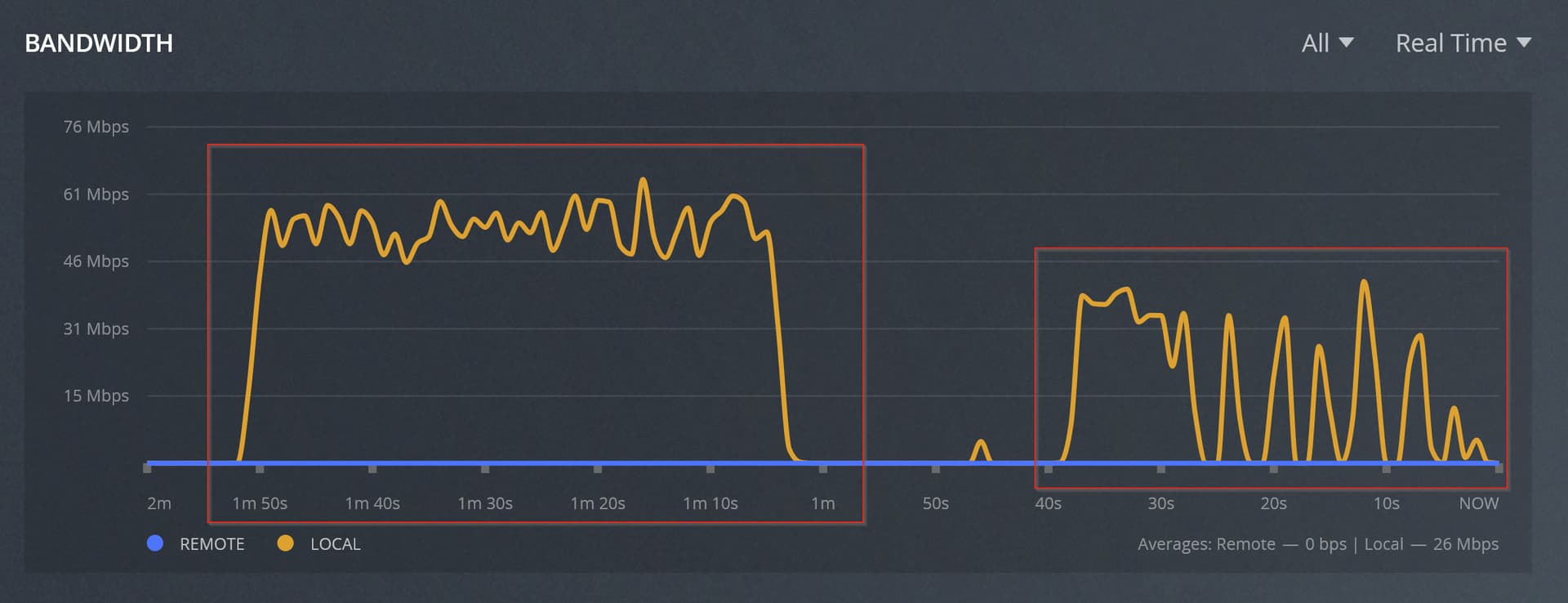
On the left is the new player, the old player is on the right.
So, the new player uses way more bandwidth than the old player - which probably explains why Plex thinks the bandwidth is not enough. Note also that the graph on the left side probably shows the maximum bandwidth available to the server - not the bandwidth that’s actually required, which is probably much higher.
Just for reference, both the old and the new player use direct streams (which, I assume, “Direct Play” means) - so no transcoding is involved in either:
Also seeing this occur with x265. At first I thought it was just a 4k issue, but I have a x265 1080p video that stutters in the exact same spot as well. I can confirm manski83’s findings are correct; enabling the old player fixes this issue.
Disabling “match frame rate” in ATV settings does nothing.
I’m having the same issue on an ATV 4K Gen 2 (HDR). What has worked for me is to turn direct play off…
Everything plays fine now even with the enhanched player. Files are now “direct streamed” instead of “direct play”. I don’t see any difference in CPU power.
Can also confirm disabling direct play allows smooth playback (with HDR as well).
Does anyone know if there are any disadvantages to disabling direct play on ATV?
I have been seeing this stuttering as well. It’s definitely not a bandwidth issue as the files I’m seeing this on are relatively small 1080p x265 HDR files and everything is hardwired in my setup with a 10GB switch (even though ATV is only 1GB). Also confirmed that this is Direct play and no transcoding is occurring.
Are people seeing this with all file types or just x265? Also is this an HDR specific thing or is it affecting non-HDR too? I personally have only seen this with my 1080p/4k x265 HDR files, but I think someone mentioned seeing this on x264 as well.
can cofirm that the issue is specifically with x265 files (potentially 10bit colorspace).
sigh I just wish we could have two versions of plex, one called maybe something like beta where new experiements live and the other called stable - wait a minute…
With your sample I can reproduce the dropped frame issue, and I agree that disabling Direct Play fixes it. Is there any harm in disabling Direct Play? (I might encourage Plex to disable it by default on Apple TV.)
I do think there’s something interesting about that sample file.
I tried remuxing using MKVToolNix and ffmpeg and MP4Box:
to a new MKV
to MKV, video and primary audio only
to MKV, video only (no audio)
to MP4
In each case the video bitstream was preserved, and none of it made a difference. The dropped frames were similar or identical.
But after remuxing to a .ts container, it does play smoothly with Direct Play.
This makes sense - Direct Stream on the Apple TV uses HLS, which uses MPEG TS chunks, so pre-conversion to .ts is similar to what Direct Stream does on-the-fly.
Direct Play also works if the video is extracted to a raw bitstream, and then that is remuxed into a new MP4 or MKV container.
Because it works after the video stream is fully extracted and any container-level information is discarded, I wonder if there’s a problem with the original sample file.
Perhaps it’s the timestamps in the container? I think a side effect of “extract to raw, mux to a new file” is that it forces PTS to be regenerated. (Maybe. I’m at the edge of my understanding.)
That is a very interesting analysis.
In any case, I am confused about the fact that this sample (and the full file associated) are playing well on pc/mac, Android tv players. So is really the file the problem?
In the case the file is the source of stuttering, how would it be possible to be detected ? Can Plex run a pre-analysis and notify ?
Or is there any special encoding used in that file that is not supported or causing troubles ? (E.g. main profile, or something like that, don’t know…)
I’m definitely not an expert in media player cores.
Edit: if the server is able to rebuild on the fly the supposed broken index to send streams to clients, maybe that functionality is broken on ATV app, or that might be a new preprocess to be required inside the mpv player. Again, not an expert.
I’m not entirely sure this is all Plex related. I have a non-Plex app (Channels for my HD Homerun) and I’m getting stuttering for 1080P content. Don’t know what container this is being streamed in or if 10bit etc but just saying it’s not just exclusive to Plex in my case.
I have been having this exact same issue on various Apple TVs. The ATV HD is the worst offender by far. Completely locks up and drops full scenes until a scene with less going on comes up and it can keep up.
I have noticed a slight chop (my wife doesn’t even see it…but she also doesn’t see the difference in 4k so…grain of salt) to the playback of 4k content on my ATV4ks. However, as the OP posted, I don’t get any of this choppy playback with InFuse.
What’s the best way to move this forward? When this happens on my setup, if I rewind to see it again it doesn’t happen. It’s not the file, but the rendering/streaming. Sharing a sample file won’t help here.
What can I provide to the team to help review this issue?